Interruptions, context switching, and repetitive administration can make work difficult to organise. This guide considers tools that may help with specific tasks; it has no measured estimate of hours lost or recovered.
The productivity gap between professionals using AI tools and those who are not has become measurable and significant in 2026. It shows up in output volume, work quality, and the mental bandwidth available for creative and strategic thinking.
But the challenge is not finding AI productivity tools — there are hundreds. The challenge is identifying which ones actually deliver on their promises, which have free plans worth using, and how they fit together into a workflow that makes your actual work better rather than just adding another app to manage.
This guide compares 25 AI productivity tools by workflow and plan considerations. The recommendations are editorial; they do not represent measured productivity or hands-on testing results.
Quick Answer
What are the best AI productivity tools in 2026? The best AI productivity tools in 2026 are Claude AI and ChatGPT for writing and thinking, Notion AI for knowledge management, Otter.ai for meeting transcription, Motion for AI-powered scheduling, Grammarly for communication quality, Make for workflow automation, and CapCut AI for content production. Together these tools eliminate the most time-consuming parts of knowledge work — freeing your focus for the work that actually requires human judgment.
Why AI Productivity Tools Are Different in 2026
The AI productivity tools available in 2026 are not the chatbots and gimmicks of 2022. They are deeply integrated, workflow-aware systems that understand context, learn from patterns, and take action — not just provide information.
Three developments have made the current generation of tools meaningfully different from what came before:
Agentic capability. Modern AI tools do not just answer questions — they execute tasks. Schedule a meeting, draft and send a follow-up email, summarize a document and add the key points to your project management system — these are actions current tools complete autonomously.
Context awareness. The best tools in 2026 understand your work context — your projects, your communication style, your priorities — and apply that understanding across tasks without you re-explaining it every time.
Integration depth. AI tools now connect to the software you already use rather than requiring you to leave your workflow to interact with them. Gmail, Notion, Slack, Calendar, and hundreds of other tools have AI built in or connected through integrations.
The result is that the productivity ceiling for a single knowledge worker has risen substantially — and the gap between those who use these tools and those who do not is widening every quarter.
The 25 Best AI Productivity Tools in 2026
Category 1 — AI Writing and Communication
1. Claude AI — Best for Deep Work Writing
Free plan: Generous daily limit Paid: Claude Pro at $20/month Best for: Long-form writing, analysis, complex thinking tasks
Claude is the AI assistant that produces the most natural, nuanced written output in 2026. For knowledge workers whose productivity depends on quality writing — reports, proposals, analyses, documentation, emails — Claude consistently outperforms other tools on the tasks that matter most.
Where it saves the most time:
Complex document drafting that previously took half a day — briefings, project proposals, strategic analyses — can be structured and first-drafted in under an hour with Claude's assistance. The output requires editing and your expertise, but the cognitive load of starting from a blank page is eliminated.
Multi-step reasoning tasks — working through a complex problem, evaluating options, structuring a recommendation — benefit from Claude's ability to follow extended reasoning chains without losing context or coherence.
Long document analysis — pasting a 50-page report and asking for a structured summary with specific insights — is where Claude's 200,000 token context window produces results that smaller-context models cannot match.
Productivity workflow: Use Claude for your first drafts, analysis, and thinking-through tasks. Reserve your focus time for the judgment, editing, and expertise that the AI cannot provide.
For a detailed comparison of Claude against other AI assistants, read the ChatGPT vs Claude vs Gemini complete comparison.
Try it: claude.ai
2. ChatGPT — Best All-Around AI Assistant
Free plan: Unlimited everyday text chats, subject to abuse-prevention safeguards; tools have separate limits Paid: ChatGPT Plus at $20/month Best for: General productivity, coding, brainstorming, everyday tasks
ChatGPT remains the most versatile AI productivity tool for everyday knowledge work. The free tier handles the majority of common productivity tasks — email drafting, meeting prep, research synthesis, code help, and data analysis — with separate limits on tools such as file uploads and analysis. For how its free tier stacks up against Claude, Gemini, Copilot, and other assistants specifically, see our best free AI assistants guide.
Where it saves the most time:
Email and communication drafting at volume — generating 10 email variants for different recipient types, drafting responses to common query types, creating templates for repetitive communications.
Spreadsheet formula generation — describing what you need in plain English and getting the exact Excel or Google Sheets formula, explanation included.
Meeting preparation — provide the meeting agenda and attendee context, get a structured set of questions, key points to raise, and potential outcomes to prepare for.
Try it: chatgpt.com
3. Grammarly — Best for Communication Quality at Scale
Free plan: Core grammar and clarity features — genuinely useful Paid: Grammarly Pro at $12/month (billed annually; $30 with monthly billing) Best for: Professional communication, proofreading, tone management
Grammarly works everywhere you write — Gmail, Google Docs, LinkedIn, Slack, Notion, and most web text fields — catching errors and improving clarity in real time without interrupting your workflow.
Where it saves the most time:
The compounding effect on professional communication is significant. A knowledge worker sending 30 emails per day who eliminates one embarrassing error and improves the clarity of three emails produces measurably better professional relationships over time. Grammarly makes this happen automatically.
The tone detection feature is particularly valuable for high-stakes communication — flagging when an email reads as more aggressive or more uncertain than intended before you send it.
Try it: grammarly.com
4. Notion AI — Best for Knowledge Management and Writing
Free plan: Limited AI trial on Notion Free and Plus Paid: Notion AI in Business at $20/member/month (billed annually) Best for: Note-to-document workflows, knowledge base management, meeting notes
Notion AI transforms your knowledge base into an active productivity tool rather than a passive storage system. It summarizes your notes, drafts documents from bullet points, answers questions about your stored information, and helps organize your thinking without leaving your workspace.
Where it saves the most time:
Meeting notes to action items — ask Notion AI to organise rough notes into proposed actions, owners, and deadlines, then confirm them against the meeting. No time reduction has been measured here.
Research synthesis — collect notes and excerpts from multiple sources over time, then ask Notion AI to synthesize them into a structured document. This transforms passive note-taking into active knowledge production.
Try it: notion.so
Category 2 — AI Scheduling and Time Management
5. Motion — Best AI-Powered Calendar and Task Manager
Free plan: 14-day trial Paid: Confirm current plan, billing term, and per-seat price with Motion Best for: Professionals with heavy task loads and meeting-heavy schedules
Motion is an AI-assisted scheduling tool. It automatically schedules your tasks into your calendar based on priority, deadline, and the time you actually have available — rescheduling dynamically when meetings run long or new priorities emerge.
Where it saves the most time:
The decision of what to work on next — which consumes significant cognitive energy for most knowledge workers — is handled automatically. Motion analyzes your task list, deadlines, and available time slots and schedules everything optimally. You open your calendar and your day is planned.
When something disrupts the plan — a meeting runs over, an urgent task arrives — Motion automatically reschedules everything else to accommodate the change rather than requiring manual reorganization.
Related articles
AI Tools
10 Best AI Writing Tools in 2026 (Free and Paid, Ranked)
Compare 10 AI writing tools in 2026 for drafting, SEO content and grammar, with workflow guidance and free-plan considerations.
AI Tools
7 Best Free AI Image Generators in 2026
Compare seven free AI image generators in 2026 by editing workflow, plan access, text rendering and commercial-use considerations.
Who it is for: Professionals managing 15 or more active tasks simultaneously who currently spend significant time deciding what to work on rather than working.
Try it: usemotion.com
6. Reclaim AI — Best for Automatic Time Blocking
Free plan: Yes — individual plan with core features Paid: From $10/month Best for: Deep work protection, habit scheduling, meeting optimization
Reclaim AI automatically creates and protects time blocks for your priorities — deep work sessions, habits, personal commitments — while keeping your calendar flexible enough to accept meetings when genuinely needed.
Where it saves the most time:
The chronic problem of reactive scheduling — where every meeting request pushes important work further down the day — is directly addressed by Reclaim's automatic buffer management and focus block protection. Your most important work gets scheduled first, protected from disruption.
The habit scheduling feature automatically finds optimal time for recurring priorities — exercise, learning, deep work — adjusting based on your schedule each week rather than requiring manual calendar management.
Try it: reclaim.ai
7. Clockwise — Best for Team Scheduling Optimization
Free plan: Yes — for individuals Paid: From $6.75/user/month Best for: Teams spending excessive time on meeting scheduling and coordination
Clockwise manages team scheduling intelligently — finding meeting times that protect deep work for everyone involved, automatically moving flexible meetings to optimize focus time, and giving your team back hours of fragmented calendar space as consolidated work time.
Where it saves the most time:
For teams, the collective scheduling tax — the hours spent finding meeting times, the fragmented calendar days that prevent deep work — is substantially reduced. Clockwise handles this automatically and asynchronously.
Try it: getclockwise.com
Category 3 — AI Meeting and Collaboration Tools
8. Otter.ai — Best for Meeting Transcription and Notes
Free plan: 300 transcription minutes per month Paid: Otter Pro at $16.99/month Best for: Meeting notes, interview transcription, lecture capture
Otter.ai transcribes spoken audio in real time, identifies speakers automatically, generates meeting summaries, and extracts action items — eliminating the cognitive load of manual note-taking in meetings.
Where it saves the most time:
Otter can assist with transcripts and summaries. Check transcription errors, speaker attribution, consent, and action items before sharing; review time depends on the recording.
The searchable transcript means you can find any specific discussion from any past meeting by keyword rather than rewatching recordings or relying on incomplete memory.
Try it: otter.ai
9. Fireflies AI — Best for Meeting Intelligence
Free plan: Limited transcription minutes Paid: From $10/month per seat Best for: Sales teams, client-facing professionals, remote teams with high meeting volume
Fireflies integrates with Google Meet, Zoom, and Teams to record, transcribe, and analyze meetings automatically. The AI identifies topics discussed, questions asked, action items committed to, and sentiment patterns — producing a structured intelligence layer over your meeting history.
Where it saves the most time:
For sales workflows, check whether the current integration supports the required CRM fields and review generated notes before saving them. Meeting patterns and suggested commitments need human confirmation.
Try it: fireflies.ai
10. Loom AI — Best for Async Video Communication
Free plan: Yes — up to 25 videos with AI features Paid: Loom Business at $12.50/month Best for: Remote teams, replacing unnecessary meetings with video messages
Loom AI adds AI summarization, automatic titles, and action item extraction to screen recordings and video messages. For remote teams, Loom replaces a significant portion of synchronous meetings with async video that recipients can watch at their own pace.
Where it saves the most time:
A recorded walkthrough can be an alternative to a meeting when the task suits asynchronous explanation. Review the transcript and summary, and allow questions; this guide has no measured duration or accuracy advantage.
Try it: loom.com
Category 4 — AI Research and Knowledge Tools
11. Perplexity AI — Best for Research with Cited Sources
Free plan: Unlimited standard searches Paid: Perplexity Pro at $20/month Best for: Research, fact-checking, current information gathering
Perplexity gives you sourced, direct answers to research questions by searching the live web — dramatically faster than traditional search for information gathering tasks.
Where it saves the most time:
Background research before a client meeting, competitive analysis, fact-checking claims, finding current statistics — tasks that previously required opening and reading 5 to 10 separate web pages happen in a single Perplexity query with cited sources you can verify.
For a full breakdown of Perplexity's capabilities, read the complete Perplexity AI review.
Try it: perplexity.ai
12. Elicit — Best for Academic and Scientific Research
Free plan: Limited queries per month Paid: From $11/month (billed annually) Best for: Researchers, academics, professionals who need peer-reviewed information
Elicit is an AI research assistant specifically designed for academic literature. It searches millions of peer-reviewed papers, extracts relevant findings, and synthesizes research on any topic — without requiring you to manually read dozens of papers to find the relevant information.
Where it saves the most time:
For literature-based work, Elicit can help locate papers and organise findings. Read the original studies, check methodology and exclusions, and verify summaries; no days-to-hours reduction has been measured here.
Try it: elicit.com
13. Consensus — Best for Evidence-Based Decision Making
Free plan: Limited searches per day Paid: From $20/month (Pro) Best for: Anyone who needs evidence-backed answers to specific questions
Consensus searches scientific literature and surfaces what the research actually says on any question — cutting through the noise of conflicting online information to give you evidence-based answers with sources.
Try it: consensus.app
Category 5 — AI Automation and Workflow Tools
14. Make (formerly Integromat) — Best for Visual Workflow Automation
Free plan: 1,000 operations per month Paid: From $9/month Best for: Connecting apps and automating multi-step workflows without coding
Make is a visual automation platform that connects your apps and automates repetitive workflows. When a new lead fills out a form, Make can automatically add them to your CRM, send a personalized welcome email, create a task in your project management tool, and notify your team on Slack — all without human intervention.
Where it saves the most time:
Automation can connect supported tools for tasks such as copying form submissions or sending updates. Configure permissions, handle failures, and monitor the workflow; no fixed time saving is established.
Try it: make.com
15. Zapier AI — Best for Beginner-Friendly Automation
Free plan: 100 tasks per month — sufficient for basic automation Paid: From $19.99/month (billed annually) Best for: Non-technical professionals who want to automate workflows without coding
Zapier connects over 6,000 apps and its AI features allow you to describe the automation you want in plain English — Zapier builds the workflow for you. No coding, no technical knowledge required.
Where it saves the most time:
The specific automations that save the most time for knowledge workers: automatically saving email attachments to Google Drive, posting approved social media content on schedule, syncing calendar events to project management tools, and routing form submissions to the right team members.
Try it: zapier.com
16. n8n — Best for Advanced Users Who Want Full Control
Free plan: Self-hosted option is completely free Paid: Cloud version from $20/month Best for: Technical users and developers who want maximum automation control
n8n is an open-source workflow automation tool that gives technical users complete control over their automation infrastructure. Unlike Zapier and Make, n8n can be self-hosted, has no per-task pricing at scale, and allows custom code execution within workflows.
Try it: n8n.io
Category 6 — AI Focus and Deep Work Tools
17. Freedom — Best for Blocking Digital Distractions
Free plan: 7 sessions free Paid: Freedom Premium at $3.33/month (billed annually) Best for: Anyone who struggles with distraction during deep work sessions
Freedom blocks distracting websites and apps across all your devices simultaneously — including phone — during scheduled focus sessions. The AI-scheduled focus blocks automatically sync with your calendar to protect deep work time without manual scheduling.
Related articles
AI Tools
7 Best Free AI Tools for Students in 2026
Compare seven free AI tools for students in 2026 for writing, math, research, notes and exam preparation, with study and accuracy limitations.
AI Tools
Best Free AI Assistants 2026: What You Get for Free
Compare the best free AI assistants in 2026 — models, message limits, web search, file upload, and image generation across ChatGPT, Gemini, Claude, and more.
Where it saves the most time:
Freedom can block selected distractions during a planned work session. Whether this improves concentration depends on the user and task; this guide has no sourced recovery-time estimate or measured productivity gain.
Try it: freedom.to
18. Superhuman — Best for Email Productivity
Free plan: No — paid only Paid: $30/month Best for: Professionals processing high email volume who need to reach inbox zero daily
Superhuman is an AI-powered email client built specifically for speed. AI triage prioritizes your inbox automatically, suggested replies reduce response time, and the keyboard-first interface eliminates the mouse clicks that fragment email processing time.
Where it saves the most time:
Superhuman offers email workflow features. Evaluate whether its shortcuts and assistance suit your inbox, including review and correction time. No independently verified speed or daily-hours saving is established here.
Try it: superhuman.com
19. Todoist AI — Best AI-Enhanced Task Management
Free plan: Generous free tier with core features Paid: Todoist Pro at $4/month Best for: Individuals managing personal and professional task lists
Todoist's AI features turn natural language into structured tasks automatically — type "follow up with Sarah about the proposal next Tuesday at 3pm" and Todoist creates the task, sets the due date, and schedules the reminder. The AI priority assistant evaluates your task list and suggests what to focus on based on deadlines and importance.
Try it: todoist.com
Category 7 — AI Content and Document Tools
20. Gamma — Best for AI Presentation Creation
Free plan: Up to 10 slides per prompt on the current official page; check current allowances and export terms Paid: Contact Gamma for current pricing and billing terms Best for: Presentations, client proposals, internal reports, visual documents
Gamma can assist with a presentation draft from a brief or outline. Check facts, layout, accessibility, branding, and the exported file; no generation duration or hours-saved result has been measured here.
Where it saves the most time:
Gamma can assist with presentation structure and layouts. Check claims, formatting, accessibility, and exports; the draft still needs review. This guide has no measured production-time or design-quality comparison.
Try it: gamma.app
21. Descript — Best for Audio and Video Document Editing
Free plan: Yes — limited monthly transcription Paid: Descript Creator at $35/month Best for: Podcast producers, video creators, anyone editing audio or video content
Descript treats video and audio files like text documents — edit the transcript to edit the media. Remove filler words across an entire recording in one click. Delete a section of an interview by deleting its text. Record overdubs in your own voice using AI voice cloning.
Try it: descript.com
22. Lex — Best for Distraction-Free AI Writing
Free plan: Yes — limited AI credits Paid: Lex Pro at $18/month Best for: Writers, journalists, long-form content producers
Lex is a distraction-free writing tool with AI assistance built in. Press a keyboard shortcut when you are stuck and Lex continues the sentence, paragraph, or argument based on what you have written — maintaining your voice and direction rather than taking over the document.
Try it: lex.page
Category 8 — AI Image and Visual Productivity
23. Canva AI — Best for Visual Content Production Speed
Free plan: Extensive — most AI features included Paid: Canva Pro lists US $144/year per person with annual billing; check current local checkout and taxes Best for: Marketers, social media managers, anyone producing visual content at volume
Canva AI can assist with image generation, layout, and editing, with features varying by plan. Review visual quality, accessibility, brand requirements, and commercial rights. No percentage reduction in production time has been measured here.
For a comprehensive look at AI image creation tools, read the best free AI image generators guide.
Try it: canva.com
24. Microsoft Designer — Best for Free AI Image Generation
Free plan: Generous daily credits with Microsoft account Paid: Included in Microsoft 365 subscription Best for: Generating unique images for presentations, documents, and marketing materials
Microsoft Designer uses DALL-E 3 to generate high-quality images from text descriptions — completely free with a Microsoft account. For knowledge workers who need custom imagery for presentations, reports, or marketing materials without a stock photo subscription, Designer provides genuinely useful free access.
Try it: designer.microsoft.com
Category 9 — AI Analytics and Insights
25. Google Analytics 4 with AI Insights — Best Free Analytics Platform
Free plan: Completely free Best for: Website and content performance analysis, audience insights
GA4's AI-powered anomaly detection automatically flags unusual patterns in your data — traffic spikes, conversion drops, emerging audience segments — without requiring you to monitor dashboards constantly. The natural language query interface lets you ask questions about your data in plain English rather than building custom reports.
For knowledge workers managing websites, content, or digital marketing, GA4's AI features transform analytics from a reactive review process into a proactive intelligence system.
Try it: analytics.google.com
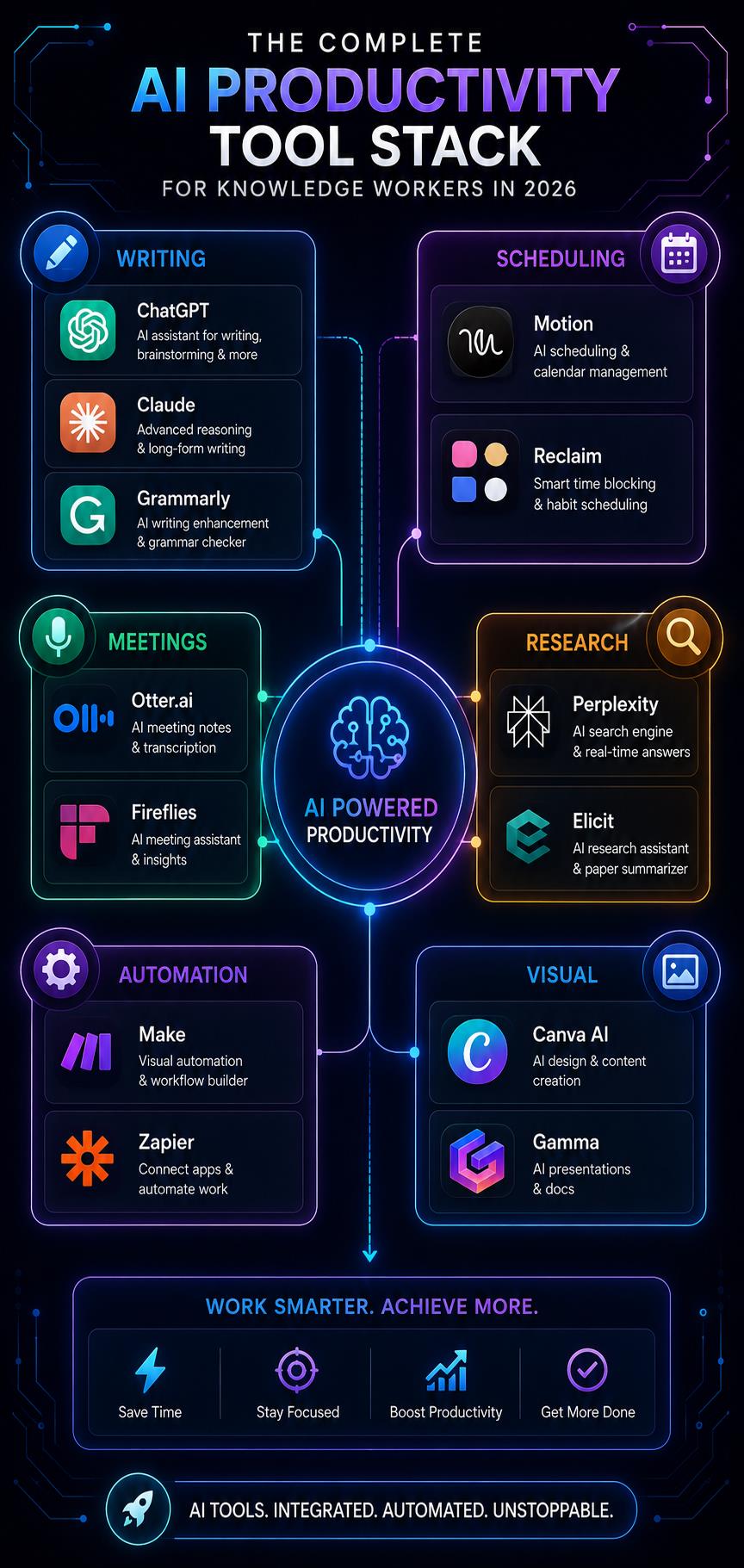
The Complete AI Productivity Stack by Use Case
For Writers and Content Creators — $0/month free stack
| Tool | Purpose | Cost |
|---|---|---|
| Claude AI | Writing and analysis | Free |
| Grammarly | Proofreading | Free |
| Perplexity AI | Research | Free |
| Notion AI | Notes and knowledge | Limited AI trial; workspace has a free plan |
| Canva AI | Visual content | Free |
| Otter.ai | Meeting notes | Free |
For Freelancers and Solopreneurs — ~$50/month
Add to free stack:
- Motion (confirm current billing term and per-seat pricing) — assisted scheduling
- Make ($9/month) — workflow automation
- Gamma (confirm current paid pricing) — presentation drafts
- Grammarly Pro ($12/month, billed annually) — professional communication
For Knowledge Workers in Teams — ~$80/month per person
Add to solopreneur stack:
- Superhuman ($30/month) — email efficiency
- Fireflies AI ($10/month) — meeting intelligence
- Clockwise ($6.75/month) — team scheduling
For Developers and Technical Professionals
Replace general writing tools with:
- GitHub Copilot Free (2,000 completions/month)
- ChatGPT Plus ($20/month) for code assistance
- n8n self-hosted (free) for automation
To turn the time you save into marketing results, see our best AI marketing tools.
How to Build Your AI Productivity Workflow — Step by Step
The most common mistake when adopting AI productivity tools is trying to implement everything simultaneously. The cognitive overhead of learning multiple new tools eliminates the productivity gains from using them.
Week 1 — Implement one AI assistant
Choose Claude or ChatGPT based on your primary use case. Use it for every writing task this week — emails, documents, analysis, communication drafts. Build the habit before adding anything else.
Week 2 — Add meeting intelligence
Implement Otter.ai or Fireflies for all meetings this week. Let the AI handle transcription and summary. Spend the time you save on post-meeting processing on other work.
Week 3 — Add one automation
Identify the most repetitive manual task in your workflow — likely copying data between tools or sending status update emails. Build one Zapier or Make automation to eliminate it.
Week 4 — Add scheduling intelligence
Implement Reclaim AI or Motion. Let the AI schedule your tasks for one week without manual calendar management. Evaluate the difference in how much deep work you complete.
Month 2 and beyond — Optimize and expand
Review which tools delivered the clearest time savings. Double down on those. Identify the next highest-friction point in your workflow and address it with a targeted tool.
Common AI Productivity Mistakes to Avoid
Adding tools without a specific problem to solve. Every AI tool you add requires learning time. Only adopt a tool when you can specifically identify the time cost it eliminates. "It might be useful" is not a sufficient reason to add complexity to your workflow.
Using AI for tasks that require your expertise. AI handles production tasks — drafting, formatting, scheduling, transcribing. It does not replace your judgment, domain expertise, or creative thinking. Using AI to skip the thinking produces low-quality work faster — which is not a productivity improvement.
Not building habits around new tools. An AI tool used occasionally provides fractional value compared to one built into your daily workflow. For each tool you adopt, identify the specific trigger that leads you to use it — and use it consistently at that trigger.
Paying for overlapping tools. Claude, ChatGPT, and Gemini largely overlap in capability. Most users need one AI writing assistant, not three. Audit your subscriptions quarterly for overlap.
Ignoring the free tier. The free plans of Claude, ChatGPT, Grammarly, Perplexity, Otter.ai, Notion, and Canva cover the majority of productivity needs for most individual knowledge workers. Build your workflow on free tools and only upgrade when you hit specific, consistent limitations.
Expert Tips for Maximum AI Productivity
Tip 1 — Batch your AI interactions. Instead of going back to your AI assistant repeatedly throughout the day for individual small tasks, batch them into two or three sessions. You maintain context better, the AI produces more consistent output when given full context, and your own focus is less fragmented.
Tip 2 — Build a prompt library. The prompts that consistently produce high-quality output for your specific work are worth saving. A personal library of 20 to 30 proven prompts eliminates the prompt-writing overhead on repeat task types. For a complete guide to effective prompting, read the complete prompt engineering guide.
Tip 3 — Use AI for your lowest-value tasks first. Identify the tasks that consume time but require minimal judgment — email formatting, data formatting, routine document creation, scheduling logistics. Automate or AI-assist these before tackling higher-complexity tasks. The quick wins build confidence and free time for higher-leverage work.
Tip 4 — Measure before and after. Before adopting a new AI tool, track how long the relevant task type takes you manually for one week. After implementing the tool for one month, measure again. Concrete time savings justify continued use and subscription costs. Absence of measurable improvement is a signal to move on.
Tip 5 — Protect your thinking time. AI tools make production faster — but original thinking, strategic judgment, and creative problem-solving are still human work. Use the time AI saves not to produce more AI-assisted output, but to do more high-quality human thinking. That is where the compounding career advantage comes from.
The Future of AI Productivity Tools
The trajectory of AI productivity tools over the next 12 to 24 months points toward three developments worth understanding now:
Fully autonomous AI agents. The current generation of tools assists your workflow. The next generation will execute complete workflows autonomously — researching, drafting, reviewing, sending, and tracking a project deliverable from brief to completion with periodic human checkpoints rather than continuous human direction.
Deeper workspace integration. AI that lives inside your existing tools — not as a separate app but as an intelligent layer within Gmail, Notion, Slack, and your other daily software — is already emerging and will become standard. The tool-switching overhead of current AI workflows will largely disappear.
Personalization at depth. AI tools that know your communication style, your project context, your decision-making patterns, and your priorities — well enough to draft emails in your voice and schedule your day in alignment with your actual goals — are on the near horizon.
The knowledge workers who will benefit most from these developments are the ones building AI tool habits now. The people who have been using Claude and ChatGPT daily for two years will be dramatically more effective with autonomous AI agents than people encountering AI tools for the first time in 2027.
Key Takeaways
- The best AI productivity tools in 2026 eliminate the most time-consuming low-judgment tasks — drafting, scheduling, transcribing, automating — freeing focus for high-value work
- A complete free AI productivity stack (Claude, Grammarly, Perplexity, Notion, Otter.ai, Canva) covers most individual knowledge worker needs at zero cost
- Implement tools one at a time over four weeks — simultaneous adoption eliminates the productivity gains from individual tools
- Measure time savings before and after each tool implementation — absence of measurable improvement is a signal to stop paying for it
- The productivity advantage compounds over time — professionals building AI habits now will have a significant advantage as tools become more capable
- Use AI for production, not for thinking — the time savings should go toward higher-quality human judgment, not more AI-assisted output
Frequently Asked Questions
What are the best free AI productivity tools in 2026? The best free AI productivity tools are Claude AI for writing and analysis, ChatGPT for general tasks, Grammarly for proofreading, Perplexity AI for research, Otter.ai for meeting notes, Notion for knowledge management, Canva AI for visual content, and Google Analytics 4 for performance tracking. Together these cover the core productivity needs of most knowledge workers at zero cost.
Which AI tool saves the most time for knowledge workers? Identify a task you repeat and record the complete workflow before and after trying a tool, including corrections and administration. This guide has no measured comparison of which product saves the most time.
Are AI productivity tools worth the cost? Compare the subscription and usage costs with a specific need and your own recorded workload. A hypothetical value of time is not cash income, and buying a tool does not guarantee a productivity gain.
How many AI productivity tools should I use? For most knowledge workers, 3 to 5 well-chosen, deeply integrated tools deliver better results than 10 to 15 tools used superficially. Quality of implementation matters more than quantity of tools. Start with 2 tools, use them consistently for a month, then evaluate whether to add more.
Do AI productivity tools work for teams? Yes — and some deliver their greatest value at the team level. Clockwise optimizes collective scheduling. Fireflies provides team-wide meeting intelligence. Make and Zapier automate cross-team workflows. The compound effect of individual productivity gains multiplied across a team produces significant organizational impact.
What is the best AI tool for task management? Motion is the most sophisticated AI task management tool — automatically scheduling tasks into your calendar based on priority and available time. Todoist AI is the best for simple, affordable task management with AI features. For teams using project management tools, Notion AI provides the deepest integration between task management and knowledge work.
Can AI tools replace human productivity entirely? No — and this misunderstands what AI productivity tools do well. They eliminate the production overhead of knowledge work — the drafting, formatting, scheduling, transcribing, and automating. They do not replace strategic thinking, creative judgment, relationship management, or domain expertise. The professionals who thrive with AI tools use them to do more of the work that genuinely requires human capability.
Conclusion — Build Your AI Productivity Stack Today
The productivity gap between AI-augmented professionals and those working without AI assistance is real, measurable, and growing. The tools to close that gap — or open it in your favor — are largely free and available today.
The path forward is straightforward: identify your highest time cost, find the tool that specifically addresses it, implement it consistently for one month, measure the difference, and build from there.
Every hour AI saves you is an hour you can invest in work that genuinely requires your expertise. That compounding reinvestment of recovered time is what separates professionals who use AI to do the same work faster from those who use it to accomplish meaningfully more.
Your AI productivity stack is waiting. The only question is when you start building it.