A faceless channel presents original material without the creator appearing on screen. That format does not establish an earnings level or eliminate the need for research, editing, rights checks, and audience development.
This is not a loophole or a hack. It is a legitimate content model that has existed since YouTube began — and AI tools available in 2026 have made it more accessible, more producible, and more profitable than at any point in YouTube's history.
AI can assist with scripting, narration, editing, and design. The amount of work depends on the content and review requirements; no complete-video production time has been measured here.
This guide covers the complete system — from choosing your niche to publishing your first video to building a channel that generates real income. Every step includes the specific AI tools, exact prompts, and practical shortcuts that work in 2026.
Quick Answer
How do you start a faceless YouTube channel with AI? Choose a topic you can cover responsibly, research original material, draft and verify a script, use licensed narration and visuals, edit and review the complete video, and publish accurate metadata. Monetization depends on current platform requirements and review; there is no guaranteed production duration or revenue timetable.
Why Faceless YouTube Channels Work
YouTube's algorithm does not care whether a human face appears in your video. It cares about watch time, click-through rate, and audience retention. A well-produced educational video with an AI voiceover competes equally with a talking-head video — and in many categories outperforms it, because the production quality is more consistent and the viewing experience is more focused.
Three factors make this model particularly viable in 2026:
AI has eliminated the production barrier. Voiceover quality from ElevenLabs, script quality from Claude, and editing speed from CapCut AI collectively produce results that previously required a professional production team. The quality ceiling for a solo creator using AI tools now exceeds what most small channels could afford to pay for professionally two years ago.
Certain niches are better without a face. Finance, technology, history, science, self-improvement, and AI topics perform better in a professional documentary or educational format than in a personal vlog style. The absence of a camera-facing host is not a limitation in these niches — it is the right format.
It scales. AI-assisted production is repeatable. The same workflow that produces one video per week produces three videos per week with the same system. No filming schedule. No recording environment dependency. No single point of failure.
Step 1 — Choose Your Niche Strategically
Niche selection determines everything downstream — your content calendar, your CPM rate, your affiliate opportunities, and how fast your channel grows. Get this right and everything else is execution.
What a Good Faceless Niche Looks Like
High search volume with evergreen demand. Your niche needs topics people actively search for on YouTube consistently — not topics that are only interesting when you find them compelling.
Revenue uncertainty. Advertising receipts vary by audience, format, demand, eligibility, and program terms. A niche and view count do not establish an expected payout; choose a topic you can cover accurately and responsibly.
Deep content library. You need enough distinct topics to publish 100 or more videos over 12 to 18 months without repetition.
Faceless format appropriate. Educational, documentary, analytical, and informational content works naturally without camera presence. Personal vlogs, cooking, and fitness demonstrations do not.
Best Faceless YouTube Niches in 2026
| Niche | CPM Range | Why It Works |
|---|---|---|
| Finance and investing | $15 to $45 | Evergreen demand, high advertiser value |
| AI and technology | $8 to $25 | Exploding search volume, engaged audience |
| Business and entrepreneurship | $12 to $35 | Professional audience, high advertiser value |
| Health and wellness (informational) | $8 to $20 | Permanent demand, wide audience |
| Self-improvement and psychology | $6 to $18 | High shareability, deep content library |
| History and documentary | $5 to $15 | Archive footage, highly engaged niche |
| Motivational and educational | $5 to $15 | Broad audience, emotional engagement |
Validate Your Niche with AI
Before committing, run this validation workflow:
Perplexity research prompt: Analyze the YouTube opportunity in the [niche] space in 2026. Tell me:
Search volume trend for this niche on YouTube Most viewed video topics in this niche currently Content gaps — topics with high demand but limited quality coverage Typical CPM range for this niche Top 5 channels currently dominating this niche and their approximate monthly views
Then validate directly on YouTube — search your top 5 niche keywords and look for videos with 100K+ views on channels with under 10K subscribers. This signals high demand relative to competition — exactly the gap you want to enter.
Step 2 — Set Up Your Channel
Channel Naming with Claude
I am starting a faceless YouTube channel about [your niche]. Generate 20 channel name ideas that:
Are memorable and easy to spell Suggest the content category without being generic Work as a brand across YouTube, social media, and a website Appeal to [describe your target viewer]
For the top 5, explain why each works as a long-term brand name.
Channel Branding
Create these visual assets using Canva AI (free):
- Channel logo: 800x800px — simple, recognizable at small sizes
- Channel banner: 2560x1440px — communicates what your channel covers
- Thumbnail template: 1280x720px — your consistent visual style
Save your colors and fonts in Canva's Brand Kit so every design applies your identity automatically.
Channel Description
Write a YouTube channel description for a faceless channel about [your niche]. Channel name: [name] Content focus: [specific topics] Upload schedule: [frequency] Requirements:
First 2 sentences optimized for both viewers and SEO Include 5 to 8 natural keyword mentions Explain the specific value the channel provides 150 to 250 words End with a subscribe invitation
Step 3 — The Complete AI Video Production Workflow
This is the core system. Every video follows the same 7 stages. Once you have run through it 5 times it becomes automatic.
Stage 1 — Idea Research and Validation
Perplexity prompt: What are the most searched YouTube topics in [niche] right now? Include:
Topics with high search volume but limited quality coverage Questions people are actively asking about [niche] Trending subtopics gaining search volume in the past 30 days
Cross-reference with YouTube autocomplete — type your keywords and record every suggestion. These are real searches people make daily.
Validate with VidIQ — search your top idea on YouTube and check the search volume and competition score. Target keywords with search volume above 1,000 monthly and competition below 40 on VidIQ's scale.
Stage 2 — Script Writing with Claude
Script quality determines watch time. Watch time determines rankings. This stage is where your video is won or lost.
Complete script prompt: You are an expert YouTube scriptwriter for faceless educational channels about [niche]. Write a complete script for a 10-minute video titled: "[your title]" Target audience: [describe specifically] Tone: Educational, authoritative, conversational — not academic or robotic STRUCTURE: HOOK (first 30 seconds):
Start with the most compelling fact or question about this topic Do NOT start with "In today's video" or "Welcome back" Create immediate curiosity that requires watching to resolve
INTRO (30 to 60 seconds):
What the viewer will learn Why it matters to them specifically Preview the most interesting point (open loop)
Related articles
AI Tools
7 Best AI Thumbnail Generators for YouTube (2026)
Compare seven AI thumbnail generators for YouTube in 2026 by design workflow, editing control, free-plan limits and publishing needs.
AI Tools
How to Grow a YouTube Channel with AI in 2026
Learn how to grow a YouTube channel with AI in 2026 using AI for video ideas, scripts, thumbnails, and editing. Includes a practical weekly workflow.
MAIN CONTENT (7 to 8 minutes):
4 to 6 clear sections Retention hook every 90 seconds: "But here is where it gets interesting..." "Most people get this wrong..." "This next part will change how you think about..." Mark [VISUAL: description] for specific visuals
CONCLUSION (1 minute):
3 key takeaways Subscribe + comment CTA
FORMATTING:
Short sentences — this is spoken audio Use contractions naturally (you'll, it's, don't) No parenthetical clauses Varied sentence rhythm Mark any technical terms needing pronunciation guidance
Before generating audio: Read the script aloud and correct unclear wording, factual errors, and pronunciation issues. This is a review step, not evidence of a measured time saving.
Stage 3 — AI Voiceover Generation
Best tool: ElevenLabs (free — 10,000 credits/month)
ElevenLabs produces the most natural AI voiceover available in 2026. The difference between ElevenLabs and basic TTS tools is immediately audible to regular YouTube viewers.
Voice selection tip: Audition voices using a paragraph from your actual script — not the sample text provided. The voice that sounds natural with your specific content is not always the most impressive-sounding voice in the library demo.
Recommended settings:
- Stability: 0.50 to 0.60
- Clarity: 0.75
- Style: 0.10 to 0.20
Generate in sections not as one complete script. Scripts over 3,000 characters produce more consistent pacing when generated section by section — and you can regenerate individual sections that do not sound right without redoing everything.
For a complete breakdown of AI voice tools and alternatives, read the best AI voice generators guide.
Stage 4 — Visual Content Assembly
Free stock footage sources:
- Pexels (pexels.com) — best free stock video library
- Pixabay (pixabay.com) — large free video collection
- Coverr (coverr.co) — high-quality cinematic clips
- Mixkit (mixkit.co) — curated professional footage
AI-generated images for specific visuals:
When stock footage does not match your topic — generate custom images:
| Tool | Best For | Cost |
|---|---|---|
| Microsoft Designer | Photorealistic scenes, general visuals | Free (daily credits) |
| ChatGPT Images | Complex custom illustrations, charts | Free limited / Plus |
| Canva AI | Branded graphics, infographics, text-on-image | Free |
| Adobe Firefly | Commercial-safe images for monetized channels | 25 free credits/month |
| Ideogram | Images with readable text inside them | 10 free/day |
When to use each:
- Abstract concepts or scene visualization → Microsoft Designer or ChatGPT
- Branded graphics with your channel colors → Canva AI
- Text overlays or data visualizations inside the image → Ideogram
- Commercial projects where copyright matters → Adobe Firefly
Stage 5 — Video Editing with CapCut AI
CapCut AI is the best free video editor for faceless channel production — it automates the most time-consuming editing tasks completely. See our CapCut AI free plan breakdown for the exact current credits, daily limits, and watermark rules before you build a workflow around it.
The CapCut AI workflow:
1. Import assets:
- All audio clips in order (from ElevenLabs)
- All visual footage and images
- Background music from YouTube Audio Library (free, copyright-safe)
2. Auto-caption generation: Generate a caption draft, then review names, terminology, timing, and accessibility. Accuracy and review time depend on the audio; no percentage accuracy or retention increase is established here.
3. Visual synchronization: Match visuals to audio content. A new visual every 3 to 5 seconds maintains attention. Static single images held for 30+ seconds lose viewers rapidly.
4. Background music: Set at 15 to 20% volume relative to voiceover — audible enough to fill silence, never competing with the narration.
5. Auto-zoom: Apply CapCut's auto-zoom moderately — subtle dynamic zooms improve visual engagement without requiring manual keyframing. Excessive zooming becomes distracting.
6. Color grading: Apply a consistent color grade across all footage using CapCut's preset LUTs. Consistency makes mixed stock footage sources look like they belong together.
Stage 6 — Thumbnail Creation
Your thumbnail controls click-through rate. Click-through rate determines how many people see your video from impressions. This is the highest-leverage design work you do for each video.
Thumbnail formula for faceless channels:
Since you have no face to anchor the thumbnail, lead with:
- A bold, specific number or claim
- A strong visual that creates curiosity or emotion
- Maximum 4 words of text — large, high contrast
- A visual that communicates the topic at a glance
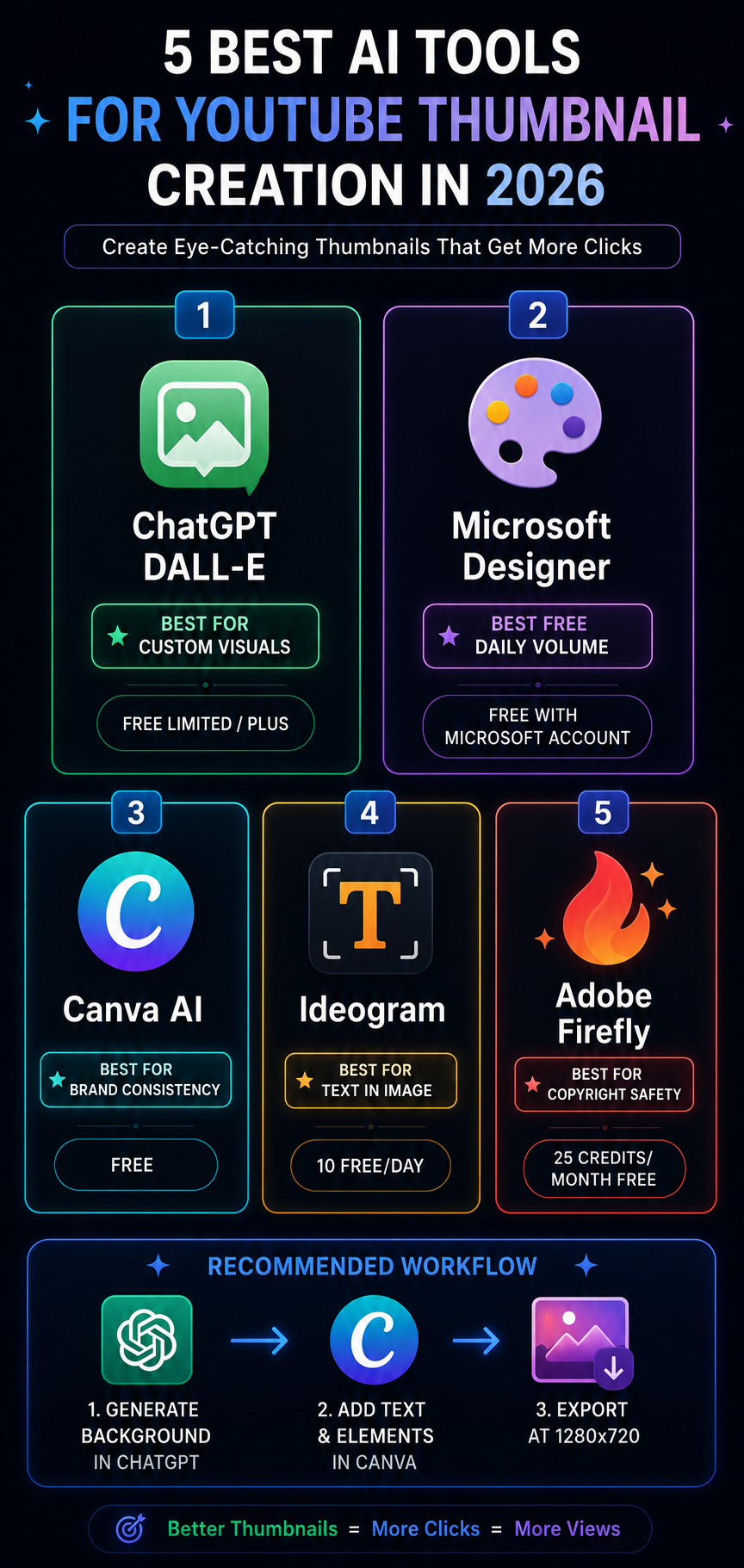
Best AI Tools for Thumbnail Creation
Tool 1: Canva AI — Best for beginners and brand consistency
Canva's AI image generator creates background visuals from text prompts, applied directly inside your thumbnail template. The Brand Kit ensures consistent colors and fonts across every thumbnail automatically.
Canva AI thumbnail prompt example: Futuristic glowing technology visualization showing AI neural network connections, dark background, blue and purple neon accents, cinematic quality, suitable as YouTube thumbnail background, 16:9 format
Tool 2: ChatGPT Images — Best for custom specific visuals
ChatGPT's image generation (available on free plan with limits, unlimited on Plus) produces high-quality custom thumbnail backgrounds from precise descriptions.
ChatGPT thumbnail prompt example: Create a YouTube thumbnail background image. Style: Cinematic, dramatic, high contrast Topic: [your video topic] Visual: [describe the specific scene or concept] Colors: Dark background with [your brand colors] accents Mood: [professional/dramatic/educational/surprising] Format: 16:9, 1280x720px equivalent quality No text in the image — text will be added separately Make it visually striking enough to stop someone scrolling on a phone screen.
After generating in ChatGPT, import the image into Canva to add your text overlay and thumbnail branding.
Tool 3: Microsoft Designer — Best free option for quality
Microsoft Designer (free with Microsoft account) uses DALL-E 3, with a higher daily credit allowance than ChatGPT's free tier. For creators who need more free image generations, Designer provides the better daily volume.
Tool 4: Ideogram — Best when thumbnail includes text within the image
Most AI image generators produce garbled, unreadable text inside images. Ideogram handles text in generated images more reliably than any other free tool — making it the best choice when your thumbnail concept requires readable words to appear as part of the visual design rather than as a separate text overlay.
Tool 5: Adobe Firefly — Best for commercial use copyright safety
Adobe Firefly is trained exclusively on licensed content — all generated images are explicitly cleared for commercial use. For monetized channels where copyright matters, Firefly provides peace of mind that other tools cannot guarantee.
Recommended thumbnail workflow (fastest and best quality): Step 1: Generate background in ChatGPT or Microsoft Designer using the prompt above Step 2: Import the generated image into Canva Step 3: Add your text overlay using Canva's bold fonts — apply your brand colors from Brand Kit Step 4: Export at 1280x720px Step 5: Test at 150px wide — if you cannot read the text and identify the topic, it will not perform on mobile
A/B test thumbnails: YouTube allows testing multiple thumbnails for the same video. Upload two versions — YouTube shows each to different viewer segments and switches to the higher-performing one automatically. Use this on every video.
Stage 7 — Upload and SEO Optimization
Title optimization prompt: Generate 10 YouTube title variations for a video about [topic]. Primary keyword: [keyword] Video covers: [brief description] Requirements:
Related articles
AI Tools
Sora AI Video Generator Review 2026: Is It Worth It?
Sora AI video generator review, updated for OpenAI's Sora discontinuation — what it could do, its shutdown dates, and where to go instead in 2026.
AI Tools
Best AI Tools for YouTube Automation (Free & Paid) 2026
Compare AI tools for YouTube automation, from research and scripts to voiceovers, editing and Shorts, with verified free plans and monetization rules.
Include the keyword naturally Create curiosity or promise a specific benefit Under 60 characters Mix formats: question, number, how-to, curiosity gap No clickbait that does not match the content
Description prompt: Write a YouTube video description for: Title: [title] Content: [brief summary of what the video covers] Requirements:
First sentence contains the primary keyword and summarizes the video value 250 to 400 words Timestamps for main sections Natural keyword placement Subscribe CTA at end 3 to 5 relevant hashtags at the bottom
After upload checklist:
- Add all relevant tags (10 to 15 using VidIQ suggestions)
- Set a custom thumbnail immediately
- Add end screen elements (subscribe button, next video) in last 20 seconds
- Add cards linking to related videos at relevant moments
- Submit URL to Google Search Console for indexing
Step 4 — YouTube SEO for Faceless Channels
SEO is not optional for faceless channels. Without on-camera personality driving subscriber loyalty, search-driven discovery is your primary growth mechanism for the first 6 to 12 months.
Keyword Research System
Level 1 — Seed keywords: 5 to 10 broad terms describing your niche.
Level 2 — VidIQ expansion: Enter each seed keyword and record every related suggestion with search volume above 500 and competition below 50. This becomes your 3 to 6 month content calendar.
Level 3 — YouTube autocomplete: Every autocomplete suggestion is an algorithmically confirmed real search. Record all of them.
Level 4 — Competitor tag research: Use VidIQ to see the tags on your top competitors' best-performing videos. These reveal the keywords their best content ranks for — you need to compete for the same terms.
Topical Authority Strategy
YouTube increasingly recommends channels that demonstrate comprehensive coverage of a specific topic — not channels producing one-off videos on disconnected subjects.
Build topic clusters using Claude: I run a YouTube channel about [your niche]. Create 5 topic clusters, each with 1 pillar video and 4 to 5 cluster videos. Each cluster should:
Cover one specific subtopic comprehensively Have the pillar video target a high-volume keyword Have cluster videos target specific long-tail variations All link to each other in descriptions and end screens
Format each cluster clearly with pillar video first and its target keyword shown.
For more on AI search optimization principles that apply to both YouTube and Google, read the complete AI SEO guide.
Step 5 — Shorts Strategy for Faster Growth
YouTube Shorts give your channel daily discovery opportunities beyond your long-form upload schedule. The most efficient approach — repurpose every long-form video into 3 to 5 Shorts.
Best Shorts repurposing tools:
Opus Clip (free limited) — upload your long-form video and it automatically identifies the most engaging moments, extracts them as vertical clips, adds animated captions, and scores each clip by predicted virality.
CapCut AI — for clips you want more editorial control over. Select the segment, reframe to 9:16 vertical, run auto-captions, add trending audio, export.
Shorts content rules:
- End every Short with a hook for the full video: "The complete breakdown is on the channel"
- Post Shorts on days between long-form uploads to maintain daily activity
- Use trending audio from YouTube Audio Library when topically relevant
Step 6 — Monetization Strategy
Faceless channels have multiple income streams. The most successful channels run all of them simultaneously.
YouTube AdSense
Requirements: Check the current YouTube Partner Program eligibility and review requirements for your country, format, and monetization feature. Meeting an audience threshold alone does not guarantee acceptance.
Timing: No verified timeline to eligibility, acceptance, or first revenue is available for this guide.
Revenue cannot be inferred from a fixed view count. Audience location, format, advertiser demand, eligibility, and payment terms all affect receipts. Some channels never earn advertising revenue.
Affiliate Marketing
Affiliate links may earn commissions from qualifying conversions under an approved program’s terms. Disclose relevant relationships and use links only when they fit the content; there is no verified claim that affiliate income exceeds advertising revenue.
Highest-converting programs for AI channels:
| Program area | What to verify |
|---|---|
| Hosting and security | Approval, qualifying purchases, attribution, reversals, and disclosure |
| Design and writing tools | Current program availability, permitted promotion, and payment terms |
| Freelance and education services | Eligibility, conversion conditions, regional restrictions, and fees |
No commission amount or conversion ranking has been verified for this guide.
For a complete guide to affiliate monetization with AI content, read the how to make money with AI tools guide.
Digital Products
Possible products include prompt packs, guides, courses, or memberships based on genuine expertise. Validate demand, content rights, support needs, platform fees, and pricing. Creating a product or using Gumroad does not guarantee sales.
Sponsorships
A media kit can describe your actual audience, engagement, and relevant work when approaching advertisers. A niche or subscriber count does not guarantee sponsorship or a particular fee.
Complete AI Tool Stack
| Stage | Best Tool | Alternative | Cost |
|---|---|---|---|
| Research | Perplexity AI | ChatGPT | Free |
| Keyword research | VidIQ | TubeBuddy | Free (basic) |
| Script writing | Claude AI | ChatGPT | Free |
| Voiceover | ElevenLabs | Murf AI | Check commercial licence and current paid terms |
| Stock footage | Pexels | Pixabay / Coverr | Free |
| AI image generation | Microsoft Designer | ChatGPT Images | Free |
| Thumbnail creation | Canva AI + ChatGPT | Ideogram | Free |
| Video editing | CapCut AI | Descript | Free |
| Shorts repurposing | Opus Clip | CapCut mobile | Free (limited) |
| SEO optimization | VidIQ | TubeBuddy | Free (basic) |
| Analytics | YouTube Studio | ViewStats | Free |
Budget check: Free tiers have limits and may exclude commercial use. Account for narration licences, model usage, editing features, assets, and marketplace fees before relying on a free-only stack.
Realistic Growth Timeline
| Period | Videos | Subscribers | Monthly Views | Income |
|---|---|---|---|---|
| Month 1 to 2 | 8 to 12 | 0 to 200 | 0 to 500 | $0 |
| Month 3 to 4 | 20 to 30 | 100 to 800 | 1,000 to 5,000 | $0 to $50 |
| Month 5 to 6 | 35 to 50 | 500 to 2,000 | 5,000 to 20,000 | $100 to $500 |
| Month 7 to 12 | 60 to 100 | 2,000 to 15,000 | 20,000 to 100,000+ | $500 to $3,000+ |
| Year 2 | 100+ | 10,000 to 50,000+ | 100,000+ | $1,500 to $10,000+ |
These are realistic ranges for channels in good niches publishing consistently. Channels in high-CPM niches like finance or AI with strong SEO execution regularly hit month-6 results by month-3.
Common Mistakes to Avoid
Choosing based on interest not demand. Your genuine interest in a topic does not guarantee an audience exists for it on YouTube. Always validate search demand first.
Inconsistent publishing. A channel posting three videos per week for one month then disappearing for three weeks performs dramatically worse than one posting once per week every week. AI tools make consistency achievable — use them.
Neglecting the hook. Most creators spend hours on production and minutes on the first 30 seconds. The hook determines whether anyone watches the rest. Treat it as its own writing task.
Generic thumbnails. Thumbnails that look like every other thumbnail in your niche produce average CTR at best. Generate multiple options with ChatGPT and Canva, test them against each other using YouTube's A/B tool.
Ignoring retention data. YouTube Studio shows exactly where viewers stop watching. Review every video's retention graph and adjust your production approach based on the patterns you see.
Using robotic AI voiceover without reviewing. AI voiceovers sometimes mispronounce words or add unnatural pauses. Always listen to the complete generated audio before editing it into your video.
Advanced Growth Strategies
The Comment Mining Method
Your competitors' comment sections are free market research. The most-asked questions in popular niche videos are explicit video requests from your target audience. Analyze these YouTube comments from a [niche] video. Identify:
Most common questions viewers had after watching What they wished the video covered but did not Specific pain points or confusions expressed 5 video ideas directly addressing what commenters wanted
Comments: [paste 50 to 100 comments]
Trend Hijacking
When a significant development happens in your niche — a new AI tool launches, a major company makes news — publish a video within 24 to 48 hours. Early videos on trending topics ride the initial search surge before competition saturates it.
Daily Perplexity check: What are the most significant news and developments in [your niche] from the past 24 to 48 hours that YouTube viewers would want explained?
Series Format
Multi-part series — "The Complete Guide to AI Tools Part 1, Part 2, Part 3" — create automatic viewer progression. Completing Part 1 gives viewers a specific next video. YouTube recommends continuation content to viewers who just finished earlier parts. Session time improves. Channel authority compounds.
The Topic Bank System
Use your content idea generation workflow to build a bank of 50 validated topic ideas before you start publishing. Every production session, choose from the validated list rather than starting research from scratch. Eliminates the most common production delay and decision fatigue.
Expert Tips
Tip 1 — Treat your first 30 videos as R&D. Test different topics, formats, lengths, and thumbnail styles. The channel you are running at video 30 should look meaningfully different from launch — built on real performance data rather than assumptions.
Tip 2 — Review existing videos. Compare traffic sources, audience response, and content accuracy before changing a title or thumbnail. A change may help or harm performance and does not guarantee more traffic.
Tip 3 — Your analytics tell you what to make more of. If one topic consistently outperforms others — make more videos on that topic regardless of whether it is your personal favorite to produce. Data over preference.
Tip 4 — Patience is a competitive advantage. Most creators quit between month 2 and month 4 when they have invested real time but have not yet seen results. Channels that reach month 6 have dramatically less competition than when they started because most of the competition has already quit.
Tip 5 — Prepare reusable layouts. Templates can help organise visual assets and branding, but each thumbnail still needs readability, accuracy, and rights checks. No production-time reduction is established here.
For more on growing a YouTube channel with AI tools across every content type, read the complete YouTube growth with AI guide.
Key Takeaways
- Faceless YouTube channels work because YouTube rewards content quality not camera presence
- Niche selection is the highest-leverage decision — choose based on search demand, CPM rate, and content library depth
- AI can assist production, but research, human review, commercial rights, and platform eligibility remain essential
- For thumbnails — use ChatGPT or Microsoft Designer for the background visual, Canva to add text and branding, Ideogram when text needs to appear within the image
- Monetization timeline is 3 to 6 months in a well-chosen niche with consistent 3 videos per week
- The total starting cost is effectively $0 — all core production tools have free tiers sufficient to start
- Consistency over time is the single most important factor — AI makes consistency achievable at whatever cadence you set
Frequently Asked Questions
Can you really make money with a faceless YouTube channel? Yes. Faceless YouTube channels generate significant income through YouTube AdSense, affiliate marketing, digital products, and sponsorships. Revenue depends heavily on niche — high-CPM niches like finance and AI generate 10 to 30 times more AdSense income per view than entertainment content. A finance channel with 50,000 monthly views generates more revenue than an entertainment channel with 500,000 views.
How long does it take to make a faceless YouTube video with AI? Production time depends on research, script quality, narration, visuals, caption corrections, and review. Track your own workflow before setting a publishing schedule; no AI-versus-manual duration comparison has been established here.
Does YouTube allow AI-generated content? Yes. YouTube's policies allow AI-assisted content as long as it provides genuine value, discloses synthetic media where required, and complies with YouTube's content policies. YouTube evaluates content quality and viewer value — not production method.
What is the best AI tool for faceless YouTube thumbnails? The best approach combines tools: use ChatGPT Images or Microsoft Designer to generate the background visual from a detailed prompt, then import into Canva to add your text overlay and brand elements. Use Ideogram specifically when you need readable text to appear within the generated image itself. Adobe Firefly is best when copyright safety on a monetized channel is the priority.
How many videos do you need before seeing results? Most faceless channels in well-chosen niches begin seeing meaningful view growth between video 20 and video 40 — when the channel has enough content for YouTube to categorize and recommend it accurately. Channels that publish consistently and optimize based on early analytics typically reach this threshold in month 2 to month 3.
What are the best faceless YouTube channel niches in 2026? The best niches combine high search volume, high CPM, and faceless-format appropriate content. Top performers: finance and investing ($15 to $45 CPM), AI and technology ($8 to $25 CPM), business and entrepreneurship ($12 to $35 CPM), and health and wellness informational content ($8 to $20 CPM).
How much does it cost to start a faceless YouTube channel? Costs depend on tool access, usage, assets, and commercial licences. ElevenLabs Free does not include a commercial licence; a suitable licensed paid plan or another authorised narration option is needed for paid use. Check all current plan limits and fees before budgeting.
Start This Week
The information in this guide is complete. The tools are available and mostly free. The only variable is execution.
Starting a channel does not establish future growth or income. Choose a manageable project, review feedback and costs, and decide whether continued work fits your available time and goals.
The first video does not need to be perfect. It needs to exist. Your workflow improves with every video. Your niche understanding deepens with every data point. Your channel authority builds with every piece of content you publish.
Pick your niche today. Write your first script this week. Publish before the weekend ends.
For more on building income and audience with AI tools, explore the best AI voice generators guide, the how to make money with AI tools complete guide, the best AI tools for content creators, the build personal brand with AI guide, and the complete AI SEO guide.