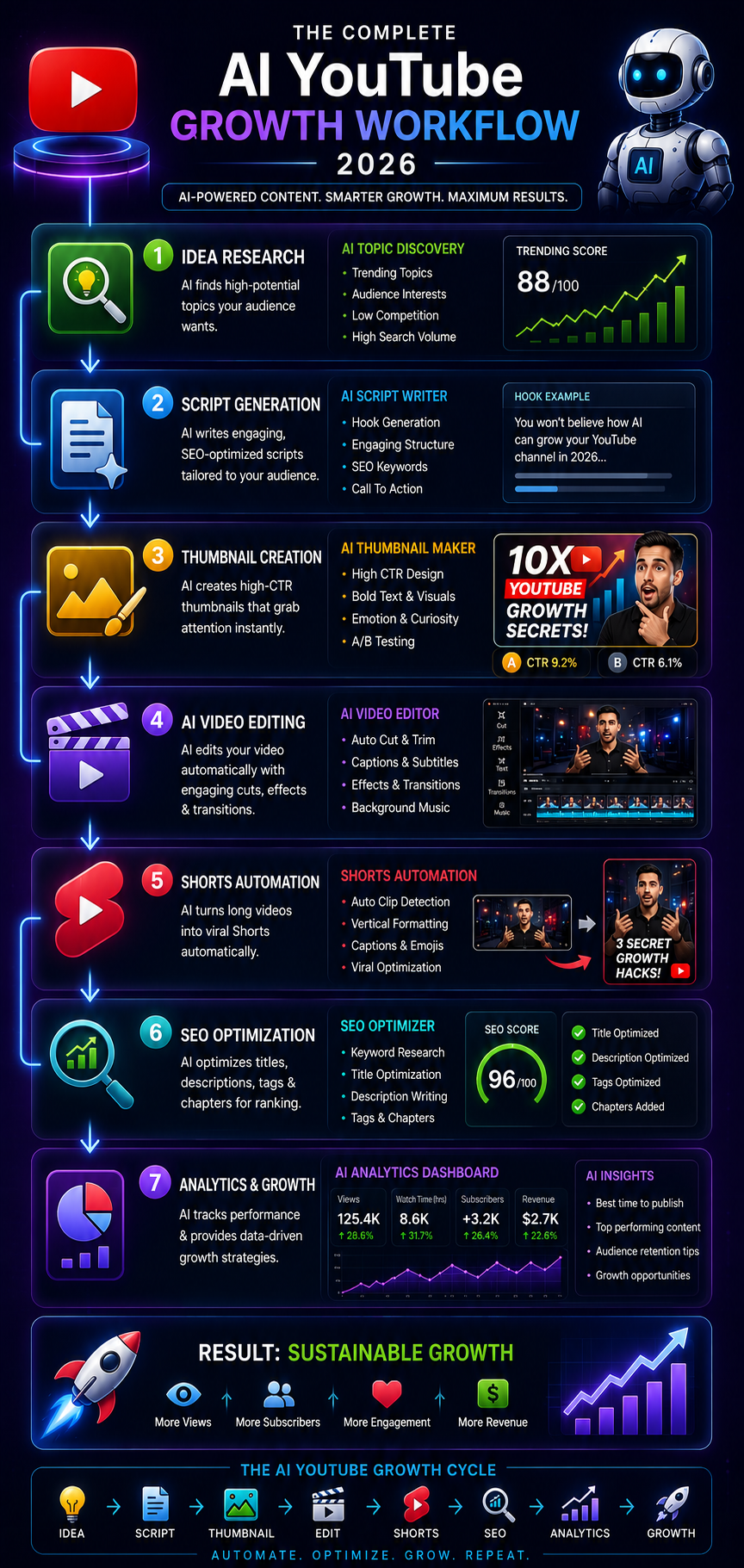
Growing a YouTube channel in 2026 is no longer just about uploading more videos. The real advantage comes from using AI to research better topics, write stronger scripts, create better thumbnails, edit faster, optimize YouTube SEO, and turn long-form videos into Shorts.
Whether you are building a traditional creator-led channel, a faceless channel, or simply using AI to speed up your existing workflow, the goal is the same: create content that people want to watch and publish it consistently.
AI can help with almost every stage of YouTube production, but it should not replace the parts that make a channel worth following. Your niche, opinions, storytelling, examples, and understanding of your audience still matter.
This guide shows you how to grow a YouTube channel with AI step by step — including free AI tools, video ideas, script writing, thumbnails, editing, Shorts, YouTube SEO, analytics, monetization considerations, and a practical weekly workflow.
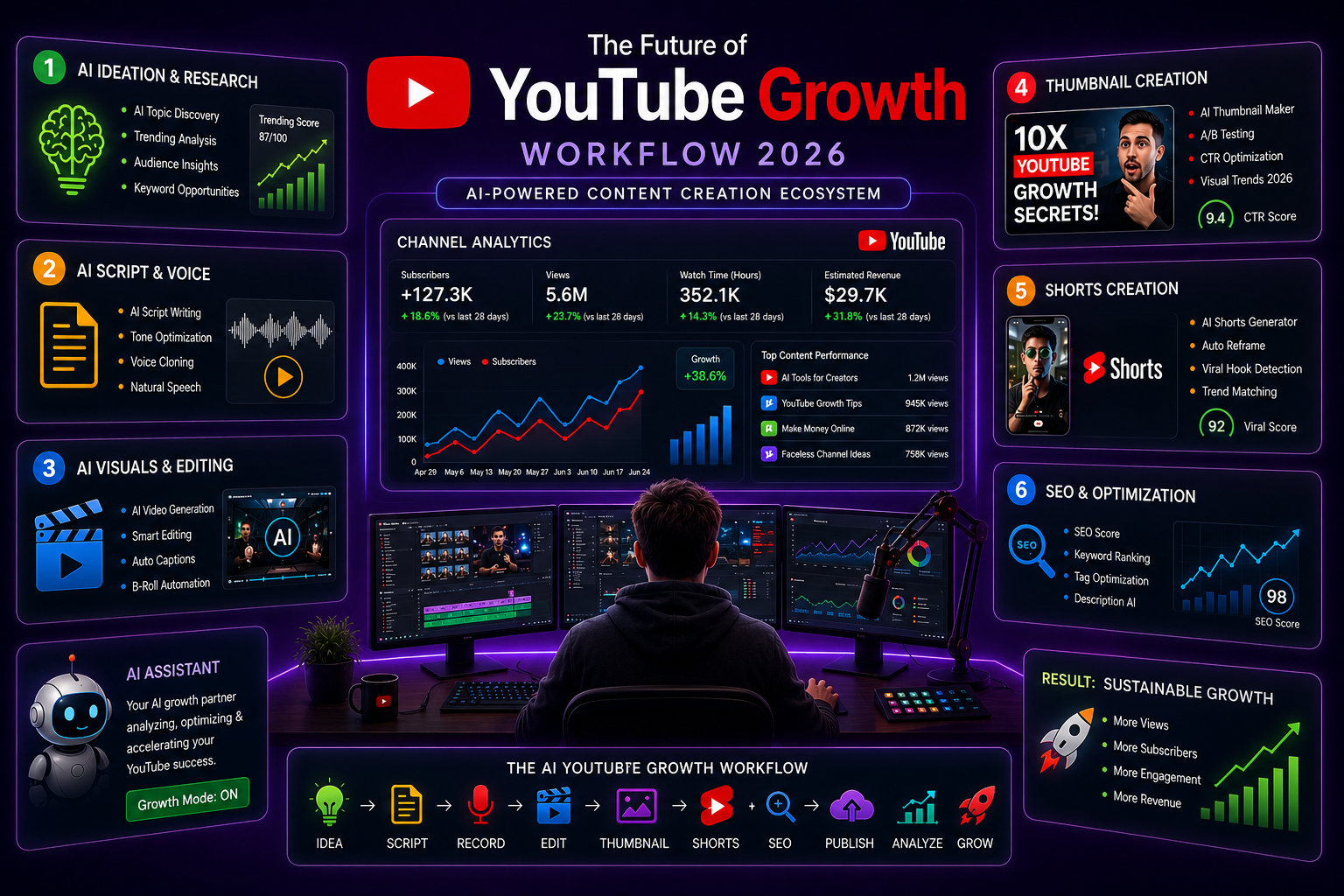
Quick Answer
How can AI help grow a YouTube channel?
AI can help you grow a YouTube channel by making the content-production process faster and more consistent.
The most useful applications are:
- Video ideas: Find topics, questions, trends, and content gaps.
- Script writing: Generate outlines, hooks, examples, and first drafts.
- Thumbnails: Create and test multiple thumbnail concepts.
- Video editing: Remove silence, generate captions, reframe clips, and speed up repetitive editing.
- YouTube SEO: Improve titles, descriptions, keywords, chapters, and content structure.
- Shorts: Turn long-form videos into multiple short clips.
- Analytics: Analyze retention and identify patterns across multiple videos.
The important distinction is that AI improves your production process; it does not guarantee views or subscribers. Topic selection, audience fit, click-through rate, watch time, retention, and viewer satisfaction still determine whether a video succeeds.
Why AI Is Transforming YouTube Growth in 2026
YouTube has always rewarded two things above everything else: consistency and quality. The problem is that quality content takes time — and time is the resource most creators run out of first.
AI changes that equation fundamentally.
The time required to produce a YouTube video varies significantly by niche, video length, filming setup, editing style, and production quality. Research, scripting, filming, editing, thumbnails, and SEO can each become major time commitments for a solo creator.
An AI-assisted workflow can reduce repetitive work across these stages, particularly for research, first drafts, captions, editing tasks, thumbnail concepts, and content repurposing.
The bigger advantage is not simply producing more videos. It is freeing up time to improve topic selection, storytelling, audience research, testing, and consistency.
The practical advantage is not that AI automatically makes a channel successful. It is that AI can reduce repetitive production work, giving creators more time to research topics, improve storytelling, test ideas, and publish consistently.
Best AI Tools for YouTube Creators in 2026
Before the workflow, here is your complete AI toolkit — one tool for each stage of production. If you are considering AI-generated footage as part of that stack, start with the Sora AI review before choosing a video generation workflow.
| Purpose | Best Tool | Free Option |
|---|---|---|
| Idea research | Perplexity AI | Free option available |
| Script writing | Claude AI | Free option available |
| Script alternatives | ChatGPT | Free option available |
| Video editing | CapCut AI | Free features available |
| Text-based editing | Descript | Free option available |
| Thumbnails | Canva AI | Free features available |
| Thumbnail text | Ideogram | Free option available |
| Voiceover | ElevenLabs | Free option available |
| SEO research | VidIQ | Free features available |
| Shorts generation | Opus Clip | Free option available |
| Analytics | YouTube Studio | Free |
| Caption generation | CapCut AI | Free features available |
For a complete breakdown of these tools and more, read the best AI tools for content creators guide.
Which AI Tools Should You Actually Start With?
You do not need every AI tool in this table.
If you are starting from zero, build your workflow around five categories:
- Research: Perplexity or another AI research assistant
- Writing: ChatGPT or Claude
- Editing: CapCut or another AI video editor
- Thumbnails: Canva or another thumbnail design tool
- Analytics: YouTube Studio
Start with these before adding specialized tools for voice generation, Shorts, automation, or advanced SEO.
For a dedicated tool-by-tool comparison, see our best AI tools for YouTube automation guide.
Step 1 — Find Viral Video Ideas with AI
The single biggest reason channels fail to grow is not poor editing or bad thumbnails. It is creating videos nobody is searching for.
Most creators choose topics based on what they personally find interesting. Successful creators choose topics based on what their target audience is actively searching for, what has high click potential, and what competitors are underserving.
AI makes that research dramatically faster.
The AI Idea Research Workflow
Start with Perplexity AI for trend identification: What are the most searched YouTube topics related to [your niche] right now? What questions are people asking that have high search volume but limited quality answers?
Perplexity searches the live web and gives you current trend data with sources — not guesses based on training data.
Then use ChatGPT for volume idea generation: Generate 30 YouTube video title ideas for [your niche]. Each title should:
Target a specific audience pain point Create genuine curiosity Be searchable on YouTube Have click-through potential Format as a numbered list.
Validate with VidIQ or TubeBuddy. Search your top 5 ideas on YouTube directly. Look for keywords with meaningful search volume and videos in results that are underperforming relative to their view count — that gap signals opportunity.
What Makes a Topic Worth Creating
Three criteria that predict whether a video will get views:
Search demand — people are actively searching for this specific topic on YouTube.
Emotional curiosity — the topic creates a question in the viewer's mind that they want answered. "AI tools" has search demand. "7 AI tools students are secretly using to save 10 hours every week" creates curiosity.
Competitive gap — the existing videos on this topic are either old, low quality, or not specifically addressing the audience you are targeting.
Expert tip: Search your topic on YouTube and sort by "Upload date." If recent videos have low view counts despite the topic being genuinely searched, either the topic has low demand or the competition gap is real and the topic is underserved. Both are useful signals.
10 AI YouTube Channel Niches to Consider in 2026
If you are starting a new AI-assisted or faceless YouTube channel, choose a niche where you can consistently provide useful information rather than simply producing large volumes of AI-generated videos.
Potential niches include:
| Niche | Why It Works With AI | Content Examples |
|---|---|---|
| AI tools | Fast-changing topic with constant new products | AI tool reviews, comparisons, tutorials |
| Technology | Strong demand for explainers and tutorials | Tech news, guides, software explainers |
| Personal finance | Information-driven content | Budgeting, investing concepts, money explainers |
| History | Research and storytelling can be supported by AI | Historical events, biographies, timelines |
| Science | Complex topics benefit from visual explanations | Science facts, discoveries, explainers |
| Productivity | Easy to demonstrate practical workflows | AI workflows, productivity systems |
| Education | AI can assist with research and explanations | Tutorials, lessons, study guides |
| Self-improvement | Large range of practical topics | Habits, productivity, learning |
| Software tutorials | Search-driven and highly practical | How-to guides, feature tutorials |
| Business | Strong potential for educational content | Case studies, business models, marketing |
The niche itself does not guarantee success. Before committing, check whether people are actively watching and searching for the topic, whether you can create original content around it, and whether you can publish consistently for at least several months.
Step 2 — Write High-Retention Scripts with AI
Script quality determines watch time. Watch time determines YouTube's algorithm decisions. This is where AI delivers the most leverage for most creators.
The mistake most creators make with AI scripting is treating it as a ghostwriter — generating the entire script and reading it word for word. This produces content that feels hollow because it lacks your specific perspective, examples, and personality.
The better approach: use AI for structure, research synthesis, and hook generation. Add your own examples, opinions, and personality in the edit.
The High-Retention Script Formula
Hook — first 15 seconds — non-negotiable:
Your hook has one job: prevent the viewer from clicking away. The first 15 seconds of every YouTube video are where most views are lost.
Use this prompt to generate hook options: Write 10 different opening hooks for a YouTube video titled "[your title]". Each hook should:
Create immediate curiosity or tension Make a specific promise or ask a provocative question Be under 30 words NOT start with "In this video" or "Today I'm going to show you" Feel like something a real person would say, not a corporate script
Generate 10 options and pick the one that would make you stop scrolling.
Complete script prompt: You are an experienced YouTube scriptwriter specializing in [your niche] content. Write a complete script for a [target length] YouTube video titled: "[your title]" Target audience: [describe your audience specifically] Tone: [conversational/educational/entertaining] My perspective: [add your unique angle or opinion on the topic] Structure:
Related articles
AI Tools
AEO vs GEO vs SEO: Definitions & Differences (2026)
AEO vs GEO vs SEO explained with clear terminology, use cases, and a practical decision framework for when each term matters.
AI Tools
AI SEO Checklist for Beginners (2026 Guide)
A step-by-step AI SEO checklist for beginners covering research, implementation order, internal links, schema, EEAT, and post-publish monitoring.
Hook: 15 seconds — create curiosity immediately Problem: establish the pain point the viewer has Promise: what they will learn/get from watching Main content: [your key points] Retention hooks: add these every 60 to 90 seconds CTA: ask for subscribe/comment/watch next video
Include [PERSONAL EXAMPLE HERE] markers where I should insert my own stories and examples. Do not make the script sound like AI wrote it.
The [PERSONAL EXAMPLE HERE] markers are critical. Fill these in with real examples from your own experience before filming. This is what makes AI-assisted scripts feel human.
Retention Hook Techniques
Insert these every 60 to 90 seconds to maintain watch time:
- Open loop: "Before I show you the most important part, let me explain why most creators get this completely wrong..."
- Pattern interrupt: Ask a question directly to the viewer
- Surprising stat or fact relevant to what you just said
- Preview of what is coming: "In a minute I'll show you the exact prompt I use for this — but first..."
AI Script vs. Human Script: What Should You Keep?
A useful rule is:
AI should create the structure. You should create the perspective.
Let AI help with:
- Research organization
- Outlines
- Hook variations
- Counterarguments
- Examples to investigate
- Transitions
- First drafts
Keep human control over:
- Personal experiences
- Opinions
- Stories
- Original examples
- Strong claims
- Final fact-checking
- The way you actually speak
This distinction matters because an AI-generated script can be technically correct while still sounding generic. Your goal is not to hide the use of AI. Your goal is to use AI without removing the reason viewers should choose your channel over hundreds of similar videos.
Step 3 — Create Thumbnails That Get Clicked
Your thumbnail is the single highest-leverage element in your entire YouTube strategy. A 1% improvement in CTR compounds across every impression your videos get — forever.
Most creators dramatically underinvest in thumbnail quality. AI tools have made professional-level thumbnail creation accessible to any creator without a design background.
The Anatomy of a High-CTR Thumbnail
High-performing thumbnails in 2026 share specific characteristics:
Emotional contrast — the thumbnail creates a visual or emotional tension that the title resolves. The viewer feels something — curiosity, surprise, recognition of their own problem — and clicks to resolve the feeling.
Subject clarity — one clear focal point. Multiple competing elements divide attention and reduce clicks.
Readable text at small size — test your thumbnail at 100px wide. If you cannot read the text and identify the subject clearly, it will not perform on mobile.
3 to 5 words maximum — thumbnails are not titles. They are visual hooks. Less text, bigger impact.
AI Thumbnail Workflow
Step 1 — Generate thumbnail concepts with Claude: I am creating a YouTube thumbnail for a video titled: "[your title]" Describe 5 different thumbnail concepts. For each concept include:
Main visual subject and composition What text should appear (3 to 5 words maximum) What emotion the thumbnail should create Color scheme recommendation Why this concept would generate clicks
Step 2 — Create with Canva AI:
Use Canva's YouTube thumbnail templates as your base. Replace the background using Canva's AI image generator with a description based on your chosen concept. Add your text using high-contrast, bold typography. Export at 1280x720.
For a deeper comparison of thumbnail tools, see our guide to the best AI thumbnail generators for YouTube.
Step 3 — Text generation with Ideogram:
For thumbnails where text is part of the generated image (stylized text effects, text integrated into a scene), Ideogram handles text in AI-generated images more reliably than any other free tool.
Step 4 — A/B test with YouTube's testing feature:
Eligible creators can test up to three different titles and/or thumbnails for a video in YouTube Studio. YouTube evaluates the versions based on watch time and can show the best-performing option to viewers after the test.
A/B testing is useful for learning which packaging works best for your audience, but it is not available for every video or every channel. Check YouTube Studio to see whether the feature is available for your account.
The Human-Led vs. Fully AI-Generated YouTube Model
There are two different ways to use AI for YouTube.
| Approach | Human involvement | AI involvement | Best for |
|---|---|---|---|
| Human-led + AI-assisted | High | Production assistance | Personal brands, educators, experts |
| Faceless + AI-assisted | Medium | Research, script, voice, visuals | Information-driven channels |
| Fully AI-generated | Low | Most production stages | Experimental or scalable content systems |
For most new creators, the human-led or human-directed model is the safer starting point. AI can handle repetitive production work while you remain responsible for the topic, editorial decisions, quality, and audience relationship.
If you specifically want to build a faceless channel without appearing on camera, continue to the complete guide to starting a faceless YouTube channel with AI.
Step 4 — Edit Faster with AI Video Editing
Video editing is the largest time investment in most YouTube workflows. AI has automated the most repetitive parts — dramatically reducing the hours required without compromising quality.
The AI Editing Stack
CapCut AI — for most creators, this is all you need:
CapCut's AI features automate the most time-consuming editing tasks:
- Auto captions: Transcribes your spoken audio into accurate subtitles in under 2 minutes for a 10-minute video. Manual captioning the same video takes 45 to 60 minutes.
- Silence removal: Detects and cuts pauses, filler words, and dead air automatically. Tightens your pacing without manual scrubbing.
- Auto zoom: Adds automated dynamic zooms to emphasize key moments — improving production value without manual keyframing.
- Background removal: Removes or replaces your filming background without a green screen.
- Eye contact correction: AI adjusts gaze direction to create consistent eye contact with the camera even when you are looking at notes.
Descript — for text-based editing:
Descript transcribes your video and lets you edit the video by editing the text transcript. Delete a sentence from the transcript and the corresponding video clip is removed. For talking-head content, this is the most intuitive editing approach available.
Practical editing workflow:
- Import raw footage into CapCut
- Run silence removal and auto captions
- Review and correct transcript errors (usually under 5 minutes)
- Add B-roll, music, and graphics
- Export and upload
For a creator producing 10-minute talking-head content, this workflow takes 90 to 120 minutes instead of 4 to 6 hours of manual editing.
If editing is the biggest bottleneck in your workflow, see our comparison of the best AI video editors for YouTube, which focuses on different channel types rather than treating every creator the same.
Step 5 — Grow Faster with AI Shorts
YouTube Shorts can be one of the fastest ways to expose your content to viewers who do not already subscribe to your channel. However, Shorts viewers do not automatically become long-form viewers, so your Shorts strategy should support your main channel rather than replace it.
The most efficient Shorts strategy is repurposing. Every long-form video you produce contains multiple potential Shorts — moments that are compelling on their own as 30 to 60 second clips.
AI Shorts Repurposing Workflow
Opus Clip — automated highlight extraction:
Upload your long-form video to Opus Clip and it uses AI to identify the most engaging segments — high-energy moments, strong statements, compelling demonstrations. It extracts these as vertical-format clips with auto-generated animated captions.
The free plan provides limited monthly clips. For channels producing one video per week, the free tier covers 3 to 5 Shorts per video — enough to maintain a consistent Shorts posting schedule.
CapCut AI — for custom Shorts editing:
For creators who want more control over which moments become Shorts, CapCut's mobile app makes it straightforward to select a clip from your longer video, reframe it to vertical, add auto captions with animated styling, and add trending audio.
Shorts Content Strategy
Volume: Start with 3 to 5 strong Shorts from each long-form video rather than publishing every possible clip. Increase the volume only if the additional Shorts maintain quality and do not distract from your long-form strategy.
Posting frequency: Post Shorts on days between your long-form uploads. If you post long-form on Tuesday, post Shorts on Thursday, Saturday, and Monday. This keeps your channel active in the algorithm daily.
CTA in every Short: End each Short with a clear next step — "Full video on the channel" or "Part 2 drops [day]." This bridges Shorts viewers to your long-form content and converts discovery into subscribers.
Step 6 — YouTube SEO with AI
YouTube is the world's second-largest search engine. Every video you publish is an opportunity to rank for searches your target audience is actively making — but only if your metadata is optimized correctly.
Most creators underinvest in SEO because the connection between SEO work and video performance is delayed — you do not see the results immediately. AI makes SEO optimization fast enough that skipping it is no longer justifiable.
AI SEO Workflow
Title optimization: I am uploading a YouTube video about [topic]. Generate 10 title variations optimized for YouTube search. Each title should:
Include the primary keyword naturally Create curiosity or promise a specific benefit Be under 60 characters Avoid clickbait that does not match the content Feel specific, not generic
Primary keyword: [your keyword] Target audience: [describe them]
Select the title with the strongest search intent match and curiosity combination.
Description optimization: Write a YouTube video description for a video titled: "[your title]" The description should:
Open with 2 to 3 sentences summarizing the video's value (this appears in search results) Include the primary keyword in the first sentence List the main topics covered using timestamps Include 5 to 8 related keywords naturally in the body End with a soft subscribe CTA Total length: 250 to 400 words Sound natural, not keyword-stuffed
Related articles
AI Tools
AI SEO vs Traditional SEO: What Actually Changes (2026)
AI SEO vs traditional SEO explained with a practical comparison, hybrid strategy guidance, and clear rules for when each approach should lead.
AI Tools
Best AI Agents in 2026: 10 Top Picks Compared by Use Case
Compare the best AI agents in 2026 for coding, research, productivity, business, automation, and personal tasks. Find the right AI agent for your workflow.
Tags: Use VidIQ's tag suggestions for your primary keyword — select 8 to 12 tags covering your primary keyword, related terms, and broader category keywords.
Chapters: Add timestamp chapters to every video over 5 minutes. Chapters appear in Google search results and allow viewers to jump to relevant sections — both factors improve click-through rate and watch time.
For more on AI search optimization techniques that apply to both YouTube and Google, read the complete AI SEO guide.
How to Get Your First 1,000 YouTube Subscribers With AI
AI can accelerate production, but your first 1,000 subscribers still come from repeatedly solving a specific audience problem.
Use this simple progression:
0–100 subscribers
Focus on finding your audience and testing topics.
- Publish consistently around one clear niche
- Test multiple video topics
- Study which videos get impressions and clicks
- Improve your hooks and thumbnails
- Turn successful long-form videos into Shorts
100–500 subscribers
Start identifying patterns.
- Find your highest-performing topics
- Create follow-up videos around successful subjects
- Build small topic clusters
- Improve retention based on YouTube Studio data
- Start testing thumbnail variations
500–1,000 subscribers
Double down on what is already working.
- Create sequels to your strongest videos
- Turn successful videos into related series
- Improve your first 30 seconds
- Link related videos together
- Use Shorts to introduce new viewers to your long-form content
The important lesson is that AI should help you learn faster, not simply publish faster. If a video performs poorly, producing ten more versions of the same idea will not solve the underlying problem.
Step 7 — Use AI Analytics to Improve Retention
Growing a YouTube channel is not just about getting views on new videos. It is about understanding why viewers stay or leave — and systematically improving the content patterns that drive retention.
Key Metrics and What They Mean
| Metric | Target | What It Tells You |
|---|---|---|
| Click-Through Rate | 5 to 10% | Thumbnail and title effectiveness |
| Average View Duration | 40%+ | Content engagement quality |
| First 30-second retention | Above average | Hook effectiveness |
| Returning viewers | Increasing trend | Channel loyalty building |
| Impressions | Growing trend | Algorithm recommendation strength |
AI-Assisted Analytics Workflow
YouTube Studio analytics — review every video at 48 hours and 7 days:
Look at the audience retention graph for every video you publish. Identify the exact moments where viewer drop-off spikes. These moments reveal specific problems:
- Drop-off at 0 to 30 seconds → hook is not working
- Drop-off after an intro sequence → intro is too long
- Drop-off at specific content moments → those topics or delivery styles are losing the audience
- Consistent drop-off at 50% → videos are too long for your audience
Use Claude to analyze patterns: Here are the retention drop-off points from my last 5 YouTube videos: Video 1: Major drop at [time] — [what I was talking about] Video 2: Major drop at [time] — [what I was talking about] [continue for all videos] What patterns do you see? What specific changes to my content structure would likely improve average view duration?
This pattern analysis across multiple videos reveals systematic issues in your content structure that single-video analysis misses.
Can You Make Money With an AI YouTube Channel?
Yes, AI-assisted and faceless YouTube channels can potentially generate revenue, but using AI does not automatically make a channel monetizable or profitable.
Potential revenue sources include:
- YouTube advertising revenue
- Affiliate marketing
- Sponsorships
- Digital products
- Courses or memberships
- Services related to the channel's niche
The business model matters as much as the number of views. A smaller channel with a highly valuable audience can sometimes generate more revenue through products, services, or affiliates than a much larger entertainment channel.
The key requirement is original, useful content that gives viewers a reason to watch. AI should help you create that content more efficiently rather than simply mass-producing nearly identical videos.
Can AI Fully Generate a YouTube Channel?
Yes, AI can now assist with most parts of a faceless YouTube production pipeline — research, scripting, voiceover, visuals, editing, thumbnails, and repurposing.
But "fully automated" and "fully successful" are very different things.
A practical AI-generated channel still needs human direction for:
- Choosing the niche
- Selecting topics
- Checking facts
- Reviewing scripts
- Maintaining originality
- Controlling quality
- Understanding audience feedback
- Deciding what to publish next
Good Niches for AI-Assisted Faceless Channels
Information-driven topics can work well with a faceless production model because the value comes primarily from research, explanation, demonstration, or storytelling.
Examples include:
- AI and technology
- Software tutorials
- History
- Science
- Productivity
- Education
- Business
- Personal finance
The niche is only the starting point. Before creating a channel, study existing videos, search demand, audience questions, competition, and whether you can consistently produce genuinely useful content.
Can AI-Generated Channels Be Monetized?
Potentially, yes. The important factor is not whether AI was used during production. The content still needs to provide genuine value and comply with YouTube's current monetization and content policies.
Avoid building a channel around repetitive, low-effort videos that simply reuse similar scripts, visuals, or narration at scale. AI should increase the quality and efficiency of your production process, not become an excuse for producing generic content.
If you want the complete faceless workflow, including niche selection, production, voiceover, and automation, see our guide to starting a faceless YouTube channel with AI.
A Practical Weekly AI YouTube Workflow
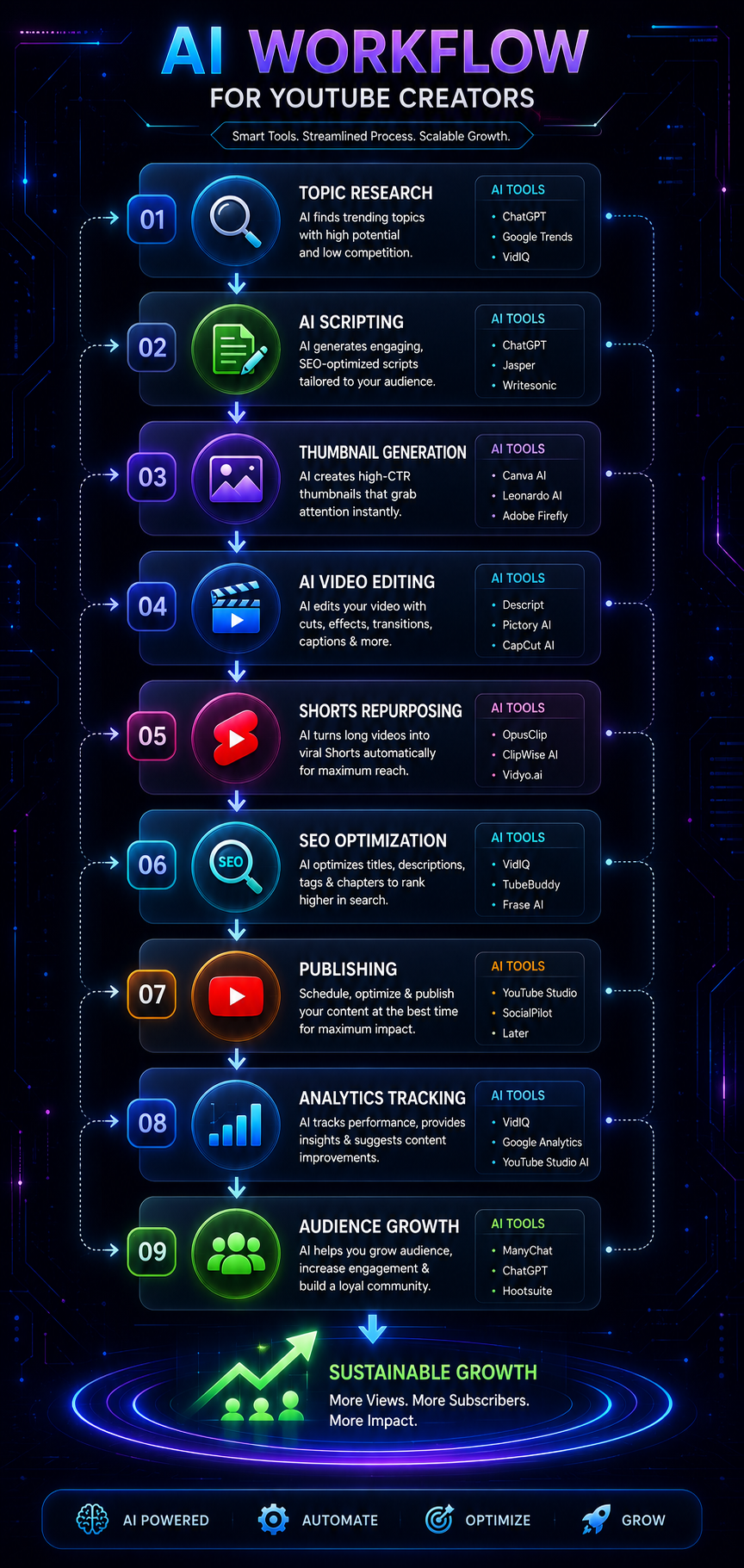
Here is how all these steps connect into a repeatable weekly workflow:
Monday — Research and Planning (1 hour)
- Use Perplexity AI to identify this week's topic
- Validate search demand with VidIQ
- Generate 20 title options with ChatGPT
- Select final title and topic angle
Tuesday — Script Writing (1.5 hours)
- Generate complete script with Claude using your topic brief
- Add personal examples and perspective
- Write 5 hook variations — select the strongest
- Review and refine for your natural speaking style
Wednesday — Filming (1 to 2 hours)
- Film with your final script
- Record 2 takes of your hook — choose the best in edit
- Capture any screen recordings or demonstrations needed
Thursday — Editing (2 to 3 hours)
- Import into CapCut AI
- Run silence removal and auto captions
- Add B-roll, graphics, and music
- Create thumbnail in Canva AI
- Export final video
Friday — Publishing and Optimization (45 minutes)
- Generate optimized title, description, and tags with AI
- Upload video with full metadata
- Add thumbnail
- Schedule or publish
Weekend — Repurposing (30 minutes)
- Run long-form through Opus Clip
- Select 3 to 5 best Shorts
- Schedule Shorts for the following week
- Check analytics on previous video — note retention insights
The exact time will vary by niche, video length, production quality, and how much of the workflow you automate. The objective is to build a repeatable process that removes unnecessary manual work without reducing content quality.
30-Day AI YouTube Growth Plan
If you are starting from zero, do not try to implement every strategy in this guide at once.
Use this simple 30-day system.
Week 1 — Research and Positioning
- Choose one specific niche
- Identify 20 potential video topics
- Study 10 competing channels
- Find recurring audience questions
- Select your first 3 video ideas
- Create 10 title options for each idea
Week 2 — Publish and Test
- Produce your first long-form video
- Create 2 to 3 thumbnail variations
- Optimize the title and description
- Publish the video
- Turn it into 3 to 5 Shorts
- Record the initial performance data
Week 3 — Improve
- Publish your second long-form video
- Analyze the first video's retention
- Improve your opening hook
- Test a different thumbnail approach
- Create follow-up content based on audience response
- Continue publishing Shorts
Week 4 — Double Down
- Publish your third or fourth long-form video
- Identify your strongest topic
- Identify your strongest thumbnail pattern
- Compare retention across videos
- Create the next 5 topics around what worked
- Build a repeatable weekly production workflow
At the end of 30 days, the goal is not necessarily to become viral. The goal is to have enough data to understand which topics, hooks, thumbnails, and formats your audience responds to.
Common Mistakes to Avoid
Fully automating your personality out of the content. Pure AI-generated scripts read by AI voiceovers produce content that technically exists but does not build an audience. Viewers subscribe to creators they connect with — and AI alone cannot create that connection. Use AI for production, not personality replacement.
Ignoring the hook. Creators can spend a lot of time optimizing SEO and thumbnails while overlooking the opening seconds of the video. A weak introduction can cause viewers to leave before they reach the main content. Invest disproportionate effort in making the opening clear, specific, and compelling.
Inconsistent uploading. YouTube's algorithm rewards channels that publish on predictable schedules. An AI workflow makes consistency achievable — do not waste that advantage by uploading sporadically.
Chasing trends without a niche. AI makes it easy to produce content on any topic. This tempts creators to chase every trending subject regardless of relevance to their audience. Channels with clear topical focus grow faster than generalist channels at every stage.
Not testing thumbnails. Every creator thinks their thumbnail looks good. YouTube's A/B thumbnail testing tells you what your specific audience actually responds to — not what you think looks good. Use it on every video.
Treating YouTube SEO as optional. Your title, description, chapters, and other metadata should accurately communicate what your video is about. AI can speed up the optimization process, but metadata should support the actual content rather than becoming an exercise in keyword stuffing.
Advanced AI Growth Strategies
Build Topical Clusters
YouTube's recommendation algorithm increasingly favors channels that demonstrate comprehensive coverage of a specific topic rather than channels that produce content across many unrelated subjects.
Build clusters of related videos around your core topic. If your channel covers AI tools, a topic cluster might include:
- "Best AI tools for students 2026" (main video)
- "AI tools for assignments and essays" (related)
- "How I use AI to study faster" (related)
- "AI tools for student productivity" (related)
- "Free AI tools every student needs" (related)
YouTube recognizes these topical relationships and recommends videos within the cluster to viewers who watched one — dramatically increasing session time and subscriber conversion.
Use Claude to plan topic clusters: I run a YouTube channel about [your niche]. Create 5 topic clusters of 5 videos each. Each cluster should:
Cover a specific subtopic comprehensively Include one main pillar video and 4 supporting videos Target related but distinct keywords Serve a clear audience need
Format each cluster with the pillar video first and supporting videos listed below it.
Mine Competitor Comments with AI
Your competitors' comment sections are the most valuable free market research available. Viewers directly tell you what they wish existed, what frustrated them about the video, and what questions the content did not answer.
The workflow:
Copy 50 to 100 comments from a competitor's high-performing video in your niche. Paste them into Claude with this prompt: Analyze these YouTube comments from a video about [topic]. Identify:
The most common questions viewers had after watching The most common frustrations or things viewers felt were missing The pain points viewers expressed about this topic generally 5 specific video ideas that directly address what these viewers wanted
Comments: [paste comments]
Each video idea that emerges directly addresses a gap the competitor left open — giving you a clear brief for content your target audience explicitly wants.
Build Multi-Platform Distribution
Every video you produce should generate content across multiple platforms through AI repurposing. This is not about building a presence everywhere — it is about creating multiple discovery pathways that funnel back to your YouTube channel.
Repurposing workflow per video:
- YouTube Shorts (3 to 5 clips via Opus Clip)
- LinkedIn post summarizing key insights (via Claude)
- Twitter/X thread (5 to 7 tweets via ChatGPT)
- Instagram Reels (1 to 2 clips via CapCut)
- Pinterest idea pin (via Canva AI)
One long-form video becomes 10 to 15 pieces of platform-specific content. Each piece is a potential discovery point for a new viewer who ends up on your YouTube channel.
Key Takeaways
- AI can reduce repetitive YouTube production work across research, scripting, thumbnails, editing, SEO, Shorts, and analytics.
- The goal is not to publish the most AI-generated content; it is to create better content more consistently.
- Human perspective, storytelling, originality, and editorial judgment remain important even when AI handles much of the production.
- Start with a small AI toolkit instead of subscribing to every available tool.
- Test topics, titles, thumbnails, and hooks rather than assuming AI-generated content will automatically perform.
- Repurpose strong long-form videos into Shorts to create additional discovery opportunities.
- Use YouTube Studio data to identify what viewers actually respond to and build your next videos around those patterns.
- If you want to build a faceless channel, treat AI as a production system that still requires human direction and quality control.
Related articles
AI Tools
Best AI Search Rank Tracking Tools 2026: Free & Paid
Compare the best AI search rank tracking tools for ChatGPT, Perplexity, and Google AI Overviews in 2026 — free options, pricing, and citation tracking.
AI Tools
7 Best Free AI Image Generators in 2026
We evaluated 7 of the best free AI image generators in 2026 for image quality, free access, ease of use, text rendering, and commercial-use considerations.
Frequently Asked Questions
Can AI actually grow a YouTube channel faster? Yes — but not by itself. AI accelerates the production elements of YouTube growth: script writing, editing, thumbnail creation, SEO optimization, and Shorts repurposing. This enables more consistent uploading and better-optimized content. The channel growth itself still depends on content quality, topic selection, and audience connection — which require human judgment AI cannot replace.
What is the best free AI tool for YouTube creators? CapCut AI is the most broadly useful free tool — it handles editing, captions, silence removal, Shorts formatting, and B-roll generation completely free. Claude AI is the best free option for scripting. Canva AI is the best free option for thumbnails. All three together cover the core production workflow at zero cost.
Is AI-generated content allowed on YouTube? Yes. YouTube allows creators to use AI in their content, but AI-generated content still needs to comply with YouTube's policies. Monetization can be affected when content is repetitive, mass-produced, generic, or lacks meaningful original value. Creators may also need to disclose realistic altered or synthetic content when YouTube's disclosure requirements apply.
Can AI edit YouTube videos automatically? Current AI tools automate specific editing tasks — captions, silence removal, Shorts clipping, zoom effects, and background removal — but do not yet produce complete edited videos without human direction. CapCut AI and Descript come closest to automated editing and handle most of the time-consuming tasks. Full autonomous editing is emerging but not yet production-ready for most creators.
Do AI YouTube channels make money? Yes, AI-assisted and faceless channels can potentially generate revenue through YouTube advertising, affiliate marketing, sponsorships, products, memberships, or services. However, using AI does not guarantee monetization or profitability. YouTube's monetization policies emphasize original and authentic content and can reject channels that rely on repetitive, mass-produced, or generic content.
How many Shorts should I post per week? There is no universal number that works for every channel. A practical starting point is 3 to 5 strong Shorts from each long-form video, then adjust based on performance and production capacity. Quality and consistency are more important than publishing every possible clip.
How much does it cost to grow a YouTube channel with AI? You can start with a $0 workflow using free versions of AI writing, research, editing, thumbnail, and analytics tools. Paid plans become useful when you need higher usage limits, advanced features, or faster production. Start free and only pay for tools that remove a real bottleneck in your workflow.
What are the best free AI tools for YouTube? A simple free workflow can use YouTube Studio for analytics, a free AI assistant for research and scripting, Canva for thumbnail design, and CapCut or another free editor for video editing. You do not need a large collection of paid AI tools to start.
How long does it take to grow a YouTube channel with AI? There is no reliable subscriber timeline because growth depends on niche, topic selection, video quality, audience demand, click-through rate, retention, and consistency. AI can reduce production time, but it cannot guarantee a particular number of subscribers within a specific period.
Can I start a YouTube channel with AI without showing my face? Yes. A faceless channel can use AI for research, scripting, voiceover, visuals, editing, and thumbnails. However, the channel still needs original ideas, useful content, quality control, and a clear reason for viewers to subscribe. See the faceless YouTube channel guide for a dedicated workflow.
What AI tool is best for YouTube SEO? VidIQ and TubeBuddy provide the most YouTube-specific SEO data — search volume, competition scores, and optimization suggestions. ChatGPT and Claude are excellent for generating optimized title, description, and tag copy once you have your keyword research. Use VidIQ or TubeBuddy for research and AI assistants for copy generation.
Can AI fully generate a YouTube channel without me filming or writing anything? Yes — this is the faceless channel model, and it's a genuinely working approach in 2026, distinct from the AI-assisted human-led workflow covered in this guide. It requires real editorial judgment on topic and niche selection even though no camera is involved. See the faceless YouTube channel guide for that specific workflow.
What are the best niches for AI-generated YouTube channels? Information-driven niches perform best for fully AI-generated channels — finance and investing, technology, history, science, and self-improvement. These topics reward research depth and consistency over on-camera personality, which fits an AI-assisted production pipeline well.
Start Growing Today
The gap between creators using AI workflows and those who are not is widening every month. The tools are available now — many completely free. The workflow is straightforward — and this guide covers every step.
Pick one section of your current workflow to improve first. If editing takes the most time, start with CapCut AI. If you struggle with ideas, start with the Perplexity and ChatGPT research workflow. If your CTR is low, start with thumbnail optimization using Canva AI.
Build one AI-assisted habit into your production process. Get comfortable with it. Then add the next.
The tools and workflows are already available, so there is little reason to wait. Start with one part of your workflow and improve it consistently.
For more on AI-powered YouTube creation, explore our best AI tools for YouTube automation, best AI thumbnail generators for YouTube, best AI video editors for YouTube, and best AI voice generators. For broader AI content creation strategies, see our best AI tools for content creators and complete AI SEO guide.