AI code editors have moved well beyond autocomplete. In 2026, the strongest ones understand your whole project, plan changes across multiple files, run commands themselves, and hand off to coding agents when a task is bigger than a single edit.
That range of capability is exactly why "best AI code editor" doesn't have a single answer. A solo developer who wants the deepest possible AI integration needs a different tool than a team standardized on JetBrains, or a beginner who'd rather skip local setup entirely. This guide compares the seven editors and IDE environments actually worth considering in 2026 — what each one does, what it costs, and who it genuinely fits.
If you're looking at the wider category of AI coding tools — including terminal agents and standalone assistants that aren't editors at all — our complete guide to AI coding tools covers that broader landscape. This article is focused specifically on the editor and IDE layer.
Quick Answer: What Is the Best AI Code Editor in 2026?
There's no single best AI code editor — the right one depends on your workflow. Cursor is the strongest overall choice for developers who want AI woven into every layer of editing and are willing to adopt a new primary editor. VS Code with GitHub Copilot is the easiest option if you want to keep VS Code and add AI on top. Windsurf is a genuine AI-native alternative to Cursor with a comparable agentic workflow. Zed is the pick for developers who prioritize raw editor performance and an open-source foundation. JetBrains IDEs with AI Assistant make the most sense if you're already deep in IntelliJ, PyCharm, or WebStorm. Replit is the best browser-based option, particularly for beginners who don't want local setup. Void is worth knowing as the open-source, privacy-first alternative to Cursor's model.
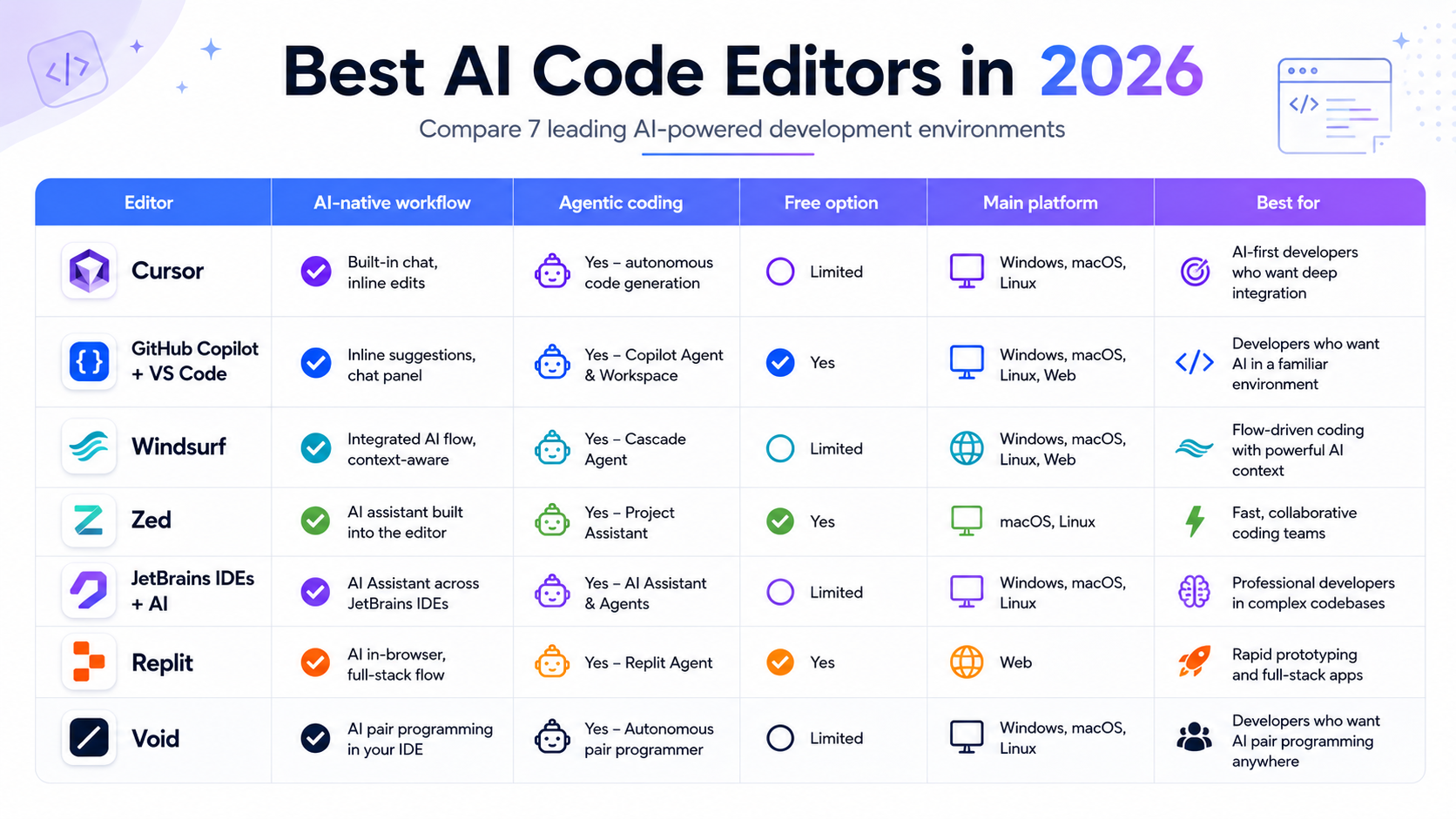
Comparison Table
| Editor | Best for | Free option | Starting paid price | AI agents | Local/BYOK | Platform |
|---|---|---|---|---|---|---|
| Cursor | AI-first daily coding | Yes (Hobby) | ~$20/month + usage — verify current | Yes | Limited | macOS, Windows, Linux |
| VS Code + Copilot | Staying in VS Code | Yes (Free) | $10/month | Yes | Limited | macOS, Windows, Linux, web |
| Windsurf | Agentic workflow alternative to Cursor | Yes | $20/month | Yes | Limited | macOS, Windows, Linux |
| Zed | Performance and open source | Yes (2,000 predictions) | $10/month | Via ACP (Claude Code, Codex, etc.) | Yes | macOS, Linux, Windows |
| JetBrains + AI Assistant | Existing JetBrains users | Limited free | IDE from ~$16.90/month + AI tier | Yes (Junie) | Limited | macOS, Windows, Linux |
| Replit | Browser-first, beginners | Yes | $25/month | Yes (Replit Agent) | No | Browser, mobile |
| Void | Open-source, privacy-first | Yes, fully | Free (BYOK model costs apply) | Limited | Yes | macOS, Windows, Linux |
Pricing in this category changes often. Figures above were checked in August 2026 — verify current numbers on each vendor's pricing page before subscribing, especially for Cursor, where reported figures have varied across sources this year.
1. Cursor — Best Overall AI Code Editor
Cursor is a full VS Code fork rebuilt with AI at every layer — inline completions, multi-file agent edits, and chat all live inside one interface rather than being bolted on as an extension.
Why Cursor stands out
Cursor's Composer mode plans and executes changes across multiple files in one continuous session, keeping the whole interaction — from description to diff — inside the editor. Codebase context is handled natively rather than through a plugin, and you can switch between multiple underlying AI models depending on the task rather than being locked to one provider.
Key features
- Multi-file agentic editing (Composer)
- Inline tab completion
- Codebase-aware chat
- Model choice across multiple providers
- Terminal integration inside the editor
Pricing
Cursor offers a free Hobby tier and paid plans in the roughly $20/month range with usage-based components on top. Cursor's exact current credit structure has been reported inconsistently across sources this year — check Cursor's official pricing page directly before subscribing, particularly for team and enterprise tiers, which are typically quoted on request.
Pros
- Deepest real-time AI integration of any editor on this list
- Strong multi-file, whole-project reasoning
- Flexible model selection
Cons
- Requires adopting a new primary editor
- Smaller extension ecosystem than plain VS Code
- Pricing has shifted enough that verifying current terms matters
Best for
Developers who want AI central to how they write code and are comfortable switching editors to get it.
Verdict
If you're optimizing purely for depth of AI involvement in your daily coding, Cursor remains the benchmark other AI-native editors are compared against.
2. VS Code + GitHub Copilot — Best for Existing VS Code Users
Plain VS Code with GitHub Copilot installed is the lowest-friction way to add serious AI capability without changing your editor at all — and VS Code itself has expanded well beyond a simple text editor into a genuine agent platform.
Why this combination stands out
Copilot's agent mode, chat, and inline completions now sit inside an editor most developers already know. VS Code has also opened up to third-party agents and BYOK/local models, which changes the older "Copilot is just autocomplete" framing significantly — it's a full AI development environment for anyone who wants to keep VS Code as the base.
Key features
- Free, unlimited code completions on every paid Copilot plan
- Agent mode for multi-step tasks
- Chat integrated into the editor and pull request review
- Support for third-party agents and BYOK/local models inside VS Code itself
Related articles
AI Tools
AEO vs GEO vs SEO: Definitions & Differences (2026)
AEO vs GEO vs SEO explained with clear terminology, use cases, and a practical decision framework for when each term matters.
AI Tools
AI SEO Checklist for Beginners (2026 Guide)
A step-by-step AI SEO checklist for beginners covering research, implementation order, internal links, schema, EEAT, and post-publish monitoring.
Pricing
GitHub Copilot moved to usage-based AI Credits billing in June 2026. Free tier available; Pro at $10/month; Pro+ at $39/month; Max at $100/month; Business at $19/user/month; Enterprise at $39/user/month. Code completions are free and unlimited on every paid plan and don't draw from your credit balance — only agent mode, chat, and premium-model usage do. For the full pricing breakdown and how it compares directly to Cursor, see our Cursor vs GitHub Copilot comparison.
Pros
- No editor-switching cost
- Clear, well-documented pricing
- Deep integration with GitHub pull requests and code review
- Broadest IDE support (VS Code, JetBrains, Visual Studio, Neovim)
Cons
- AI feels more like a layer than a native part of the editor
- Agent-mode credits can run out faster than expected under heavy use
Best for
Developers and teams who want to keep VS Code and add AI on top, especially teams already built around GitHub for review and CI.
Verdict
The safest, most predictable choice if you don't want to change your daily editor — and increasingly capable now that VS Code itself supports agent workflows and outside models.
3. Windsurf — Best AI-Native Alternative to Cursor
Windsurf is a standalone AI-native code editor with an agentic workflow (Cascade) comparable in ambition to Cursor's Composer. It's worth noting that Windsurf was acquired by Cognition AI (maker of Devin) in 2026, which is reshaping its product direction — check current positioning before committing long-term.
Why Windsurf stands out
Cascade handles multi-step, multi-file tasks with a strong emphasis on staying inside one continuous agentic session rather than bouncing between chat and manual edits. Tab completion is fast and, per Windsurf's own positioning, unlimited across plans.
Key features
- Cascade agentic workflow for multi-file tasks
- Unlimited tab completion on paid plans
- Free tier with real daily usage
- Team and enterprise tiers
Pricing
Windsurf overhauled its pricing in March 2026: Free at $0, Pro at $20/month, Max at $200/month, Teams at $40/user/month, with Enterprise custom-quoted. Credits were replaced with daily/weekly usage quotas — verify current allowances directly, as this changed materially from the older credit-based model.
Pros
- Genuine AI-native alternative to Cursor, not a clone
- Real free tier for daily use
- Strong agentic multi-file editing
Cons
- Product direction less certain following the Cognition acquisition
- Smaller community and extension ecosystem than VS Code-based tools
Best for
Developers who want an AI-native editor comparable to Cursor but want to evaluate a second option before committing.
Verdict
A legitimate Cursor alternative on technical merit — the main open question in 2026 is where the product goes post-acquisition, worth watching before deep team-wide adoption.
4. Zed — Best for Performance and Open Source
Zed is a Rust-built, open-source editor originally known for raw speed, now with AI features and real-time collaboration built in natively.
Why Zed stands out
Zed's performance advantage over Electron-based editors is real and noticeable in daily use, particularly on large files and projects. Its Agent Client Protocol (ACP) lets you plug in Claude Code, Codex, and other CLI agents directly rather than being limited to Zed's own built-in AI — a genuinely different approach from Cursor or Windsurf's closed agent loops.
Key features
- Native Rust performance, minimal latency
- Open Agent Client Protocol (ACP) for connecting external agents
- Real-time collaboration built in, no extension required
- BYOK and local model support
Pricing
Personal is free forever, including 2,000 accepted edit predictions per month plus external agent and BYOK support. Pro is $10/month for unlimited edit predictions with $5 of included token usage. Business is $30/seat/month. Zed cut its Pro price from $20 to $10 in May 2026, one of the more aggressive pricing moves in this category this year.
Pros
- Fastest editor experience on this list
- Genuinely open source
- Flexible — connect Claude Code or Codex directly via ACP instead of being locked to one agent
- Transparent, low-cost pricing
Cons
- Smaller extension ecosystem than VS Code
- Agentic capabilities less mature out of the box than Cursor's or Windsurf's
- Windows support newer and less polished than macOS or Linux
Best for
Developers who feel friction in slower AI editors and want a fast, open, flexible foundation they can extend with the agent of their choice.
Verdict
Not the most agentically ambitious editor on this list by default, but the most technically elegant foundation — especially once you connect it to an external agent via ACP.
5. JetBrains IDEs + AI Assistant — Best for JetBrains Developers
For developers already working in IntelliJ IDEA, PyCharm, WebStorm, or another JetBrains IDE, JetBrains AI Assistant adds AI capability without leaving that ecosystem — including Junie, JetBrains' coding agent for more autonomous tasks.
Why this combination stands out
JetBrains IDEs already have some of the deepest static analysis, refactoring, and language-specific tooling available for languages like Java, Kotlin, and Python. AI Assistant and Junie add generative capability on top of that existing strength rather than replacing it.
Key features
- AI Assistant chat and inline suggestions inside the IDE you already use
- Junie for more autonomous, multi-step coding tasks
- Deep, mature refactoring and static analysis specific to each language
- Integration options with external models including Claude and Copilot
Pricing
JetBrains IDE licensing starts from roughly $16.90/month depending on the specific IDE, with AI Assistant available as a separate tier on top — approximately $10/month based on current reporting. Verify exact current tiers directly on JetBrains' pricing page, as AI Assistant plans have changed structure more than once.
Related articles
AI Tools
AI SEO vs Traditional SEO: What Actually Changes (2026)
AI SEO vs traditional SEO explained with a practical comparison, hybrid strategy guidance, and clear rules for when each approach should lead.
AI Tools
Best AI Agents in 2026: 10 Top Picks Compared by Use Case
Compare the best AI agents in 2026 for coding, research, productivity, business, automation, and personal tasks. Find the right AI agent for your workflow.
Pros
- Best-in-class refactoring and static analysis for supported languages
- No need to abandon deep, mature tooling to get AI
- Junie adds genuine agentic capability
Cons
- Two separate costs to track (IDE license plus AI tier)
- Less compelling if you're not already a JetBrains user
Best for
Developers already invested in a JetBrains IDE, particularly for Java, Kotlin, Python, or enterprise codebases where JetBrains' existing tooling depth matters.
Verdict
Not a reason to switch into JetBrains on its own, but a strong reason to stay if you're already there.
6. Replit — Best Browser-Based AI Development
Replit runs entirely in the browser, combining coding, AI assistance, and hosting in one platform — no local setup required at all.
Why Replit stands out
Replit Agent can go beyond code suggestions to build and deploy working applications from a description, making it distinctly beginner-friendly compared to every other editor on this list, which all assume some existing local development environment.
Key features
- Fully browser-based, zero local setup
- Replit Agent for autonomous app building
- Built-in hosting and deployment
- Real-time collaboration
Pricing
Free tier available; Pro at $25/month.
Pros
- Nothing to install — start coding immediately from any device
- Genuinely strong for learning and rapid prototyping
- Built-in hosting removes a whole separate deployment step
Cons
- No local/offline development
- Less suited to complex, large-scale production codebases than desktop editors
Best for
Beginners, educators, and anyone who wants to build and deploy quickly without managing local infrastructure.
Verdict
The clear choice when browser-first, zero-setup access matters more than deep local tooling.
7. Void — Best Open-Source, Privacy-First Alternative
Void is an open-source AI code editor built as a direct alternative to Cursor's closed-source model — same category of AI-native editing, but with source code you can inspect and self-host where relevant.
Why Void stands out
Void's core pitch is transparency and control: no proprietary lock-in on the editor itself, and the ability to bring your own API keys or local models rather than routing everything through a closed vendor pipeline.
Key features
- Open-source AI-native editor
- BYOK and local model support
- VS Code-familiar interface
Pricing
The editor itself is free. Costs come from whichever model provider or API keys you connect — verify current specifics directly, as Void's own feature set and any hosted options continue to evolve.
Pros
- No vendor lock-in on the editor itself
- Strong fit for privacy-conscious or self-hosting developers
- Free to use
Cons
- Smaller community and ecosystem than Cursor, Windsurf, or VS Code
- Less agentic maturity than the category leaders
Best for
Developers who specifically want an open-source, inspectable alternative to Cursor and are comfortable managing their own model access.
Verdict
Worth knowing specifically for the open-source and privacy angle — not yet a default recommendation over Cursor or Windsurf for most developers, but a real option if vendor lock-in is a genuine concern for you.
AI Code Editor vs AI Coding Assistant: What's the Difference?
These terms get used interchangeably in search, but they describe different things.
AI code editor means AI is built into the development environment itself — Cursor, Windsurf, Zed, and Void are full editors designed around AI from the ground up.
AI coding assistant means AI works as a layer or plugin inside an editor you already use — GitHub Copilot inside VS Code or JetBrains AI Assistant inside an existing JetBrains IDE are the clearest examples.
AI coding agent means AI can autonomously carry out multi-step development tasks, sometimes from outside a traditional editor entirely — a terminal, a cloud sandbox, or a GitHub issue. Claude Code is a good example: it's genuinely important in the current AI coding landscape, but it's a terminal-native agent, not a traditional code editor, so it isn't one of the seven editors compared above. For a full breakdown of how it compares to Cursor and OpenAI's Codex specifically, see our Claude Code vs Cursor vs Codex comparison.
Best Free AI Code Editors in 2026
"Free" means different things across this category — worth being specific about what you actually get before assuming a free plan covers your needs.
Best free overall: Zed's Personal tier is free forever and includes 2,000 accepted edit predictions monthly plus BYOK support — a genuinely usable daily tier, not a crippled trial.
Best free for VS Code users: GitHub Copilot's free tier, with unlimited code completions on every paid tier above it and limited chat/agent access on free.
Best free open-source option: Void or Zed — both are free and open source at the editor level, with Zed's free tier also including real AI usage out of the box.
Best free browser option: Replit's free tier, for browser-based coding with no local setup at all.
None of these free tiers include unlimited advanced AI usage — agent mode, premium models, and high-volume completions are where paid tiers or usage-based billing typically kick in across every tool on this list.
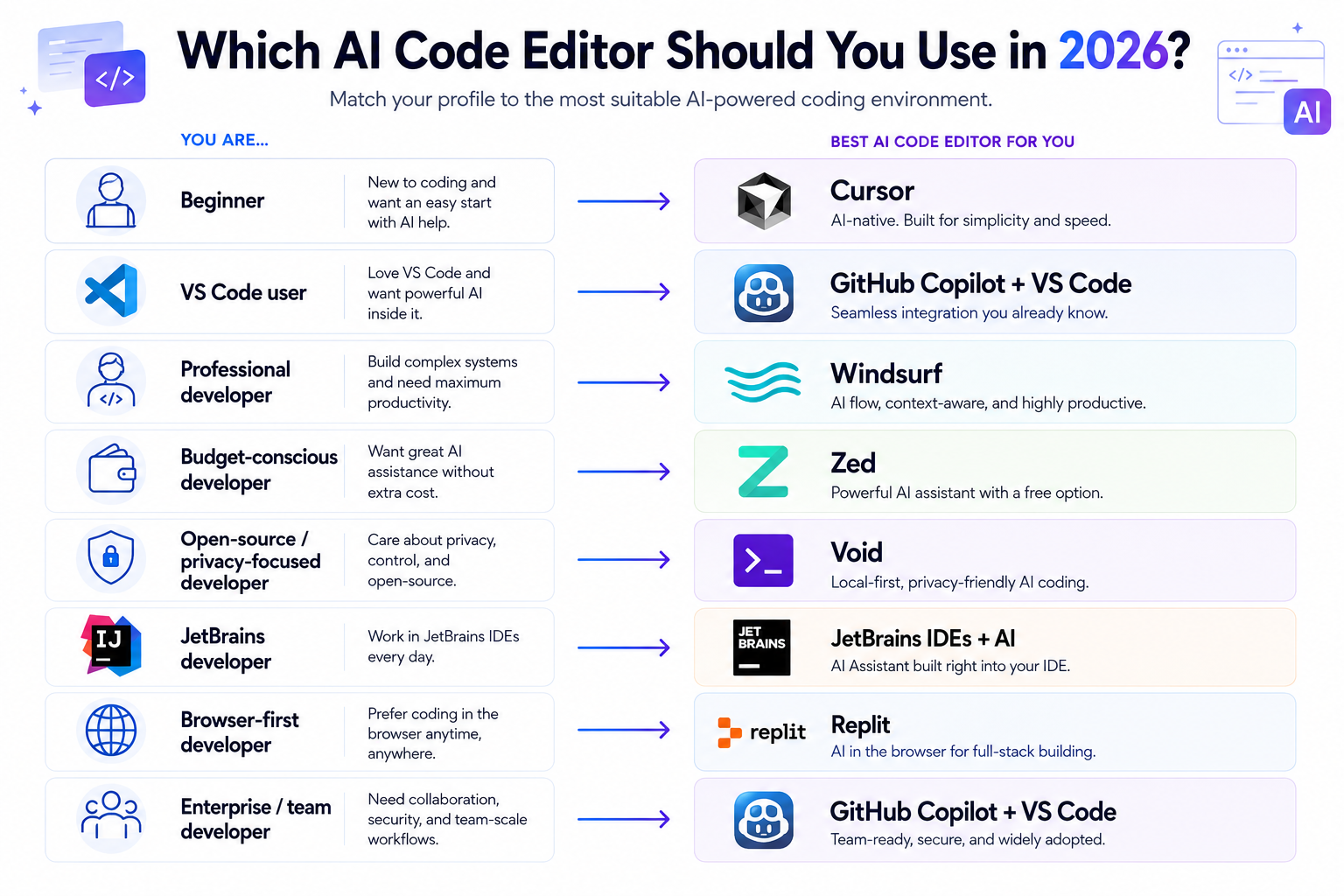
Which AI Code Editor Should You Choose?
| If you are... | Choose... | Why |
|---|---|---|
| Beginner | Replit | No local setup, browser-based, Agent can build for you |
| Professional developer | Cursor | Deepest AI-native, multi-file agentic workflow |
| VS Code user | VS Code + Copilot | Keep your editor, add AI on top |
| Python developer | JetBrains (PyCharm) + AI Assistant | Mature Python-specific tooling plus AI |
| Java/Kotlin developer | JetBrains (IntelliJ) + AI Assistant | Best-in-class refactoring for these languages |
| Student | Replit or VS Code + Copilot (free tiers) | Lowest cost of entry, real capability |
| Budget-conscious | Zed | Free tier is genuinely usable; Pro is the cheapest paid tier here |
| Privacy-conscious | Void or Zed | Open source, BYOK/local model support |
| Open-source enthusiast | Zed or Void | Both are open source at the editor level |
| Team/enterprise | GitHub Copilot Business/Enterprise or JetBrains | Mature admin controls and GitHub/enterprise integration |
| Browser-first developer | Replit | Fully browser-based, nothing to install |
Cursor vs GitHub Copilot vs Windsurf
These three come up together constantly, so it's worth a direct, brief comparison here.
Cursor is a standalone AI-native editor — it replaces your editor entirely to give you the deepest possible AI integration across completions, multi-file agent edits, and chat in one continuous workflow.
GitHub Copilot is an AI layer added to an editor you keep — most commonly VS Code, but also JetBrains, Visual Studio, and others. You get AI capability without switching your daily tool, and you get GitHub's native integration with pull requests and code review, which neither Cursor nor Windsurf replicates.
Windsurf sits closest to Cursor architecturally — another standalone AI-native editor with its own agentic workflow (Cascade) rather than a plugin model. The practical choice between Cursor and Windsurf comes down to which agentic interaction style you prefer more than a clear capability gap between them.
The deciding factor for most developers isn't which tool scores higher on a feature checklist — it's whether you're willing to adopt a new primary editor (Cursor or Windsurf) or want to keep your current one (Copilot). For the full pricing, privacy, and workflow breakdown between Cursor and Copilot specifically, read our complete Cursor vs GitHub Copilot comparison.
Frequently Asked Questions
What is the best AI code editor in 2026? There's no single best editor — it depends on your workflow. Cursor leads for AI-native depth, VS Code with GitHub Copilot leads for staying in a familiar editor, and Zed leads for performance and open-source transparency. Match the tool to how you actually want to work, not a generic ranking.
Which AI code editor is best for beginners? Replit, because it requires no local setup and its Agent can build and deploy working applications from a description — the lowest barrier to entry on this list. VS Code with GitHub Copilot's free tier is a strong second option for beginners who want to learn inside a more traditional editor.
Related articles
AI Tools
Best AI Search Rank Tracking Tools 2026: Free & Paid
Compare the best AI search rank tracking tools for ChatGPT, Perplexity, and Google AI Overviews in 2026 — free options, pricing, and citation tracking.
AI Tools
7 Best Free AI Image Generators in 2026
We evaluated 7 of the best free AI image generators in 2026 for image quality, free access, ease of use, text rendering, and commercial-use considerations.
Is there a free AI code editor? Yes — several. Zed's Personal tier is free forever with real AI usage included. Void is fully open source and free (model costs depend on what you connect). GitHub Copilot and Replit both have functional free tiers, though with more limited AI access than their paid plans.
Is Cursor better than GitHub Copilot? Neither is universally better. Cursor offers deeper, more AI-native editing if you're willing to switch editors. Copilot lets you keep VS Code (or JetBrains, or Visual Studio) and adds AI on top, with tighter GitHub pull request and review integration. See our full Cursor vs Copilot comparison for the detailed breakdown.
Is Windsurf better than Cursor? They're close competitors on capability, both offering AI-native, agentic editing. Windsurf's product direction is worth watching following its 2026 acquisition by Cognition AI. For most developers, the choice comes down to which agentic workflow feels more natural in testing, rather than a clear capability gap.
Can I use AI coding agents inside VS Code? Yes. Beyond GitHub Copilot's own agent mode, VS Code now supports connecting third-party agents and BYOK/local models directly, moving well past the older "Copilot is just autocomplete" framing.
What is the difference between an AI code editor and an AI coding assistant? An AI code editor has AI built into the development environment itself, like Cursor or Zed. An AI coding assistant is a layer added inside an editor you already use, like GitHub Copilot inside VS Code. A related but distinct category, AI coding agents, can work autonomously outside a traditional editor entirely — see our Claude Code vs Cursor vs Codex comparison for that distinction in depth.
Can AI code editors use local models? Some can. Zed and Void both support BYOK (bring your own key) and local model connections directly. Cursor's local model support is more limited. Check each editor's current documentation, since this is an area still actively developing across the category.
Key Takeaways
- Cursor is the strongest choice if you want an AI-first coding workflow and are willing to adopt a new primary editor
- VS Code + GitHub Copilot is the easiest option if you already live in VS Code and want AI added rather than a new editor
- Windsurf is a genuine AI-native alternative to Cursor, though its direction is worth watching post-acquisition
- Zed is the pick for developers who prioritize editor performance and an open-source foundation, and its ACP support lets you connect Claude Code or Codex directly
- JetBrains IDEs with AI Assistant make the most sense if you're already invested in that ecosystem, particularly for Java, Kotlin, or Python
- Replit is the clearest choice for browser-first development and beginners who want zero local setup
- There is no universal winner — workflow fit matters more than any single feature comparison
For the broader AI coding landscape, including terminal agents and standalone assistants beyond editors, read our complete guide to AI tools for coding, the Cursor vs GitHub Copilot deep comparison, the Claude Code vs Cursor vs Codex comparison, and Gemini vs ChatGPT vs Claude for coding for how the underlying AI models compare.