Building a professional website used to require weeks of design work, development skills, or a significant upfront budget. In 2026, AI website builders can generate a working website in minutes, while many platforms let you launch and manage a professional site for a relatively low monthly cost.
AI website builders have changed the starting point for creating a web presence. Instead of designing every page from scratch, you can describe your business, audience, style, and goals and let AI generate the initial structure, content, and visual direction.
But not all AI website builders deliver the same results. Some prioritize speed, some focus on visual design, while others provide deeper customization, ecommerce, WordPress compatibility, or professional design control.
But not all AI website builders deliver on this promise equally. Some generate impressive-looking demos that fall apart when you try to customize them. Some are genuinely fast to launch but limited in what they can produce. Some are excellent for specific use cases and wrong for others.
We compared the leading AI website builders available in 2026 across generation quality, customization, pricing, SEO capabilities, ecommerce support, and ease of use. Here are the 10 strongest options and the situations where each one makes the most sense.
Quick Answer
What are the best AI website builders in 2026? The best AI website builders in 2026 are Wix AI Website Builder for beginners who want the fastest launch, Framer for designers and creators who want stunning visuals, Squarespace AI for portfolio and small business sites, Hostinger AI Website Builder for the best price-to-quality ratio, Webflow AI for professional designers who want full control, and Durable for service businesses that need a site in under a minute. The right choice depends on your use case, technical comfort, and budget.
What Makes an AI Website Builder Actually Good in 2026
Before the rankings, the criteria that separate genuinely useful AI website builders from impressive-looking demos:
Generation quality. Does the AI produce a site that looks professional without significant manual redesign? Many AI builders generate technically functional sites that look generic or dated — requiring more customization than building from a template manually.
Customization depth. How much can you change after the AI generates the initial site? The best AI builders give you full control over every element. Weak ones lock you into limited style options.
Performance. Does the site load fast on mobile? Google's Core Web Vitals directly affect search rankings. An AI-built site that looks great but scores poorly on PageSpeed Insights damages your SEO from day one.
SEO foundation. Does the builder give you control over meta titles, descriptions, structured data, and URL structure? Basic SEO capability should be standard — it is still missing from some AI builders.
Content management. Can you add and update content without rebuilding the site? A website you cannot maintain easily becomes outdated quickly.
Pricing transparency. What are the actual costs including domain, hosting, and features you will actually need? The advertised price and the real cost often differ significantly.
The 10 Best AI Website Builders in 2026
1. Framer — Best for Designers and Visual Creators
Free plan: Yes — Framer branding on the free tier Paid: From $10/month on the current Basic plan Best for: Portfolios, agency sites, SaaS landing pages, and visually impressive brand sites
Framer has become the go-to AI website builder for designers and creative professionals who want genuinely impressive visual output without writing code. Its AI site generation produces results that actually look like they were designed by a skilled designer — not like a template with your content swapped in.
What makes Framer stand out:
Framer is one of the strongest options on this list for AI-assisted visual design. Its AI tools can help generate layouts, write content, and speed up design work while still giving designers detailed control over the final result. Describe your site, your brand, your aesthetic direction — and Framer generates a site with genuine design sensibility. The typography choices, spacing, and visual hierarchy consistently produce results that impress.
The component system gives designers full control over every element after generation. Unlike some AI builders that generate and then lock you into limited editing, Framer lets you dive into the design of every component with granular control — without writing code.
Framer is designed for fast, modern websites, but actual PageSpeed scores depend on the site's images, scripts, fonts, animations, and third-party integrations. The platform itself is only one part of the performance equation.
Framer's AI workflow has also evolved beyond initial website generation. Its current AI tools and agents can help with design and code-based website changes, while AI usage is increasingly tied to a credit-based system. If you plan to use AI heavily, check the current included credits and limits for your plan before committing.
The AI features that actually save time:
AI copywriting — describe what your site section needs to say and Framer generates the copy inline. AI image generation — request custom images within the design context without switching to another tool. AI localization — translate your entire site for international audiences automatically.
Limitations: The learning curve is steeper than Wix or Squarespace for non-designers. The free plan limits visitors and includes Framer branding. The most impressive results require some design sense to direct the AI effectively.
Best for: Portfolios, agency sites, SaaS product landing pages, and any site where visual design is a competitive differentiator.
Try it: framer.com
2. Wix AI Website Builder (Wix Harmony) — Best for Beginners
Free plan: Yes — Wix branding and a wixsite.com subdomain Paid: From $17/month when billed annually; higher tiers add ecommerce, marketing, analytics, and advanced business features Best for: Beginners, small businesses, local services, and users who want an all-in-one platform
Wix AI Website Builder (Artificial Design Intelligence) remains the most accessible AI website builder for people with no design or technical background. Answer a series of questions about your business and goals, and Wix AI Website Builder generates a complete, functional site tailored to your specific use case — with relevant sections, appropriate imagery, and business-specific features built in.
What makes Wix AI Website Builder stand out:
The onboarding is the most guided of any AI builder. Every decision — color scheme, layout, section type — is explained in terms of what it achieves rather than what it is technically. A restaurant owner or fitness instructor can launch a professional site without ever feeling confused about what they are doing.
The feature breadth is unmatched. Wix's 900+ app market provides booking systems, payment processing, membership areas, email marketing integration, event management, and hundreds of other business functions — all accessible without coding.
The AI continues to help after launch. Wix's AI writing assistant, AI image generator, and AI SEO tools assist with ongoing site maintenance rather than just the initial build.
The practical workflow:
Describe your business, audience, goals, and preferred style to Wix Harmony. The AI generates the initial site and content structure. You can then refine the result using AI prompts or traditional drag-and-drop editing, connect your domain, and publish. This hybrid workflow is one of Wix's main advantages for beginners who want AI speed without giving up visual control.
Limitations: Wix sites cannot be migrated to other platforms. Once you build on Wix, changing platforms means rebuilding from scratch. Performance is good but not at the level of Framer or Webflow for technically demanding sites. The pricing escalates significantly once you need e-commerce or advanced business features.
Best for: Small businesses, local service companies, restaurants, fitness professionals, and anyone building their first professional website.
Try it: wix.com
3. Hostinger AI Website Builder — Best Price-to-Quality Ratio
Free plan: No Paid: From $2.99/month on the current long-term promotional plan Best for: Bloggers, small businesses, entrepreneurs, and budget-conscious website owners
Hostinger's AI Website Builder is the most underrated option on this list. At under $3/month for a hosting plan that includes the AI builder, a domain for the first year, email, hosting, AI tools, and website-building features — the value proposition is significantly better than any competitor at this price point.
What makes Hostinger stand out:
The AI generation takes under 2 minutes. Answer 5 questions about your business type, name, description, and color preferences — and Hostinger generates a complete site with appropriate sections, imagery, and copy. The quality is genuinely competitive with builders charging significantly more.
The all-in-one value is exceptional. Most competitors charge separately for hosting, domain, email, and the builder itself. Hostinger bundles everything into one low monthly price — making it the best choice for cost-conscious entrepreneurs and bloggers.
The AI writer helps generate page content, blog posts, and product descriptions within the builder — reducing the time from site launch to content-ready.
Performance: Hostinger's infrastructure delivers fast load times globally. Their LiteSpeed servers and built-in caching produce performance scores that more expensive platforms sometimes fail to match.
Limitations: Less design flexibility than Framer or Webflow. The template variety is narrower than Wix. E-commerce capabilities are functional but not as sophisticated as Shopify or WooCommerce for large product catalogs.
Best for: Bloggers, small business owners, freelancers, and entrepreneurs who want professional results at the lowest possible cost.
Try it: hostinger.com
4. Squarespace AI — Best for Portfolios and Creative Businesses
Free plan: 14-day trial — no free tier Paid: From $16/month (Personal) to $49/month (Commerce Advanced) Best for: Photographers, designers, artists, creative agencies, small e-commerce
Squarespace has long been the benchmark for template design quality in website builders — and the AI features added in 2025 and 2026 have made the initial site creation significantly faster while maintaining the visual quality Squarespace is known for.
What makes Squarespace AI stand out:
Blueprint AI — Squarespace's site generation system — asks about your site's purpose, audience, and style before generating a complete site layout with AI-written placeholder copy specific to your business type. The generated results look distinctly better than most AI builder outputs because they draw on Squarespace's design-quality template library.
The AI copywriting is genuinely useful. Describe what a page section should communicate and Squarespace generates copy that matches the professional tone of the surrounding design — a consistency that manual copy sometimes breaks.
For e-commerce, Squarespace's AI product description generator reduces the most tedious part of building an online store — writing unique descriptions for every product.
Design quality: Squarespace templates are consistently the most visually refined of any all-in-one website builder. For creative professionals whose website is a direct reflection of their design capability, Squarespace's aesthetic standard is uniquely appropriate.
Limitations: No free tier — only a 14-day trial. Less flexible than Webflow for custom interactions. More expensive than Hostinger for comparable functionality. Not suitable for large e-commerce operations.
Best for: Photographers, artists, designers, creative agencies, consultants, and service businesses where visual presentation is central to the brand.
Try it: squarespace.com
5. Webflow AI — Best for Professional Designers Who Want Full Control
Free plan: Yes — Webflow Starter with a webflow.io domain Paid: From $15/month for the Basic Site plan when billed annually Best for: Professional designers, marketing teams, agencies, and complex content-driven websites
Related articles
AI Tools
AEO vs GEO vs SEO: Definitions & Differences (2026)
AEO vs GEO vs SEO explained with clear terminology, use cases, and a practical decision framework for when each term matters.
AI Tools
AI SEO Checklist for Beginners (2026 Guide)
A step-by-step AI SEO checklist for beginners covering research, implementation order, internal links, schema, EEAT, and post-publish monitoring.
Webflow is the most powerful no-code website builder available — and the AI features added in 2025 and 2026 have made it significantly more accessible without reducing the depth of control that made it popular with professional designers.
What makes Webflow AI stand out:
Webflow also introduced a credit-based system for its AI features in 2026. AI credits are included with Workspace plans, with self-serve plans receiving monthly credits and Team and Enterprise plans using annual credit allocations. Heavy AI usage can therefore affect how much value you get from the platform beyond the base site plan.
Webflow's AI can generate complete page layouts, component structures, and CSS styling from natural language descriptions — dramatically reducing the time professional designers spend on initial structure before applying their own design direction.
The code quality underneath Webflow sites is the cleanest of any no-code builder. The HTML, CSS, and JavaScript that Webflow generates is semantic, accessible, and production-ready — which matters for performance, SEO, and the ability to add custom code when needed.
The CMS (Content Management System) is the most flexible of any builder on this list — suitable for complex content structures like multi-author blogs, product databases, job boards, and event listings that other builders cannot handle without third-party integrations.
The AI workflow for designers:
Describe the layout and interaction you want in plain English. Webflow's AI generates the structure. Apply your design system — typography, colors, spacing — through Webflow's visual design tools. Export clean code or host directly on Webflow's infrastructure.
Limitations: Steeper learning curve than any other builder on this list. Not designed for non-technical users who just want a simple site. The pricing for team collaboration and advanced features is significantly higher than competitors.
Best for: Professional web designers, marketing teams at mid-sized businesses, and any project requiring custom functionality, complex content structures, or sophisticated interactions.
Try it: webflow.com
6. Durable — Best for Service Businesses That Need Speed
Free plan: Yes — limited features, Durable subdomain Paid: From $12/month (Starter) to $20/month (Business) Best for: Freelancers, local service businesses, consultants who need a professional site immediately
Durable is built around one promise: a professional business website in under a minute. It delivers on that promise more reliably than any competitor. Choose your business type, enter your business name and location, and Durable generates a complete four-page website with relevant copy, imagery, and contact information in approximately 30 seconds.
What makes Durable stand out:
The generation speed is genuinely remarkable. For a freelancer who needs a professional online presence today — not after a weekend of design work — Durable provides immediate results that are good enough to share with clients.
The AI regeneration capability allows you to regenerate any section, copy block, or the entire site with one click if the first result does not match your vision. Iterating to a result you are happy with typically takes 3 to 5 regenerations — still faster than manual building.
The built-in AI tools for service businesses are practical — invoice generation, CRM basics, client communication tools. Durable positions itself as a complete business operations tool rather than just a site builder.
Limitations: Less design flexibility than Framer or Webflow. Customization depth is more limited than Wix or Squarespace. Best for simple service business sites rather than complex or visually ambitious projects.
Best for: Freelancers, local service businesses (plumbers, electricians, cleaners, consultants), and anyone who needs a professional online presence urgently without a design process.
Try it: durable.co
7. Shopify with AI — Best for E-Commerce
Free plan: No — free trial available Paid: From $29/month when billed annually ($39/month monthly) Best for: Online stores, product-based businesses, and ecommerce entrepreneurs
For building an online store, Shopify combined with its AI features is the strongest platform available in 2026. Shopify Magic — the AI layer built across Shopify — generates product descriptions, email campaigns, blog content, and FAQ answers from brief inputs.
What makes Shopify AI stand out:
Product description generation at scale is the highest-value AI feature for e-commerce. Writing unique, compelling descriptions for hundreds of products is the most time-consuming part of building a product catalog. Shopify Magic generates descriptions from product titles and basic attributes — reducing hours of writing to minutes.
The AI theme editing generates CSS customizations from natural language descriptions — change colors, fonts, and spacing by describing what you want rather than editing code.
Shopify Sidekick — the AI assistant built into the Shopify admin — answers questions about your store performance, suggests optimizations, and executes simple administrative tasks through conversation.
Limitations: The most expensive option on this list for a complete e-commerce setup. Not suitable for service businesses or content sites where e-commerce features are not needed. Transaction fees on lower plans add cost at scale.
Best for: Anyone selling physical or digital products online who needs the most robust, scalable e-commerce infrastructure available.
Try it: shopify.com. For a deeper look at Shopify against Wix, Squarespace, Hostinger, and WordPress specifically for running a store — transaction fees, product limits, and hosting included — see our best AI website builders for ecommerce guide.
8. GoDaddy AI Website Builder — Best for Domain + Site in One Place
Free plan: No — trial available Paid: From $9.99/month Best for: Small business owners who want the simplest all-in-one setup
GoDaddy's AI website builder creates sites from a brief business description and is designed specifically for small business owners who want the simplest possible path from idea to live website. The integration with GoDaddy's domain and email services makes the complete setup — domain, professional email, website — manageable in a single platform.
What makes GoDaddy AI stand out:
For users who are already GoDaddy customers for domain registration, extending to the website builder with AI generation requires minimal additional decision-making or platform switching.
The AI is specifically trained on small business use cases — generating content and layouts appropriate for local services, retail, restaurants, and professional services rather than generic outputs that require significant customization.
Limitations: Less design quality than Framer or Squarespace. Less flexibility than Webflow or Wix. Best for simple sites where functionality matters more than visual distinctiveness.
Try it: godaddy.com
9. 10Web AI — Best for WordPress Users
Free plan: Limited trial Paid: From $10/month Best for: WordPress users who want AI-assisted site building and optimization
10Web uses AI to generate WordPress websites from a URL or description — recreating the structure of a reference site or building from your brief, then hosting it on 10Web's managed WordPress infrastructure.
What makes 10Web AI stand out:
For users who need the flexibility of WordPress — plugin ecosystem, content management, SEO control — but want AI to handle the initial design and setup, 10Web provides the best bridge between AI generation speed and WordPress capability.
The AI PageSpeed optimizer automatically improves Core Web Vitals scores for existing WordPress sites — useful for businesses with existing WordPress sites that need performance improvement without manual optimization.
Limitations: Requires more WordPress knowledge than fully managed builders like Wix or Squarespace. Not suitable for users who want to avoid WordPress's complexity entirely.
Best for: Existing WordPress users, agencies managing WordPress client sites, and businesses that specifically need WordPress's flexibility.
Try it: 10web.io
10. Relume — Best for Web Design Agencies and Developers
Free plan: Limited free tier Paid: From $38/month Best for: Web design agencies, professional developers, Webflow and Figma users
Relume is an AI sitemap and wireframe generator specifically designed for professional web design workflows. It generates complete site architectures — page structure, section layout, navigation — from a brief description, then exports to Webflow or Figma for design and development.
What makes Relume stand out:
For agencies producing multiple client sites, Relume eliminates the information architecture phase of the web design process — a discovery and planning stage that can consume 10 to 20 hours per project. Relume generates this in minutes.
The component library — AI-generated design components compatible with Webflow and Figma — gives designers a comprehensive starting point that reduces component-building time dramatically.
Limitations: Not a standalone website builder — requires Webflow or Figma to complete the design process. Not suitable for end users who want a complete website without design tools.
Best for: Web design agencies, freelance web designers, and development teams who want to accelerate the architecture and wireframing phase of professional web projects.
Try it: relume.io
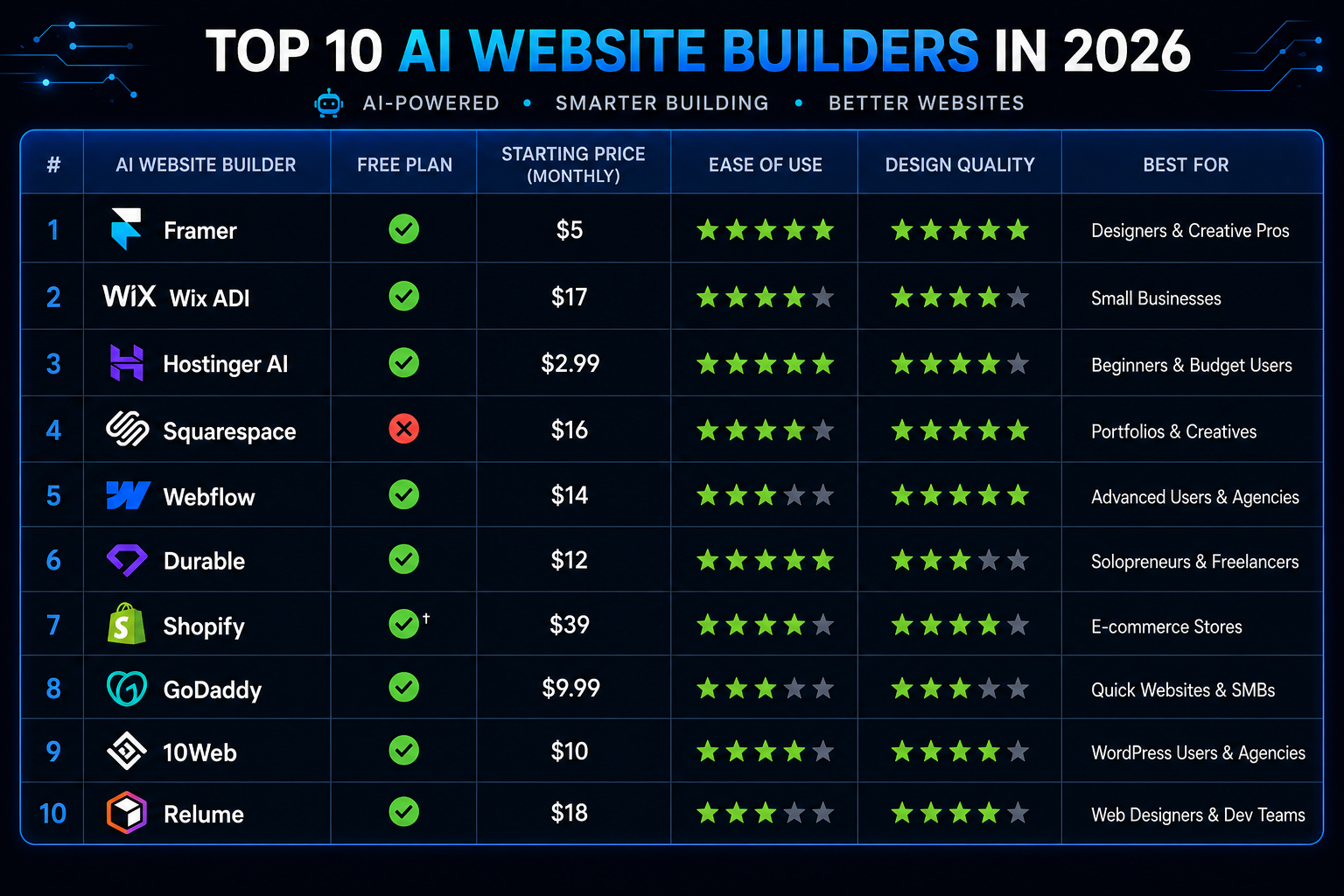
Side-by-Side Comparison
| Builder | Free Plan | Starting Price* | Best For | Design Quality | Ease of Use | E-commerce |
|---|---|---|---|---|---|---|
| Framer | Yes | $10/month | Designers, portfolios | Outstanding | Moderate | Limited |
| Wix AI | Yes | $17/month | Beginners, small business | Very good | Easiest | Good |
| Hostinger AI | No | $2.99/month** | Budget-conscious users | Good | Easy | Basic–Good |
| Squarespace AI | Trial | $16/month | Creative professionals | Excellent | Easy | Good |
| Webflow AI | Yes | $15/month*** | Professional designers | Outstanding | Advanced | Good |
| Durable | Yes | Varies | Service businesses, speed | Good | Very easy | Limited |
| Shopify AI | Trial | $29/month | E-commerce | Good | Moderate | Outstanding |
| GoDaddy AI | Trial | Varies | Simple small business sites | Good | Easy | Basic |
| 10Web AI | Trial | Varies | WordPress users | Good | Moderate | Via plugins |
| Relume | Limited | Varies | Agencies, developers | Outstanding | Advanced | No |
* Starting prices can vary by billing cycle, region, promotions, and plan type.
** Hostinger's advertised $2.99/month price is based on a long-term promotional plan and renews at a higher rate.
*** Webflow's $15/month Basic price is based on annual billing.
Best Free AI Website Builders in 2026
If you want to build a website without paying upfront, several AI website builders let you start for free. However, free plans usually come with limitations such as platform branding, a provider subdomain, usage limits, or restricted business features.
Best free options:
- Wix AI Website Builder — Best for beginners who want a complete website-building platform.
- Framer — Best for visually polished personal sites and design experiments.
- Webflow — Best for designers who want more control and are comfortable with a steeper learning curve.
- Durable — Best for quickly testing a simple service-business website.
The important distinction is between building for free and running a professional website for free. A free plan can be enough to test an idea, but a custom domain, advanced business features, ecommerce, or removal of platform branding usually requires a paid plan.
Wix, Framer, and Webflow all provide ways to start building without paying, but their free tiers have different limitations. Check the current plan details before choosing a platform for a commercial website.
Related articles
AI Tools
AI SEO vs Traditional SEO: What Actually Changes (2026)
AI SEO vs traditional SEO explained with a practical comparison, hybrid strategy guidance, and clear rules for when each approach should lead.
AI Tools
Best AI Agents in 2026: 10 Top Picks Compared by Use Case
Compare the best AI agents in 2026 for coding, research, productivity, business, automation, and personal tasks. Find the right AI agent for your workflow.
Best No-Code AI Website Builders
You do not need to know HTML, CSS, or JavaScript to build a professional website with most of the platforms in this guide.
Best no-code choices:
- Wix AI Website Builder — Best for beginners and small businesses.
- Framer — Best for design-focused websites and portfolios.
- Hostinger AI Website Builder — Best for low-cost all-in-one website hosting.
- Squarespace AI — Best for polished creative and portfolio websites.
- Webflow — Best for advanced visual control without traditional coding.
The main difference is how much control you want. Wix and Squarespace prioritize simplicity, while Framer and Webflow give designers more control over layouts, interactions, and visual details.
If you need authentication, databases, payments, dashboards, or custom application logic, you are moving beyond a traditional no-code website builder into the AI app-builder category.
Which AI Website Builder Should You Choose?
Choose Framer if:
Your website is a direct representation of your design capability or brand quality — portfolios, agency sites, SaaS products. Visual excellence is non-negotiable and you are willing to spend time directing the AI to achieve it.
Choose Wix AI Website Builder if:
You are building your first professional website, you want the widest range of business features available without coding, and you value the guided, reassuring experience of Wix's onboarding over raw design quality.
Choose Hostinger AI Builder if:
Budget is a primary consideration and you want professional results at the lowest possible monthly cost. The current $2.99/month promotional rate bundles hosting, the AI website builder, and a free custom domain for the first year on the applicable plan. The promotional price is based on a 48-month term and renews at a higher rate, so check the current renewal price before purchasing.
For those starting a blog or website, read the guide to making money with AI tools for a practical path from setup to monetization.
Choose Squarespace AI if:
You are a photographer, creative professional, or service business where your website's visual quality directly reflects your professional brand. Squarespace's design standard is uniquely appropriate for creative industries.
Choose Webflow AI if:
You are a professional designer or developer who wants full design control without writing code, you need a sophisticated CMS, or you are building for a client who needs a custom, high-performance site.
Choose Durable if:
You need a professional online presence today — not after a design process — and a simple, clean service business site is sufficient for your immediate needs.
Choose Shopify AI if:
You are selling products online. Full stop. For e-commerce, Shopify's infrastructure, payment processing, inventory management, and AI features are the strongest available.
Quick Decision Guide
Not sure where to start? Match your situation to a builder directly:
I need to sell products online → Shopify AI for serious ecommerce, Wix AI Website Builder for a small store alongside other content.
I need a site with hosting bundled in, cheaply → Hostinger AI Website Builder — domain, hosting, and email included from $2.99/month.
I need the site to look genuinely designed, not templated → Framer.
I need it live in the next 10 minutes → Durable.
I'm not confident in my design taste and want guardrails → Wix AI Website Builder or Squarespace AI.
I already run WordPress and want AI on top of it, not instead of it → 10Web AI.
I'm a designer or developer building for clients → Webflow AI, or Relume if you want the architecture phase automated before you open Webflow or Figma.
Which Builder Is Best for Your Specific Situation?
Beginners with no design or technical background: Wix AI Website Builder. The guided onboarding explains every decision in plain terms rather than assuming prior knowledge.
Bloggers: Hostinger AI Website Builder. The bundled hosting and built-in AI writer make it the lowest-friction path from idea to published content.
Ecommerce businesses: Shopify AI for anything beyond a handful of products — the inventory, payment, and Shopify Magic product-description tooling outgrow what general-purpose builders offer. For a small store alongside a content-heavy site, Wix or Squarespace's built-in ecommerce is sufficient.
Agencies and freelance designers: Relume to automate the architecture and wireframing phase, then Webflow to execute — the two are commonly used together rather than as alternatives to each other.
Designers and creative professionals: Framer, for the design quality ceiling, or Squarespace AI if you want that quality without the steeper learning curve.
SaaS and product companies: Framer for the marketing site and landing pages; for the actual product build, see the note on AI app builders below — a genuinely different category of tool.
Local businesses (restaurants, service providers, contractors): Durable for speed, Wix AI Website Builder if you want more customization control and don't need it live today.
Portfolios and personal sites: Framer or Squarespace AI — both prioritize visual quality over feature breadth, which is the right tradeoff for a portfolio.
AI Website Builders vs. AI App Builders — Don't Confuse the Two
If your search has brought you across names like Lovable, Bolt.new, or Replit, it is worth being clear about what those tools actually are, because searches for AI website builders increasingly overlap with AI app builders. These platforms solve a different problem from traditional website builders.
AI website builders — Wix, Framer, Squarespace, Hostinger, Webflow, and the rest of this list — generate marketing sites, portfolios, blogs, and content-driven pages. They're built for visitors who read, browse, and contact you.
AI app builders, sometimes called "vibe coding" tools, generate functional software — full-stack applications with a database, user accounts, and custom logic. Lovable, Bolt.new, and Replit are the three most commonly compared platforms in this category as of 2026. Lovable is generally positioned as the strongest option for non-technical founders shipping a working SaaS product, with native database integration and exportable code. Bolt.new is built for fast, disposable prototypes — get a visual demo in front of people quickly, then decide whether to invest further. Replit combines an AI agent with a full browser-based development environment, making it the choice for anyone who wants to see and edit the underlying code directly rather than treating it as a black box.
If you need a site people read — use a website builder from the list above. If you need software people log into and use — that's an app builder, a different category entirely. For the coding and development tools that sit adjacent to this space, see the complete guide to AI coding tools.
Best AI Website Builders With Hosting Included
If you want the site, domain, and hosting handled by one provider rather than stitching services together, four builders on this list bundle it cleanly:
| Builder | What's Included | Starting Price* |
|---|---|---|
| Hostinger AI Website Builder | Hosting, domain benefits, email, AI website builder | From $2.99/month |
| Wix AI | Managed hosting, website builder, AI tools | From $17/month |
| Squarespace AI | Managed hosting, website builder, AI tools | From $16/month |
| Durable | Managed hosting and website builder | Varies by current plan |
* Starting prices vary by billing cycle, region, promotions, and plan type.
Hostinger remains the clear value leader here — it's the only one bundling hosting, domain, and email at a genuinely low monthly cost rather than pricing hosting as an assumed baseline before real features start.
AI Website Builder vs. AI Landing Page Builder
These overlap but aren't the same tool for the same job. A full website builder like Wix or Framer is built for a multi-page presence — home, about, services, blog, contact. A dedicated landing page builder is built for one thing: a single, conversion-focused page tied to a specific campaign or offer, usually with tighter A/B testing and analytics built around that one page's performance rather than a whole site.
Most builders on this list can produce a landing page, but if landing pages are your primary need — performance marketing campaigns, product launches, lead generation — a purpose-built landing page tool will typically out-perform using a full site builder for the same job, mainly through faster iteration and testing tools built specifically around conversion rate rather than general site structure.
How to Build a Website with AI — Step by Step
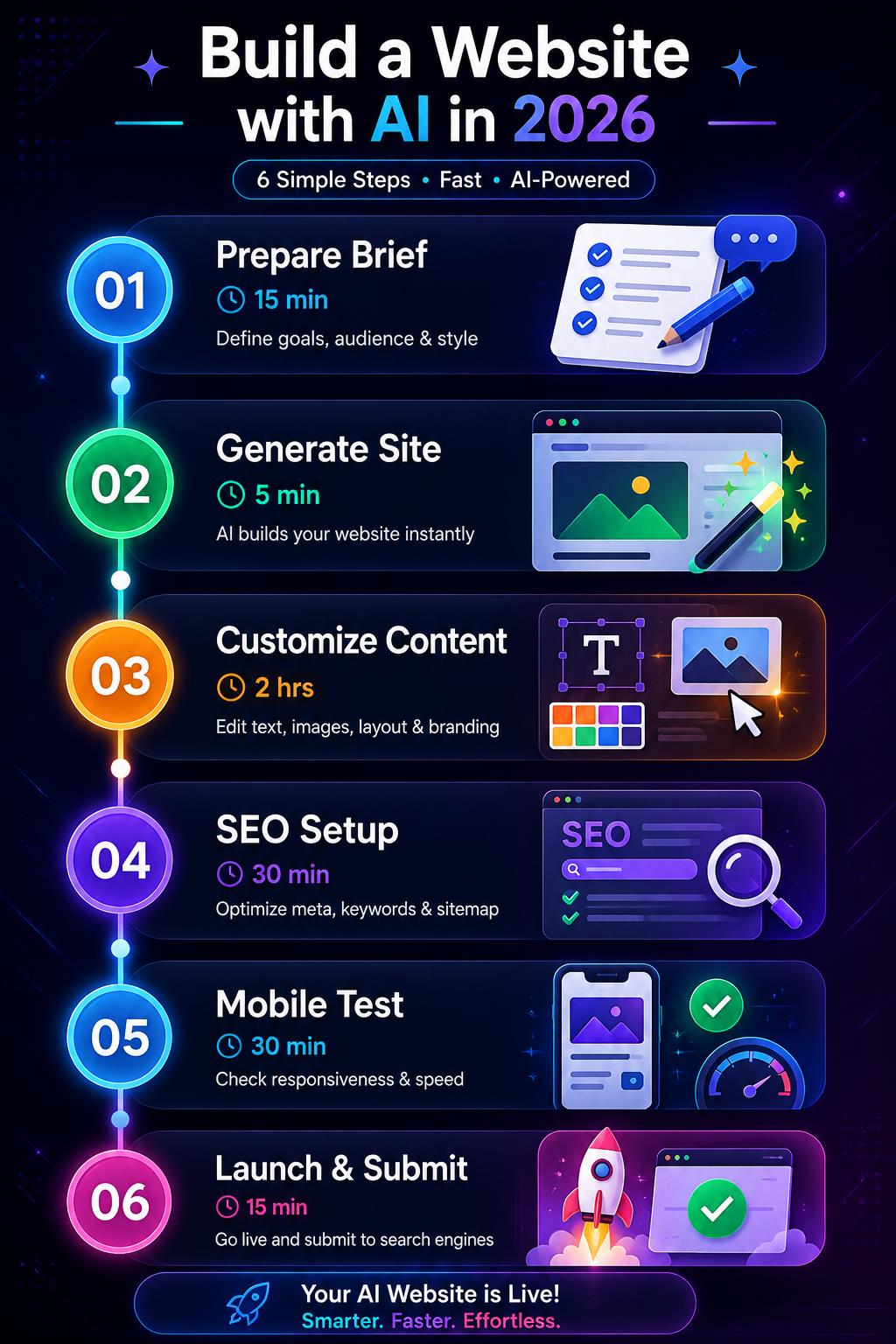
Regardless of which builder you choose, this workflow produces the best results:
Step 1 — Prepare Your Brief (15 minutes)
Before touching any builder, document:
- Your business name and one-sentence description
- Your target audience (who visits your site and why)
- Your primary goal (sell products, generate leads, showcase work, publish content)
- 3 websites you admire the aesthetic of
- Your brand colors if you have them
The quality of your brief directly determines the quality of the AI's initial generation. Vague input produces generic output.
If you're building on WordPress specifically rather than a hosted builder, the same brief-first principle applies — 10Web's AI setup uses it exactly the same way before generating your WordPress site.
Step 2 — Generate and Evaluate (20 minutes)
Use your brief to generate the initial site. Evaluate the result against three criteria:
Structure — are the right sections present? Does the page flow logically from the visitor's arrival to the action you want them to take?
Tone — does the generated copy match the voice your brand needs? Professional? Friendly? Technical? Creative?
Visual direction — is the general aesthetic appropriate for your audience and industry?
Do not get attached to specific copy or visual details at this stage — those are easy to change. Focus on whether the AI has understood the structure and direction correctly.
Step 3 — Customize Content (1 to 2 hours)
Replace all placeholder copy with your actual content. Use Claude or ChatGPT to help write sections that need to be compelling rather than generic.
Content prompt for any AI builder section: Write copy for the [section name] section of my website. My business: [describe it specifically] Target audience: [who visits this page] What I want them to do after reading this section: [specific action] Tone: [professional/friendly/technical/creative] Length: [approximate word count] Do not use clichés like "passionate", "dedicated", or "solutions". Write like a real person talking to a real potential customer
Step 4 — Optimize for Search (30 minutes)
Every page needs:
- A unique, keyword-relevant meta title (under 60 characters)
- A compelling meta description (under 160 characters) that describes the page value
- An H1 heading that includes your primary keyword naturally
- Alt text on every image
Use Claude or ChatGPT to generate these for each page:
Write SEO metadata for my [page type] page. Business: [description] Primary keyword: [keyword] Page content: [brief description of what the page covers] Generate:
Meta title (under 60 characters, include keyword) Meta description (under 160 characters, compelling) H1 heading suggestion (natural, not keyword-stuffed)
Step 5 — Test Before Launch (30 minutes)
Before making your site public:
Mobile check — view every page on your phone. Most visitors arrive on mobile — if your site looks broken or slow on mobile, fix it before launch.
PageSpeed test — run your site through Google's PageSpeed Insights at pagespeed.web.dev. Aim for 80+ on mobile. A score below 60 means performance issues that will hurt your search rankings.
Link check — click every button and link. Broken links on a new site create an immediately poor first impression.
Contact form test — submit your contact form and confirm the notification arrives where you expect it.
Step 6 — Launch and Submit to Google (15 minutes)
Once live, submit your site to Google Search Console at search.google.com/search-console. Add your property, verify ownership, and submit your sitemap. Google will begin crawling and indexing your pages — a process that typically takes 2 to 4 weeks for a new domain.
For more on getting your site found in both Google search and AI-generated responses, read the complete AI SEO guide.
Common Mistakes When Building AI Websites
Accepting the first generation without evaluating structure. The AI generates quickly — which creates pressure to accept and move to customization. Spend 10 minutes evaluating whether the generated structure actually serves your visitors before investing time in customization.
Using all placeholder copy. Every AI builder generates placeholder copy that sounds plausible but is generic. Visitors recognize generic web copy instantly and it reduces trust. Replace all placeholder copy with specific, real content about your actual business.
Ignoring mobile. AI builders generate for desktop by default. Always review and test every page on mobile before launch — and optimize specifically for the experience your mobile visitors will have.
Skipping SEO setup. Most AI builders do not automatically optimize your meta titles, descriptions, and image alt text. This step takes 30 minutes and directly affects whether your site gets found in search.
Choosing a builder based on features you will never use. Wix has 900+ apps — most users use 5. Shopify has sophisticated inventory management — most small stores need basic product listing. Choose the builder that handles your actual requirements well rather than the one with the longest feature list.
Not connecting Google Analytics immediately. Day one traffic data is lost forever if you do not set up analytics before launch. Connect Google Analytics 4 as part of your launch checklist.
Expert Tips for Getting the Best Results
Tip 1 — Feed the AI specific brand language. If your brand has a specific voice, terminology, or key messages — include these in your generation brief. AI builders that allow you to describe your brand voice in detail produce copy that requires less editing.
Tip 2 — Use competitor sites as reference. Most AI builders allow you to reference sites you want to emulate. Providing 2 to 3 specific reference URLs gives the AI concrete visual direction that produces better results than abstract style descriptions.
Tip 3 — Generate multiple variations. If your chosen builder supports regenerating sections or the full site, generate 3 to 5 variations before committing to one direction. The first generation is rarely the best.
Tip 4 — Separate your AI tools. Use your website builder for structure and design. Use Claude or ChatGPT for copy writing. Use Canva AI or Microsoft Designer for custom images, and use the best AI presentation makers when the same brand needs investor decks, sales presentations, or webinar slides. Each tool does its specific job better than a single all-in-one solution handles everything.
Tip 5 — Plan for content before you build. Sites that launch with complete, specific content perform better than sites that launch with placeholder content replaced later. Write your homepage, about, and services copy before building — then paste it in during customization.
The Future of AI Website Building
The AI website builders available in 2026 are impressive. The builders coming in 2027 and 2028 will be significantly more capable in three specific ways:
Conversational site management. Instead of using a visual editor to make changes, you will describe changes in conversation — "make the header more minimal," "add a testimonials section after the services," "change the site to a dark color scheme" — and the AI will execute them instantly.
Behavioral optimization. AI that monitors your site's performance data and automatically suggests — or implements — changes to improve conversion rates, time on page, and user experience based on actual visitor behavior.
Related articles
AI Tools
Best AI Search Rank Tracking Tools 2026: Free & Paid
Compare the best AI search rank tracking tools for ChatGPT, Perplexity, and Google AI Overviews in 2026 — free options, pricing, and citation tracking.
AI Tools
7 Best Free AI Image Generators in 2026
We evaluated 7 of the best free AI image generators in 2026 for image quality, free access, ease of use, text rendering, and commercial-use considerations.
Full content generation. AI that generates not just the site structure but a complete content library — blog posts, product descriptions, case studies, FAQ pages — tailored to your specific audience and updated continuously based on trending topics in your industry.
The businesses building with AI tools now are developing the workflows and institutional knowledge that will give them significant advantages as these capabilities arrive.
Key Takeaways
- The best AI website builder depends on your use case — Framer for design quality, Wix for beginners, Hostinger for budget, Shopify for e-commerce, Webflow for professionals
- Most AI builders generate a usable site in under 5 minutes — the differentiation is in customization depth and design quality
- The quality of your brief directly determines the quality of the AI's output — invest 15 minutes in preparation before generating
- Always replace placeholder copy with specific, real content — generic AI copy reduces visitor trust
- Test on mobile and check PageSpeed scores before launch — performance directly affects SEO rankings
- Submit to Google Search Console immediately after launch — indexing takes time and every day you delay costs search visibility
Frequently Asked Questions
What is the best AI website builder in 2026? The best AI website builder depends on your use case. For beginners: Wix AI Website Builder. For design quality: Framer. For budget: Hostinger AI Builder. For e-commerce: Shopify. For professional designers: Webflow. For speed: Durable. There is no single best builder — the right choice matches your specific requirements.
Can you build a website without code?
Yes. Modern AI and no-code website builders can generate pages, layouts, copy, images, navigation, forms, and other website components without requiring you to write HTML, CSS, or JavaScript. Wix, Framer, Squarespace, Hostinger, Webflow, and Durable all support visual or AI-assisted website creation. However, more complex functionality such as custom databases, authentication, or advanced application logic may require an AI app builder or traditional development.
Can ChatGPT code a website?
Yes. ChatGPT can generate HTML, CSS, JavaScript, React, and other web-development code from natural-language instructions. However, generating code is different from using an AI website builder. Website builders handle hosting, visual editing, publishing, domains, and other infrastructure, while ChatGPT gives you more direct control over the code. If you want a ready-to-publish website without managing code, an AI website builder is usually simpler.
Is there a 100% free website builder?
Yes, but free website builders usually come with trade-offs. You may have to use a platform subdomain, keep the builder's branding, accept lower storage or traffic limits, or use fewer business features. A free plan is useful for testing an idea or creating a personal project, but a professional business website usually needs a paid plan for a custom domain and additional features.
Is Wix a no-code website builder?
Yes. Wix is designed so users can build and manage websites without writing traditional code. Its current Wix Harmony experience combines AI-powered website creation with visual drag-and-drop editing, allowing users to generate pages and then customize the design and content without needing HTML or CSS.
Can I build a website with AI for free? Yes — Framer, Wix, Webflow, and Durable all have free plans that let you build and publish a site without paying. The free plans include the builder's subdomain rather than a custom domain and typically display the builder's branding. For a professional custom domain, paid plans typically start at $5 to $17/month.
How long does it take to build a website with AI? AI generation takes 30 seconds to 5 minutes depending on the builder. The total time from starting to a launch-ready site is typically 2 to 6 hours including content customization, SEO setup, and testing. This compares to days or weeks for traditional custom development.
Do AI-built websites rank on Google? Yes — AI-built websites rank on Google when they meet Google's quality standards: useful content, good performance, mobile responsiveness, and proper SEO setup. The AI builder you use does not affect your ranking potential — your content quality, site speed, and SEO optimization do.
Which AI website builder is best for e-commerce? Shopify with AI features is the strongest e-commerce platform in 2026 by a significant margin. For small stores with basic needs, Wix and Squarespace provide solid e-commerce at lower cost. For very simple single-product stores, a landing page builder combined with a payment processor (Stripe or PayPal) may be sufficient.
Can AI website builders replace web developers? For most small to medium business websites — yes, AI builders provide sufficient capability without developer involvement. For complex custom applications, advanced integrations, high-traffic e-commerce, or sites requiring custom functionality beyond what builders provide, developers remain necessary. The practical boundary is becoming more favorable to no-code solutions every year.
What is the cheapest AI website builder? Hostinger AI Website Builder at $2.99/month (including hosting, domain, and email) is the lowest total cost for a complete professional website setup. Framer's free plan and Wix's free plan allow site building at zero cost but require a paid plan for a custom domain.
How do I choose between Wix and Squarespace? Choose Wix for: more features, more app integrations, more flexibility in layout, and the most beginner-friendly experience. Choose Squarespace for: higher design quality out of the box, better fit for creative and portfolio sites, and a more curated, cohesive template aesthetic. Squarespace sites consistently look more professionally designed. Wix sites are more functionally flexible.
Start Building Your AI Website Today
The barrier to a professional web presence is lower in 2026 than it has ever been. The tools are accessible, the costs are minimal, and the quality achievable without coding expertise is genuinely impressive.
The most important decision is not which builder to choose — it is starting. A good website built on Hostinger today serves your business better than a perfect website still being planned next month.
Pick the builder that matches your use case from this guide. Spend 15 minutes preparing your brief. Generate your site. Customize the content. Launch.
Your website is your 24-hour sales and credibility asset. Every day it does not exist is a day potential clients cannot find you, evaluate you, or contact you.
Build it today.
For more on building your online presence with AI, read the how to make money with AI tools guide, the complete AI SEO guide to get your new site found in search, the best AI productivity tools guide to maximize your workflow, and the prompt engineering complete guide to get better results from every AI tool you use.