If you ask a chatbot to explain something, it gives you an answer. If you give an AI agent a goal, it can potentially decide which steps to take, use tools, inspect the results, and continue until the task is complete or it needs your approval.
That difference — responding once versus working through a goal — is what separates a basic AI tool from an AI agent. This guide explains exactly what an AI agent is, how it works, how it differs from a chatbot, assistant, or plain language model, and what it can realistically do today. Once the concept is clear, you can compare the best AI agents in 2026 by use case instead of treating every agent as interchangeable.
AI Agent in Simple Terms
An AI agent is an AI-powered system that can pursue a goal by deciding what steps to take, using tools, observing results, and continuing through multiple steps with bounded autonomy.
In practice, that means an agent can:
- Understand a goal you give it
- Plan or select which actions to take
- Use tools to gather information or take action
- Observe the results of those actions
- Complete the task or escalate to a human when needed
That's the core idea. Everything below explains how it actually works, what it looks like in practice, and where the real limits are.
What Is an AI Agent?
An AI agent is a software system that uses an AI model to pursue a goal, decide what steps to take, use tools, and perform actions with some degree of autonomy — rather than simply generating one response to one input.
The term gets used somewhat differently across the industry, so it helps to be precise. Google Cloud describes AI agents as software systems that pursue goals and complete tasks using reasoning, planning, memory, and the ability to act across systems. Anthropic draws a related but sharper distinction: workflows follow predefined code paths, while agents dynamically direct their own process and tool use to accomplish a task. OpenAI describes agentic systems as ones capable of using tools and taking actions on a user's behalf, with its ChatGPT agent serving as a concrete example — a mode that can reason and act through tools such as browsing, a terminal, and connected applications.
Put together, the common thread is this: an agent doesn't just produce text. It decides what to do next, does it, checks what happened, and keeps going — or stops and asks you.
AI agent definition in simple terms
A normal chatbot is like someone you ask a question. You get an answer, and the conversation moves to whatever you say next.
An AI agent is more like an assistant you give a goal to, who decides which steps and tools are needed to complete it — checking in with you when something requires your approval, rather than waiting for you to specify every step.
That's the useful mental model. It's not a perfect one-to-one comparison, and it starts to break down the deeper you go into how these systems are actually built — but it's the right starting point.
What Does an AI Agent Do?
An AI agent understands a goal, breaks it into steps, decides what action to take, calls tools when needed, and adjusts its approach based on what it observes — continuing until the task is done or it needs your input.
More specifically, depending on how it's built, an agent can:
- Understand a goal stated in plain language
- Break a task into smaller steps
- Decide what action to take next
- Call external tools or APIs
- Retrieve information it needs
- Interact with software or interfaces
- Execute actions
- Inspect the results of those actions
- Adjust its approach based on what it finds
- Stop, or ask for human approval, when appropriate
What an agent can actually do is bounded by the tools and permissions it's been given. An agent with no access to your email cannot send an email, no matter how capable the underlying model is. Capability and access are two separate things.
How Does an AI Agent Work?
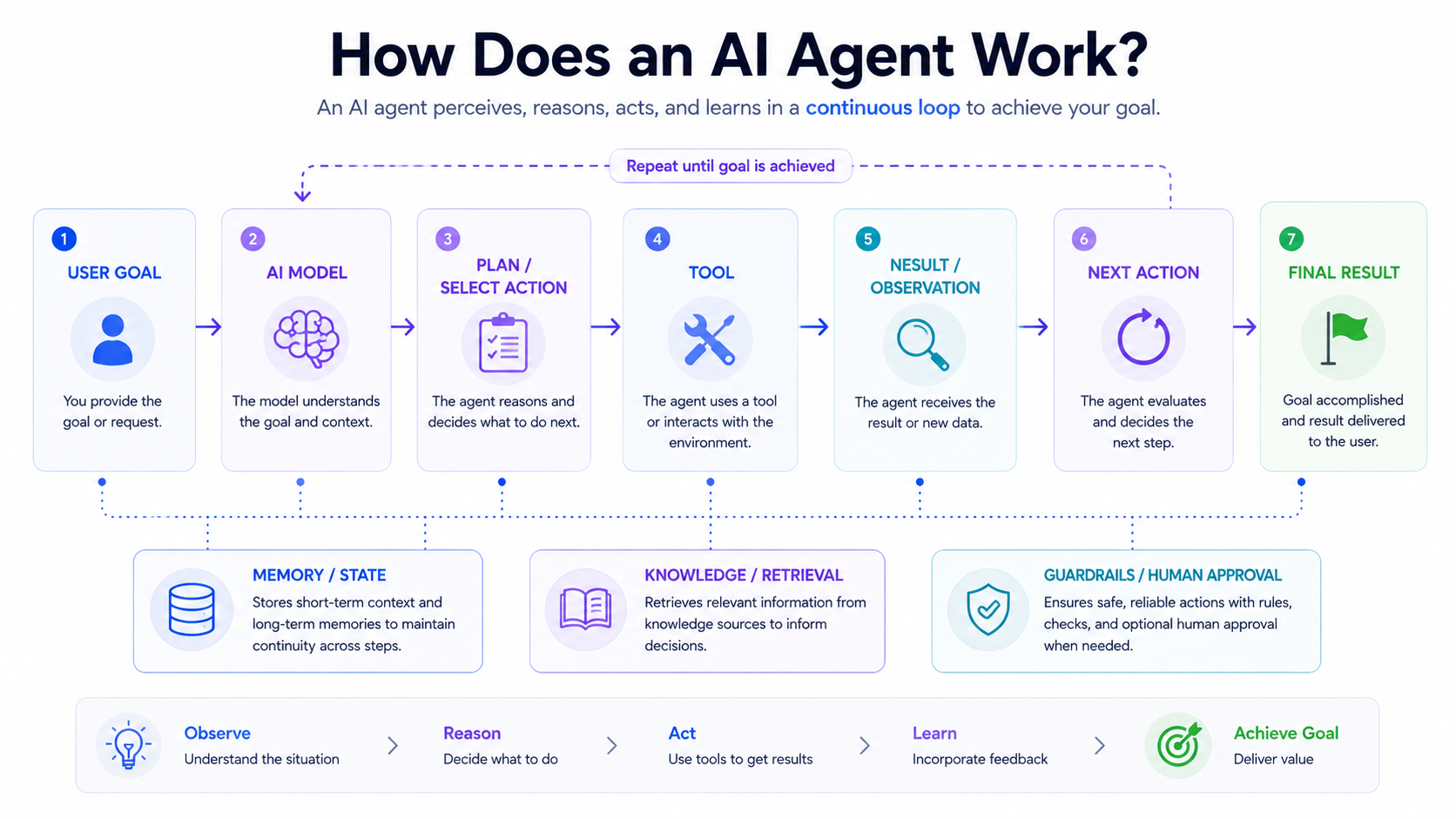
An AI agent works through a repeating loop: it receives a goal, plans or selects an action, uses a tool to carry it out, observes the result, and either continues, asks for approval, or finishes.
The basic loop looks like this:
- Receive a goal
- Understand the context
- Plan or select the next action
- Choose a tool
- Execute the action
- Observe the result
- Update its context or state
- Continue, ask for approval, or finish
Here's what that looks like with a concrete example.
User: "Find three suitable laptops under my budget and compare them."
An agent handling this might:
- Interpret the budget and requirements from the request
- Search relevant websites or product databases
- Collect product information for candidates that fit
- Compare specifications across the options
- Calculate and compare prices
- Produce a recommendation
The exact sequence isn't fixed — it depends on the system, the tools it has access to, and what it finds along the way. If a search returns nothing useful, a well-built agent adjusts its next step rather than giving up or hallucinating a result. This is observable behavior: the agent takes an action, gets a result, and reacts to it — not a hidden internal thought process you're meant to see.
AI Agent Architecture: What Components Does an Agent Need?
An AI agent typically combines an AI model, a defined goal, tools it can use, a way to track state or memory, and some form of orchestration that coordinates the steps between them.
| Component | What it does | Simple example |
|---|---|---|
| AI model | Understands input and helps make decisions | An LLM such as Claude or GPT |
| Instructions/goal | Defines what the agent should accomplish | "Find and summarize..." |
| Tools | Lets the agent take actions | Search, an API, a calculator |
| Memory/state | Preserves relevant context across steps | Previous task state |
| Orchestration | Coordinates steps and tool calls | The agent loop itself |
| Knowledge/grounding | Gives access to external information | A database or retrieval system |
| Runtime/environment | Where the agent actually executes | Cloud, server, or browser |
| Guardrails | Limits risky or unintended behavior | Approval steps, permissions |
Not every agent implements all of these in the same way, and some simpler agents skip several of them entirely. Architectures vary significantly depending on what the agent is built to do.
AI Agent vs LLM: What's the Difference?
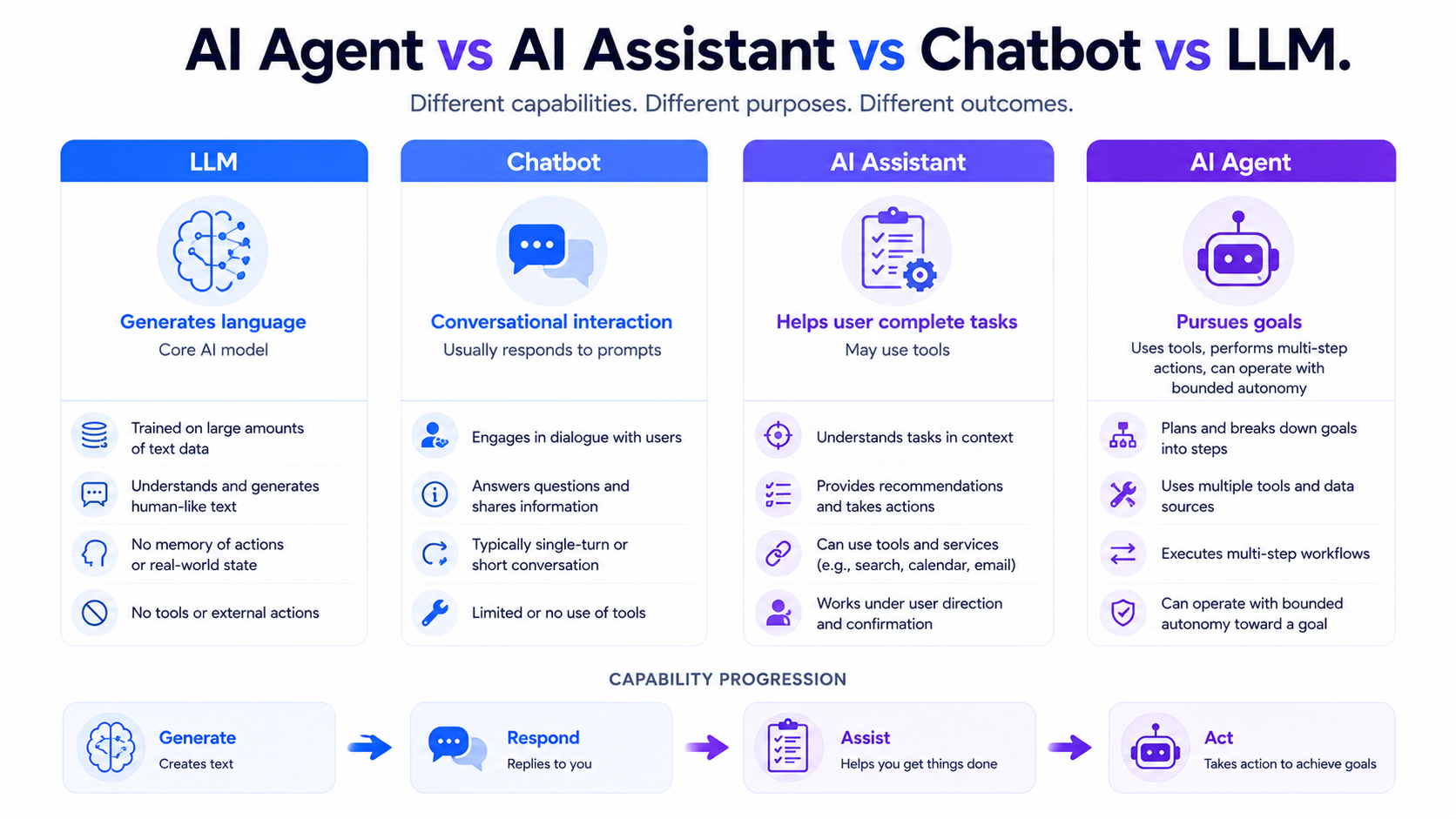
An LLM generates text from a prompt. An AI agent typically uses an LLM as its reasoning engine, but adds the ability to plan multi-step work, call tools, take actions, and track state — capabilities the model doesn't have entirely on its own.
| Feature | LLM | AI Agent |
|---|---|---|
| Generates text | Yes | Yes |
| Pursues multi-step goals | Limited by itself | Yes |
| Uses external tools | Only when integrated | Core capability |
| Takes actions | Usually no | Yes |
| Memory/state | Depends on the application | Often included |
| Autonomous workflow | No by itself | Designed for it |
| Example | A base language model | A tool-using task agent |
Related articles
AI Tools
Best AI Agents in 2026: 10 Top Picks Compared by Use Case
Compare the best AI agents in 2026 for coding, research, productivity, business, automation, and personal tasks. Find the right AI agent for your workflow.
Beginner Guides
What Is AI SEO? Definition, Framework, and Strategy (2026)
What is AI SEO and when does it matter? This guide defines AI SEO, explains the ecosystem, and shows how to build a topical authority hub.
An AI agent normally uses an AI model as one of its core components. An LLM by itself is not automatically an agent — it becomes part of one once it's wired up with tools, a loop, and a goal to work toward.
AI Agent vs Chatbot
A chatbot is defined by how you interact with it — a conversational interface that responds to your messages. An agent is defined by what it does — pursuing a goal across multiple steps, using tools, and continuing until the task is finished.
A chatbot typically:
- Responds to conversation
- Usually waits for user input before doing anything
- May call tools, if it's been designed to
- May not independently pursue a task beyond the current message
An agent typically:
- Can pursue a defined goal
- Can plan multi-step work
- Can call tools as needed
- Can inspect results and adjust
- Continues until completion or a stopping condition
It's worth being precise here: not every chatbot is non-agentic. A chatbot can have an agent running underneath its conversational interface — "chatbot" describes the interface and use case, while "agent" describes the underlying system behavior and architecture. The two labels aren't mutually exclusive, which is exactly why the next question — is ChatGPT an AI agent — doesn't have a one-word answer.
AI Agent vs AI Assistant
An assistant primarily helps you respond, draft, summarize, or complete tasks under your direction. An agent can take a goal and carry out multiple actions using tools with less continuous input from you along the way.
The distinction is one of degree, not a hard line — and the terms overlap in practice. A modern AI assistant frequently includes agentic capabilities as part of what it offers, which is exactly why a query like "what is an AI agent copilot" doesn't have a clean, single-category answer. Depending on the specific mode or feature you're using, a tool marketed as an "assistant" may be operating in a genuinely agentic way for a given task, and a tool marketed as an "agent" may sometimes just be answering a question.
AI Agent vs Agentic AI
An AI agent is the actual system or piece of software doing the work. Agentic AI is the broader design philosophy — AI systems built with the capability to plan, decide, use tools, and act toward goals, of which any individual agent is one implementation.
Think of "agentic AI" as the category and "an AI agent" as a specific member of that category.
AI Agent Examples
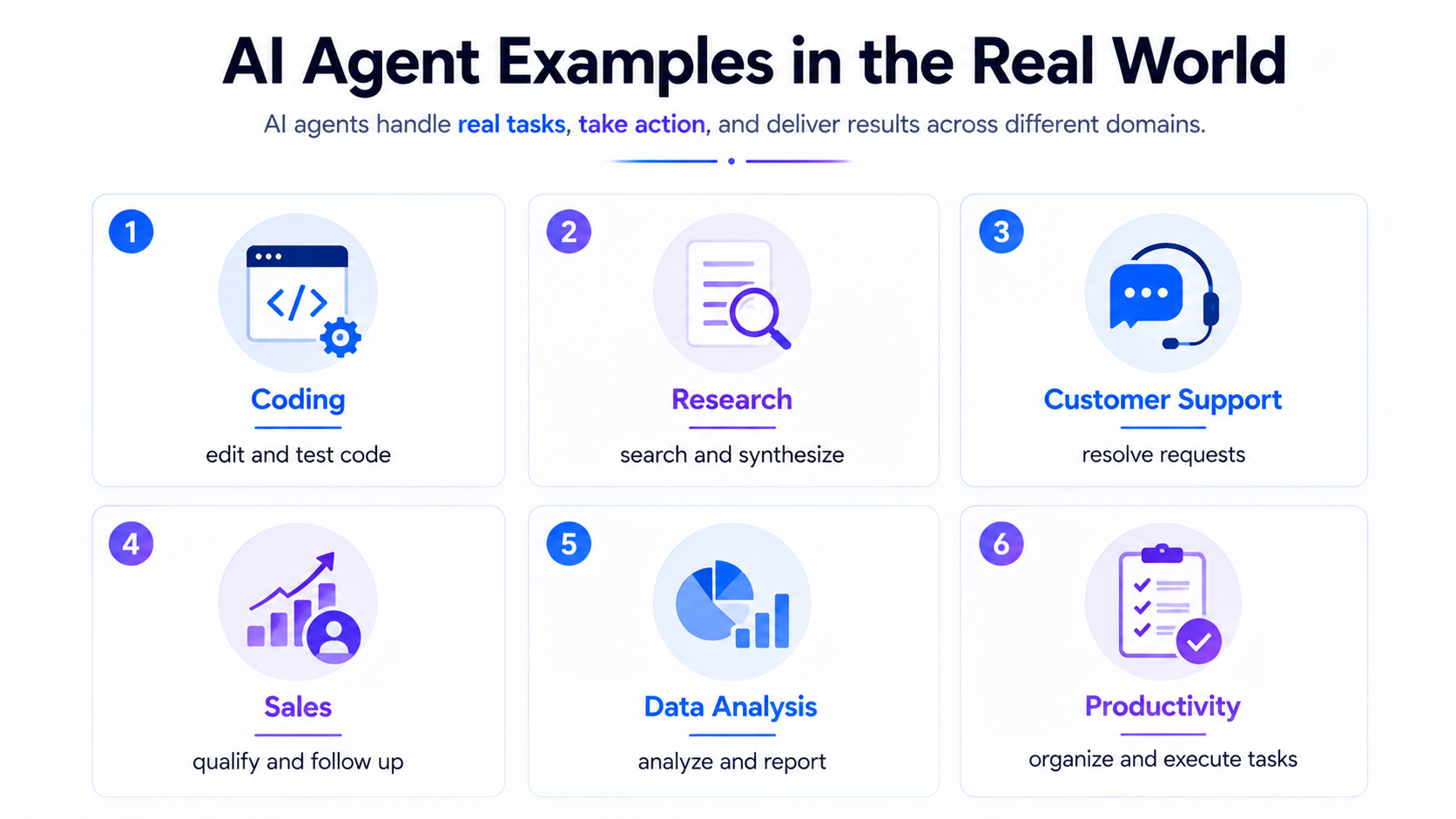
AI agents are already used for coding, research, customer support, sales, data analysis, and everyday productivity tasks — each applying the same underlying loop of planning, tool use, and observation to a different kind of work.
1. Coding agents
Coding agents can inspect a repository, modify files, run tests, diagnose errors, create pull requests, and iterate on fixes based on what the tests report back. Current examples include Claude Code, OpenAI's Codex, GitHub Copilot's agentic capabilities, and the agent workflows built into editors like Cursor and Windsurf. For a full comparison of how these specific tools differ, see our Claude Code, Cursor, and Codex comparison, and for the wider landscape of coding tools, our AI coding tools guide and AI code editor guide go deeper than this article needs to.
2. Research agents
A research agent can search multiple sources, gather relevant information, synthesize findings across them, and produce a structured report — handling in minutes what would otherwise mean opening a dozen browser tabs manually.
3. Customer support agents
Support agents can classify incoming requests, retrieve relevant account information, answer common questions directly, update records in a system, and escalate to a human when a request falls outside what they're equipped to handle.
4. Sales and CRM agents
These agents can qualify inbound leads against defined criteria, update CRM records automatically, draft follow-up messages, and schedule meetings — reducing the manual data entry that eats into a sales team's actual selling time.
5. Personal productivity agents
An agent focused on productivity can organize information across sources, summarize long documents, prepare reports from raw data, and coordinate repetitive workflows you'd otherwise do by hand every week.
6. Browser and computer-use agents
Some agents are built to interact directly with websites or computer interfaces — clicking, typing, and navigating much like a person would, rather than working through a dedicated API.
7. Data analysis agents
A data analysis agent can inspect a dataset, run calculations, generate charts, identify patterns, and produce a written summary of what it found — connecting steps that would otherwise require switching between several separate tools.
8. Workflow automation agents
These agents connect APIs and business applications to carry out multi-step processes across systems that don't otherwise talk to each other — the same broad territory covered by tools discussed in our AI productivity tools guide.
Example: How an AI Agent Completes a Task
Here's one concrete, end-to-end walkthrough: preparing a weekly business report.
User goal: "Prepare this week's business summary report."
- The agent interprets the request and identifies what data is needed
- It retrieves the relevant data from connected sources
- It uses tools or APIs to pull specific figures
- It analyzes the information for notable changes or trends
- It generates a draft report
- It requests approval if a step requires it — for example, before sending the report externally
- It delivers the final result
Each step feeds into the next. If a data source is unavailable at step two, a well-built agent adjusts — trying an alternative source or flagging the gap in the final report — rather than silently producing an incomplete result as if nothing were missing.
Types of AI Agents
AI agents are commonly grouped by how they make decisions and how much autonomy they're given — ranging from simple rule-following agents to more flexible ones that plan across multiple tools and steps.
Classic academic categories still show up in some references — simple reflex agents, goal-based agents, and planning agents among them. For a beginner, the more useful categories are the practical ones actually in use today:
- Tool-using agents — call specific tools to complete parts of a task
- Workflow agents — coordinate a defined sequence of steps, often across multiple systems
- Autonomous agents — operate with wider latitude to decide their own next steps within set boundaries
- Multi-agent systems — multiple agents, each handling part of a task, coordinating with one another
Terminology here isn't fully standardized across vendors, and you'll see these categories described somewhat differently depending on the source.
Do AI Agents Have Memory?
AI agents can have memory, but memory isn't automatic or universal — it has to be built into the surrounding system, and different agents implement it differently.
Common approaches include:
- Short-term or context memory — information relevant to the current task or conversation
- Task state — what's been done so far within a specific multi-step job
- Persistent memory — information retained across separate sessions
- External databases — structured storage the agent can query
- Retrieved knowledge — information pulled in on demand rather than stored directly
Related articles
AI Tools
AEO vs GEO vs SEO: Definitions & Differences (2026)
AEO vs GEO vs SEO explained with clear terminology, use cases, and a practical decision framework for when each term matters.
AI Tools
AI SEO Checklist for Beginners (2026 Guide)
A step-by-step AI SEO checklist for beginners covering research, implementation order, internal links, schema, EEAT, and post-publish monitoring.
It's worth being clear on this point: a language model itself does not automatically have permanent memory. Memory is a capability the system around the model is built to provide — not something inherent to the underlying AI.
What Tools Can an AI Agent Use?
An AI agent can use whatever tools it's explicitly been given access to — commonly web search, APIs, databases, code execution, file systems, and connected business applications.
Common categories include:
- Web search
- APIs
- Databases
- Calculators
- Code execution environments
- File systems
- Browsers
- Email and calendar systems
- CRM systems
- Retrieval systems
- Computer-use interfaces
The model decides which available tool makes sense for a given step, but it can only choose from what's actually been exposed to it. An agent cannot spontaneously reach a system it hasn't been connected to, no matter how capable the underlying model is.
A growing number of agents connect to these tools through the Model Context Protocol (MCP), a standardized way for an AI application to discover and use external tools and data without a custom-built integration for every single connection. It's not the only way to connect an agent to tools, but it's become a common one — see our guide to what MCP is for how the mechanism actually works.
How to Create an AI Agent
Building an AI agent typically means defining a clear goal, connecting an AI model to the tools it needs, giving it a way to track state, and adding guardrails before testing it against realistic tasks.
A general build process looks like this:
- Define the goal the agent should accomplish
- Choose an underlying AI model
- Give it clear instructions
- Add the tools it needs access to
- Add relevant knowledge or data sources
- Manage state and memory
- Build the agent loop or orchestration layer
- Add guardrails and permissions
- Test against realistic tasks
- Monitor failures and refine
Developers today typically build on top of existing platforms rather than starting from scratch — including OpenAI's Agents SDK and Responses API, Anthropic's tool-use and agent-building approaches, and Google's agent tooling within its Cloud platform. The Model Context Protocol (MCP) has also become a common way for agents to connect to external tools and context in a standardized way — more on that below.
At a conceptual level, the loop looks roughly like this:
goal → model → tool → result → model → next action → final answer
You don't need to write a full framework to understand agents conceptually — but if you're building one, these platforms are the current starting point rather than assembling every piece from scratch.
When Should You Use an AI Agent?
An AI agent is worth using when a task involves multiple steps, requires external tools, and can't easily be reduced to a fixed set of predetermined steps. For simple, deterministic tasks, a regular script or workflow is usually the better fit.
Good fit: "Research competitors and prepare a report" — the steps vary depending on what's found along the way, and the task genuinely benefits from dynamic decision-making.
Less suitable: "Convert this text to uppercase" — there's exactly one correct way to do this, and a simple function will do it faster and more reliably than routing it through an agent.
This distinction matters more than it might seem. Reaching for an agent when a simple, hard-coded workflow would do the job adds complexity, cost, and failure points without adding value.
Benefits of AI Agents
AI agents are useful primarily because they can automate multi-step work that would otherwise require constant manual coordination between tools.
- Automating multi-step work across tools
- Reducing repetitive manual tasks
- Connecting to and coordinating multiple systems
- Speeding up research and information-gathering
- Supporting continuous, ongoing workflows
- Personalizing output to a specific goal or context
- Scaling work that would otherwise require proportional human time
- Operating across applications rather than staying siloed in one
AI Agent Limitations and Risks
AI agents can make mistakes, misuse tools, or take unintended actions — which is why permissions, monitoring, and human oversight remain important even as agents become more capable.
The main risks worth understanding:
- Hallucinations — an agent can act confidently on incorrect information
- Incorrect decisions — a flawed plan can lead to a series of wrong actions
- Tool misuse — a tool can be used in an unintended or harmful way
- Prompt injection — malicious content encountered during a task can attempt to redirect the agent
- Excessive permissions — an agent with more access than it needs increases the potential impact of a mistake
- Data and privacy risks — agents interacting with sensitive systems need careful boundaries
- Security vulnerabilities — agents that execute code or browse the web inherit those surfaces' risks
- Cost and latency — multi-step agent tasks can be slower and more expensive than a single model call
- Compounding errors — a small mistake early in a multi-step task can affect everything after it
- Unclear stopping conditions — an agent needs a well-defined point at which it stops or asks for help
- Over-autonomy — giving an agent more independence than a task actually warrants
None of this means agents are inherently dangerous — it means that greater autonomy introduces additional failure modes and security considerations that need to be actively managed, not that the technology should be avoided. This is an active area of ongoing safety research, and current work from labs including Anthropic continues to focus specifically on tool permissions, monitoring, and containment as agents take on more consequential tasks.
Are AI Agents Fully Autonomous?
Most AI agents in practical use today are not fully autonomous in the unlimited sense people sometimes imagine — they operate within defined instructions, tool access, and permission boundaries.
In practice, agents typically work within:
- Defined instructions and goals
- The specific tools they've been given access to
- Explicit permissions
- A sandbox or execution environment
- Defined stopping conditions
- Approval requirements for consequential actions
- Safety controls built into the surrounding system
This is often described as bounded autonomy — the agent has real latitude to decide how to approach a task, but within limits set by the system around it, not limits it sets for itself. Understanding this distinction matters, because the word "autonomous" gets used loosely and often implies more independence than most deployed agents actually have.
Is ChatGPT an AI Agent?
ChatGPT as a standard conversational product is not identical to an agent in every interaction — but it includes agentic capabilities, most concretely through ChatGPT agent, a mode built to reason and act through tools such as browsing, a terminal, and connected applications on a user's behalf.
A normal conversational exchange with ChatGPT — ask a question, get an answer — isn't meaningfully different from using any other chatbot. But when ChatGPT operates in its agent mode, it can plan and carry out multi-step tasks, using tools to gather information or take action, rather than simply generating a response to a single message.
So the honest answer isn't a flat yes or no — it depends on which mode or feature of the product you're actually using at a given moment.
Is Copilot an AI Agent?
"Copilot" refers to several different Microsoft and GitHub products, so this doesn't have one blanket answer either. Some Copilot experiences include genuinely agentic functionality — GitHub Copilot's agent mode, for example — while a traditional assistant-style Copilot interaction, offering suggestions as you work, is not necessarily operating as an autonomous agent in that moment.
AI Agent Use Cases
| Use case | What the agent can do |
|---|---|
| Coding | Write, edit, test, and debug code |
| Research | Search, compare, and summarize information |
| Customer support | Resolve or escalate incoming requests |
| Marketing | Research, draft, and analyze campaign content |
| Sales | Qualify leads and update CRM records |
| Finance | Analyze data and prepare reports |
| Operations | Coordinate multi-step workflows |
| Personal productivity | Organize information and execute recurring tasks |
| Education | Research, tutor, and help plan study work |
| Data analysis | Query, analyze, and visualize datasets |
Agents handling sensitive financial or legal actions should still operate with human review at consequential decision points — capability to act isn't the same as being safe to act without oversight in high-stakes contexts.
AI Agent vs Traditional Automation
Traditional automation follows predefined rules through predefined steps. An AI agent starts from a goal and dynamically selects steps, tools, and adjustments based on what it observes along the way.
Traditional automation:
predefined rules → predefined steps
AI agent:
goal → dynamically selected steps → tools → observations → adaptation
In practice, many real systems combine both — using rigid automation for the parts of a process that never change, and an agent for the parts that genuinely require judgment or vary from case to case.
AI Agents vs RAG: What's the Difference?
RAG (retrieval-augmented generation) gives an AI system relevant information retrieved from an external source before it generates a response. An agent can use RAG as one of its tools or capabilities — but RAG on its own is not an agent.
The relationship runs in one direction: an agent may use RAG to ground its answers in real information, but retrieval by itself doesn't give a system the ability to plan, take actions, or pursue a multi-step goal. RAG solves a knowledge problem; agentic behavior solves a task-execution problem. They're complementary, not the same thing.
How Does MCP Relate to AI Agents?
The Model Context Protocol (MCP) provides a standardized way for AI applications and agents to connect with tools and external context, rather than every application building its own custom integration for every tool.
MCP has seen rapid adoption across the industry through 2026 as a shared standard for tool and context integration — but it's one increasingly important mechanism among several, not a mandatory protocol every AI agent is required to use. Not every agent relies on MCP specifically, and the broader space of agent-to-tool and agent-to-agent communication continues to evolve.
Related articles
AI Tools
AI SEO vs Traditional SEO: What Actually Changes (2026)
AI SEO vs traditional SEO explained with a practical comparison, hybrid strategy guidance, and clear rules for when each approach should lead.
AI Tools
Best AI Search Rank Tracking Tools 2026: Free & Paid
Compare the best AI search rank tracking tools for ChatGPT, Perplexity, and Google AI Overviews in 2026 — free options, pricing, and citation tracking.
Frequently Asked Questions
What is an AI agent in simple terms?
An AI agent is an AI-powered system that can pursue a goal by deciding what steps to take, using tools, observing results, and continuing through multiple steps — rather than just producing a single response to a single input.
What does an AI agent do?
It understands a goal, plans the steps needed to achieve it, uses available tools to take action, checks the results, and adjusts its approach — continuing until the task is finished or it needs your approval.
What are examples of AI agents?
Common examples include coding agents like Claude Code and Codex, research agents that gather and synthesize information, customer support agents, sales and CRM agents, data analysis agents, and workflow automation agents connecting multiple business systems.
How does an AI agent work?
It runs through a loop: receive a goal, plan the next action, choose a tool, execute it, observe the result, update its context, and either continue, ask for approval, or finish the task.
Is ChatGPT an AI agent?
Not in every interaction. Standard conversational ChatGPT responses aren't meaningfully agentic, but ChatGPT includes agentic capabilities — most directly through ChatGPT agent, which can reason and act through tools like browsing and connected applications.
Is Copilot an AI agent?
It depends which Copilot experience you mean. Some Copilot features, like GitHub Copilot's agent mode, are genuinely agentic. A standard suggestion-based Copilot interaction is closer to an assistant than an autonomous agent.
What is the difference between an AI agent and an LLM?
An LLM generates text from a prompt. An AI agent typically uses an LLM as its reasoning component but adds tool use, multi-step planning, and the ability to take action — capabilities the model doesn't have entirely on its own.
What is the difference between an AI agent and a chatbot?
A chatbot describes an interface — a conversational back-and-forth. An agent describes a behavior — pursuing a goal across multiple steps using tools. A chatbot can have an agent operating underneath its conversational interface.
How do I create an AI agent?
Define a clear goal, choose an AI model, give it instructions and tools, add a way to track state, build an orchestration loop, add guardrails, and test it against realistic tasks. Most developers build on existing platforms — such as the OpenAI Agents SDK or Anthropic's agent tooling — rather than starting from scratch.
Do AI agents have memory?
They can, but memory isn't automatic — it has to be implemented by the system around the model, whether as short-term context, task state, or a persistent external database.
Can AI agents use tools?
Yes, that's one of their defining capabilities — but only tools they've been explicitly given access to. An agent can't reach a system it hasn't been connected to.
Are AI agents fully autonomous?
Usually not in the unbounded sense people imagine. Most agents operate within defined instructions, tool access, permissions, and stopping conditions — a pattern often described as bounded autonomy.
What is agentic AI?
Agentic AI is the broader design approach behind systems that can plan, decide, use tools, and act toward goals. An individual AI agent is a specific implementation of that broader approach.
Key Takeaways
- An AI agent is an AI-powered system that pursues goals through multiple steps, not a single response to a single prompt
- Agents can use tools and connect to external systems, but only tools they've explicitly been given access to
- An LLM is not automatically an AI agent — it becomes part of one once it's connected to tools, a loop, and a goal
- Agents can have memory or state, but this has to be implemented by the surrounding system, not assumed
- Modern agents typically operate with bounded autonomy — working within permissions, tool access, and stopping conditions rather than unlimited independence
- Coding, research, customer support, data analysis, and everyday productivity are among the most common current use cases
- Agents are most useful for tasks that require flexible, multi-step decisions — simple deterministic tasks are usually better served by a regular script or workflow
- Human oversight remains important for consequential actions, even as agent capabilities continue to expand