MCP stands for Model Context Protocol. It's an open protocol that standardizes how AI applications connect to external tools, data, and services — so an AI assistant can look something up, take an action, or pull in information from a system outside its own training, in a consistent way rather than through a one-off custom integration every time.
That matters because AI models on their own can only work with what's in their training data and whatever text you paste into the conversation. The moment you want an AI application to check a real database, read a real file, or interact with a real system, something has to bridge that gap. MCP is that bridge — a shared, standardized layer rather than a different custom connection for every AI tool and every external system.
MCP was originally introduced by Anthropic in November 2024. In December 2025, Anthropic donated MCP to the Agentic AI Foundation under the Linux Foundation, giving the project a vendor-neutral home while its technical maintainers continue to guide the protocol. It is not a Claude-only feature.
What Does MCP Stand For?
MCP stands for Model Context Protocol. Each word describes what it does: it's about giving an AI model relevant context — information and capabilities from outside itself — through a defined protocol, a set of rules both sides agree to follow.
A protocol, in this sense, is just a shared set of rules two systems use to talk to each other reliably — similar in spirit to how HTTP is the shared protocol that lets any web browser talk to any web server, regardless of who built either one.
What Problem Does MCP Solve?
Before a standard like MCP existed, every AI application that wanted to connect to an external tool needed its own custom-built integration for that specific tool. Connect the same AI application to a different tool, and you needed another custom integration. Multiply that across many AI applications and many tools, and the number of one-off integrations needed grows fast.
Without a standardized protocol, the pattern looks like this:
AI application → custom integration → GitHub
 AI application → different custom integration → database
 AI application → another custom integration → CRM
Every connection is bespoke. Nothing built for one AI application is reusable by another.
With MCP, the pattern changes to:
AI application → MCP → compatible MCP servers (GitHub, database, CRM, and more)
It's important to be precise about what this actually solves. MCP doesn't eliminate integration work — someone still has to build or run an MCP server for GitHub, for a database, for a CRM. What MCP standardizes is the interaction layer between the AI application and that server, so a server built once can, in principle, be used by any MCP-compatible AI application, and an AI application built to speak MCP can connect to any compatible server without custom code for each one.
How Does MCP Work?
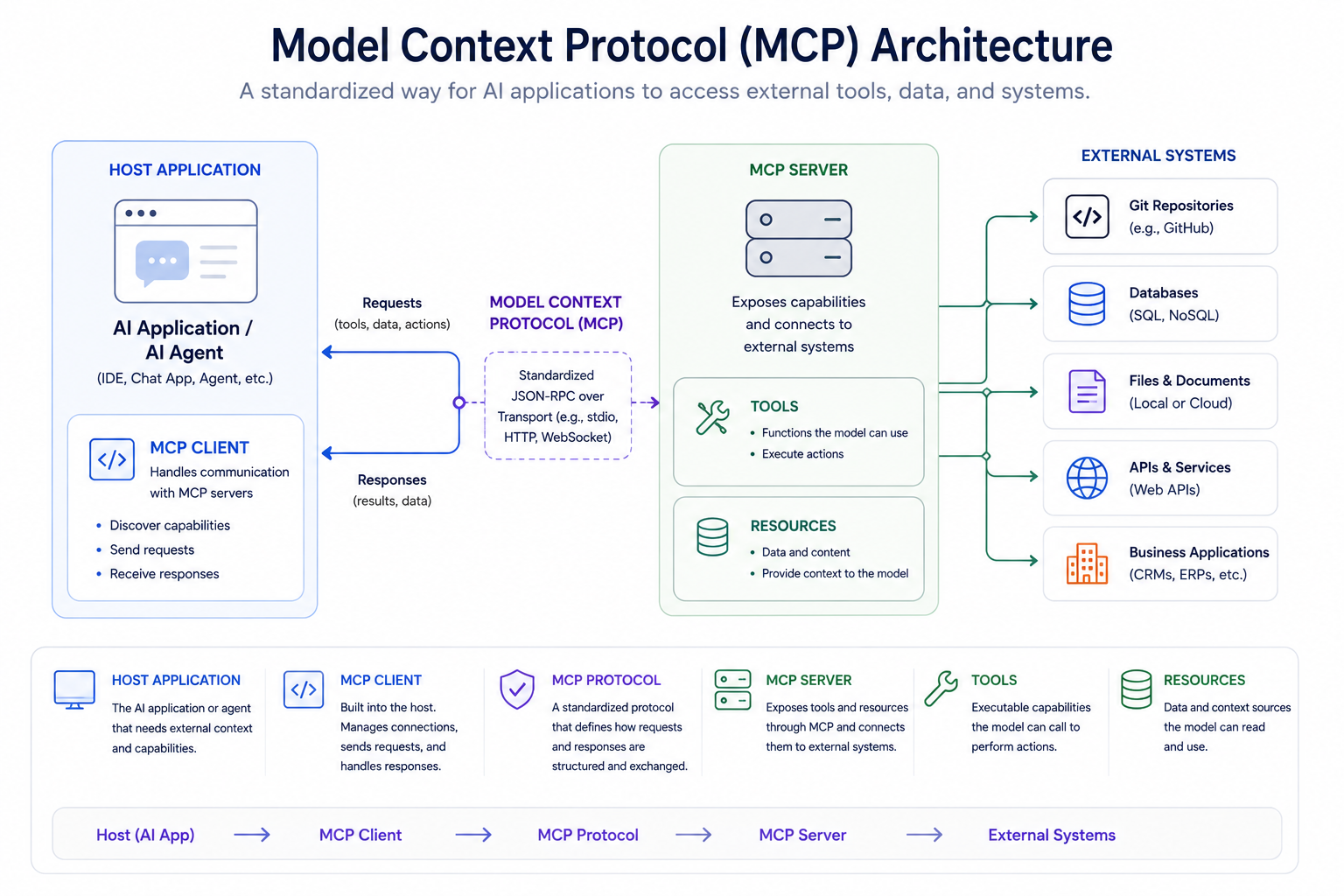
MCP works through three roles working together: a host, one or more clients, and one or more servers. This is confirmed directly in the current official MCP architecture documentation.
The host is the AI application you actually interact with — something like Claude Desktop, an IDE such as Cursor, or a custom-built agent. The host coordinates MCP clients and the user-facing interaction, including the security and consent boundaries around what connected servers and tools can do.
The client lives inside the host application and communicates with an MCP server. The MCP client-server relationship is one-to-one: if a host uses three MCP servers — say, a filesystem server, a GitHub server, and a database server — it uses three client-server relationships. With the current 2026-07-28 protocol revision, requests are stateless at the protocol layer rather than depending on a persistent protocol session.
The server is a separate program that exposes specific capabilities — tools, data, or templates — through the shared MCP interface. The server is what actually knows how to talk to GitHub, or a database, or whatever system it's built around; the AI application doesn't need to know those details itself, because the server handles the translation.
One important clarification: the MCP client is not the AI model itself. The model does the reasoning. The client is the connection-management component inside the host that lets the host's AI actually reach a server's capabilities.
A note on how this has evolved: the current 2026-07-28 MCP specification uses a stateless request/response core. It removed the protocol-level initialize handshake and Mcp-Session-Id for the new revision; clients can use server/discover when they want capabilities up front. Older tutorials may therefore describe a session-based flow that no longer represents the current wire protocol. Legacy clients and servers can still support earlier revisions during migration.
MCP Architecture: Host vs Client vs Server
| Component | What it does | Simple example |
|---|---|---|
| Host | The AI application you interact with directly. Coordinates MCP clients and the user-facing interaction. | Claude Desktop, an AI-powered IDE, a custom agent |
| Client | Lives inside the host and communicates with one MCP server. In the 2026-07-28 flow, protocol requests are stateless rather than tied to a persistent session. | The MCP client used by an IDE to talk to a GitHub server |
| Server | A separate program that exposes tools, resources, or prompts for a specific system. | A GitHub MCP server, a database MCP server, a file-system MCP server |
What Can an MCP Server Provide?
An MCP server can expose three distinct kinds of capability, sometimes called primitives: tools, resources, and prompts. These are genuinely different concepts, and it's worth keeping them separate rather than treating them as three names for the same thing.
Tools
Tools are actions the AI application can invoke. A tool does something — it performs an operation, often with a side effect.
Examples of tools an MCP server might expose:
- Searching a knowledge base
- Querying a database
- Creating a support ticket
- Retrieving a customer's account record
- Opening or commenting on a GitHub issue
Resources
Resources are information the server makes available to the AI application — data to read, not an action to perform. Think of resources as closer to a GET request than a command: they supply context without changing anything.
Examples of resources:
- The contents of a specific file
- A document or document collection
- Structured data about a repository
- A snapshot of records from a database
Prompts
Prompts are reusable templates or predefined workflows that a server can offer — a structured starting point for a specific kind of task, rather than raw data or an action.
Keeping these three separate matters because they solve different problems: tools do things, resources provide things, and prompts structure an interaction. A well-designed MCP server is deliberate about which of these it's exposing for a given capability.
A Simple MCP Example
Here's what actually happens, step by step, when a developer asks an AI coding assistant:
Related articles
AI Tools
AEO vs GEO vs SEO: Definitions & Differences (2026)
AEO vs GEO vs SEO explained with clear terminology, use cases, and a practical decision framework for when each term matters.
AI Tools
AI SEO Checklist for Beginners (2026 Guide)
A step-by-step AI SEO checklist for beginners covering research, implementation order, internal links, schema, EEAT, and post-publish monitoring.
"Check the latest GitHub issues and identify which one is causing the failing tests."
- The host's AI application receives the request.
- The host uses its MCP client to send the request to a GitHub-oriented MCP server.
- That server exposes tools and resources related to GitHub — for example, a tool to list recent issues.
- The AI application discovers what capabilities are currently available from the server.
- The AI decides which tool is appropriate for this request and calls it.
- The server executes that call against the real GitHub repository and returns the result.
- The result — the actual issue data — comes back to the AI application through the client.
- The AI uses that real data to form its answer about which issue is likely causing the failing tests.
Note what's actually happening here: the AI model never touches GitHub directly. The MCP server is the integration layer doing the real work of talking to GitHub; the model is reasoning over the results that come back through it.
MCP Use Cases
MCP is most useful anywhere an AI application needs to reach outside its own training data and into a live system. Common categories include:
- AI coding assistants — reading a repository, checking issues, running tests
- GitHub and repository access — pulling code context, opening pull requests
- Databases — querying records relevant to a request
- File systems — reading or searching local or shared documents
- Business applications — connecting to internal line-of-business tools
- CRM systems — retrieving or updating customer records
- Productivity tools — calendars, task trackers, documents
- Research workflows — pulling from multiple structured or unstructured sources
- Data analysis — connecting an AI application to a live dataset
- Customer support — retrieving account history to inform a response
- Internal enterprise systems — connecting proprietary tools without custom one-off code
- AI agents — giving an agent a standardized way to discover and use whatever capabilities it's been permitted to access
What Is an MCP Server?
An MCP server is a program that exposes a defined set of tools, resources, or prompts through the MCP interface, so any compatible AI application can discover and use them without a custom integration built specifically for that application.
A server exists to sit between an AI application and some external system — a database, an API, a file system, a piece of business software — and translate between MCP's standardized interface and whatever that underlying system actually requires.
MCP servers can run locally, often as a process on the same machine as the host, which is common for local files and developer workflows. They can also run remotely over HTTP, which is useful for shared services and enterprise deployments. The transport and deployment choice depends on the use case; the current 2026-07-28 revision is designed around stateless request/response operation for the new protocol flow.
Examples of what an MCP server could reasonably connect to: a GitHub repository, a PostgreSQL database, a local file directory, an internal ticketing system, a CRM, or a search index.
MCP vs API: What's the Difference?
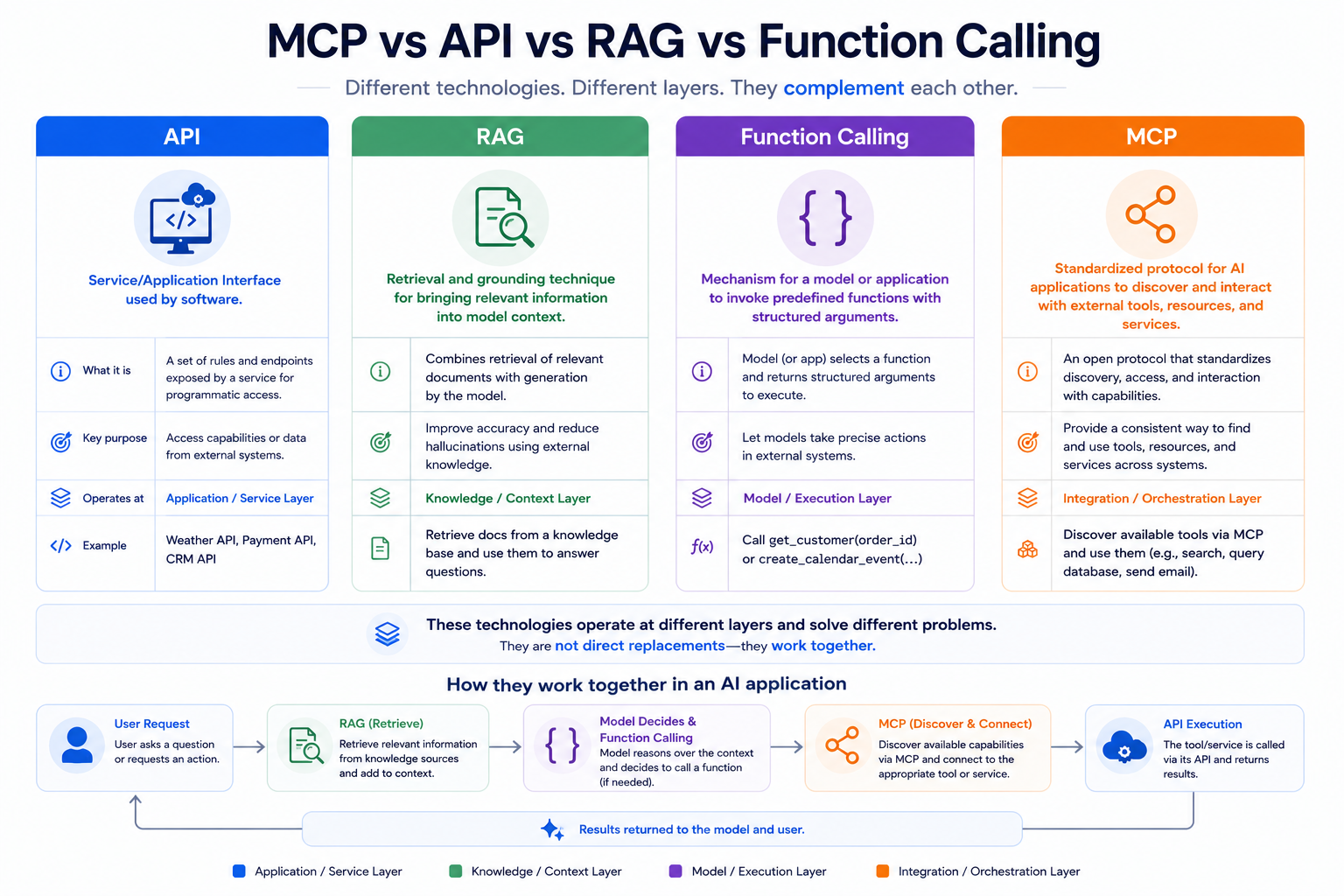
MCP doesn't replace APIs — an MCP server frequently sits on top of an existing API, translating between MCP's standardized interface and that API's own specific format. The difference is about audience and discovery, not about which one is "better."
An API is built primarily for developers who already know its specific documentation and write code against it directly. MCP is built primarily for AI applications that need to discover, at runtime, what capabilities are available and how to use them — without a developer having pre-wired that specific connection in advance.
| API | MCP | |
|---|---|---|
| Primary consumer | Developers writing code against a known interface | AI applications discovering capabilities at runtime |
| Main purpose | Expose a service's functionality | Standardize how AI applications connect to tools and data |
| Discovery | Requires reading documentation in advance | Capabilities can be discovered dynamically by the client |
| AI-oriented tool interaction | Not designed for this specifically | Built specifically for this |
| Relationship | Can exist independently | Can be built on top of an existing API |
How is MCP different from an API? An API is a fixed interface a developer integrates against directly, with the connection built and known in advance. MCP is a protocol layer built specifically so AI applications can discover and use tools dynamically, and it often works by exposing an underlying API through a standardized format rather than replacing that API.
MCP vs RAG
What is MCP vs RAG? They solve different problems and are frequently used together rather than as alternatives. RAG (retrieval-augmented generation) is a technique for pulling relevant information into a model's context before it generates a response — it's about grounding an answer in real information. MCP is a protocol for connecting an AI application to external tools and capabilities more broadly, of which retrieval is only one possible category.
A concrete example of how they combine: an MCP server could expose a search or retrieval tool that's internally powered by a RAG system. The AI application calls that tool through MCP; RAG is the retrieval technique running underneath it. MCP is the connection layer. RAG is one thing that connection layer can be used to reach.
MCP vs Function Calling
Function calling — sometimes called tool calling — is a mechanism where a model or application can invoke a specific, predefined function with structured arguments. It's typically defined within a single application's own code.
MCP operates at a different, broader layer: it standardizes how any compatible AI application can discover and interact with tools and capabilities exposed by any compatible server — not just functions predefined inside one specific application's codebase.
MCP doesn't replace function calling so much as sit alongside and above it. In many implementations, when an AI model calls an MCP tool, the underlying mechanism triggering that call inside the host application is a form of function calling — MCP just standardizes how that tool became discoverable and callable in the first place, across applications rather than within just one.
MCP vs A2A
A2A (Agent2Agent) is a separate, related protocol focused on a different problem: how one AI agent communicates and collaborates with another AI agent.
The distinction is straightforward:
- MCP: AI application/agent → tools, data, and services
- A2A: agent → another agent
These aren't competing standards — they address different layers of interoperability and can be used together in a system where an agent both connects to external tools through MCP and coordinates with other agents through A2A.
Does ChatGPT Use MCP?
Yes, but support depends on the ChatGPT product and plan. As of August 2026, OpenAI documents full MCP support for custom apps in ChatGPT developer mode, including write/modify actions, with the feature rolling out in beta to Business, Enterprise, and Edu plans. Availability, permissions, and UI can change as OpenAI iterates, so verify the current plan-specific documentation before relying on a particular capability.
Related articles
AI Tools
AI SEO vs Traditional SEO: What Actually Changes (2026)
AI SEO vs traditional SEO explained with a practical comparison, hybrid strategy guidance, and clear rules for when each approach should lead.
AI Tools
Best AI Agents in 2026: 10 Top Picks Compared by Use Case
Compare the best AI agents in 2026 for coding, research, productivity, business, automation, and personal tasks. Find the right AI agent for your workflow.
Does Claude Use MCP?
Yes — Claude, through Claude Desktop and Claude Code, was one of the earliest major AI applications to adopt MCP, and Anthropic originally introduced the protocol in November 2024. That said, MCP is not exclusive to Claude. It is an open specification with vendor-neutral governance under the Agentic AI Foundation, and other AI applications and coding tools have adopted it. Its origin with Anthropic is a historical fact about where it started, not a statement about who can use it today.
MCP and Cursor / VS Code
MCP is relevant to AI-assisted coding specifically because it gives coding tools a standardized way to reach outside a single file or conversation — into a real repository, a real terminal, or real project context — without every editor building its own bespoke integration for every possible data source. AI-native and AI-assisted editors have been among the more prominent adopters of MCP as a way to extend what they can connect to.
If you're comparing the editors and tools in this space more broadly, our guides on the best AI code editors and Claude Code vs Cursor vs Codex go deeper into how these specific tools differ, including where agentic and MCP-related capabilities fit into each one.
Why MCP Matters for AI Agents
An AI agent becomes significantly more useful once it can reach beyond its own training data and conversation context into real systems — checking a real ticket queue, reading a real file, updating a real record. MCP provides a standardized way for a compatible AI application to discover and use exactly that kind of external capability, rather than requiring a custom-built connection for every tool an agent might need.
This connects directly to what makes something an agent in the first place, rather than a simple chatbot: the ability to plan, use tools, and act toward a goal across multiple steps. If you haven't already, our guide on what an AI agent actually is covers that distinction in depth — MCP is one of the mechanisms that makes the "use tools" part of an agent's behavior practical and standardized, rather than something rebuilt from scratch for every project.
It's worth being precise, though: MCP is not required for every AI agent. Some agents are built with direct, custom tool integrations and never touch MCP at all. MCP is a widely adopted option for standardizing that connection, not a mandatory component of agentic AI.
Is MCP Secure?
MCP itself doesn't guarantee security — it's a protocol that can expose real, powerful access to tools and data, and how safely that access is handled depends heavily on how a specific server, client, and deployment are actually built and configured.
Security in an MCP deployment depends on several factors working correctly together:
- Authentication — confirming who or what is connecting
- Authorization — controlling what an authenticated connection is actually allowed to do
- Permissions — the host's role in approving or denying specific tool calls, especially sensitive ones
- Server trust — whether you actually trust the server you're connecting to and what it does with a request
- Tool descriptions — accurate, non-deceptive descriptions of what a tool actually does
- Input validation — a server properly checking and sanitizing what it receives
- User consent — a human approving consequential actions rather than everything running automatically
- Least privilege — granting a connection only the access it genuinely needs, not broad default access
- Secrets handling — how credentials and tokens used by a server are stored and protected
- Server implementation quality — the protocol doesn't prevent a poorly built server from having vulnerabilities
- Prompt injection defenses — protecting against malicious content encountered during a task attempting to manipulate the AI's behavior
- Monitoring and auditing — visibility into what connections and tool calls are actually happening
The July 28, 2026 specification strengthened authorization, including issuer validation and a shift from Dynamic Client Registration toward Client ID Metadata Documents. Separately, the U.S. National Security Agency published MCP-specific security design guidance in May 2026, warning that MCP deployments introduce risks around trust boundaries, serialization, dynamic tool invocation, and agent misuse. Connecting an AI application to real external systems can therefore expand the attack surface compared with a system that only generates text. Treat any MCP server — especially one you didn't build yourself — the same way you'd treat any other piece of software with real access to your systems: verify what it does before you trust it with anything sensitive.
Advantages of MCP
- A standardized integration layer instead of one-off custom connections
- Genuine interoperability between different AI applications and the same underlying servers
- Reusable servers — build once, connect from multiple compatible clients
- Dynamic tool and capability discovery at runtime
- Composability — servers and capabilities can be combined for more complex workflows
- A more consistent foundation for connecting AI applications to real systems
- A useful, increasingly common building block for agentic workflows
Limitations and Trade-Offs of MCP
A balanced view matters here — MCP is genuinely useful, but it isn't the right choice for every situation, and pretending otherwise isn't helpful.
- Security is still your responsibility. The protocol standardizes communication; it doesn't automatically make a given server or deployment secure.
- Server quality varies significantly. Anyone can build an MCP server, and quality, reliability, and security practices differ widely across the ecosystem.
- Authorization can get complex in real deployments, particularly at enterprise scale with many servers and many users.
- Context and tool overload is a real, practical problem — connecting an AI application to too many tools at once can make it harder for the model to choose correctly, not easier.
- There's real implementation effort in building or properly configuring a good server — MCP standardizes the interface, not the underlying integration work.
- The ecosystem is still maturing. Server quality, documentation, and available integrations vary, and this is an actively evolving space.
- Compatibility and version differences exist between older and newer protocol revisions, and not every client and server combination is guaranteed to interoperate cleanly.
- MCP isn't necessary for every integration. A simple, fixed connection between one application and one system sometimes doesn't need a protocol layer at all.
When Should You Use MCP?
Use MCP when:
- Multiple different AI clients or applications need access to the same integration
- You want an AI application to dynamically discover and choose from available tools
- You're building agentic workflows where the AI needs to take multi-step actions across systems
- Interoperability between different AI tools genuinely matters to you
- You want a standardized, reusable way to connect AI applications to external capabilities
You may not need MCP when:
- A simple, fixed API integration already does exactly what you need
- No AI-driven tool discovery is actually required — you know in advance exactly what will be called and how
- The integration is internal, extremely simple, and unlikely to be reused elsewhere
- Adding a protocol layer would introduce complexity that isn't buying you anything real
MCP Examples in the Real World
- A coding assistant using an MCP server to read repository context and open pull requests
- A research assistant using an MCP server to search and synthesize information across multiple structured sources
- An AI application querying a live database through an MCP server rather than working from stale exported data
- A support tool retrieving customer account history from a CRM through an MCP connection
- A productivity assistant reading and organizing information across connected documents and files
- An enterprise AI application reaching internal systems that were never designed to be publicly API-accessible
- An AI agent using MCP as its standardized way to discover and choose from a defined set of permitted tools during a multi-step task
How to Start Learning MCP
- Understand the three core roles — host, client, and server — before anything else.
- Learn the difference between tools, resources, and prompts, since these are the actual building blocks a server exposes.
- Try an existing, well-documented MCP server rather than building one from scratch first.
- Connect that server to a compatible AI client and observe how discovery and tool calls actually work in practice.
- Learn how authentication, authorization, and permissions work in whatever client and server you're using — don't skip this step.
- Once the concepts are clear, try building a small MCP server of your own for a simple, low-stakes use case.
- Read the current official specification directly rather than relying solely on tutorials, since this is a fast-moving area where older guides can describe outdated behavior.
For general context on the AI landscape MCP fits into — including the coding tools and assistants most likely to use it — our guides on the best AI tools for coding, Cursor vs GitHub Copilot, and what an AI agent actually is are useful next reads.
Frequently Asked Questions
What is MCP in simple terms?
MCP is an open protocol that lets AI applications connect to external tools, data, and services in a standardized way, instead of needing a custom-built integration for every single connection.
What does MCP stand for?
MCP stands for Model Context Protocol — a standardized way of giving an AI model relevant context and capabilities from outside itself.
What is an MCP server?
An MCP server is a program that exposes tools, resources, or prompts through the MCP interface, letting any compatible AI application use those capabilities without a custom integration built specifically for that application.
Related articles
AI Tools
Best AI Search Rank Tracking Tools 2026: Free & Paid
Compare the best AI search rank tracking tools for ChatGPT, Perplexity, and Google AI Overviews in 2026 — free options, pricing, and citation tracking.
AI Tools
7 Best Free AI Image Generators in 2026
We evaluated 7 of the best free AI image generators in 2026 for image quality, free access, ease of use, text rendering, and commercial-use considerations.
What is MCP used for?
MCP is used to connect AI applications to real external systems — databases, file systems, business applications, code repositories, and more — so an AI can access current information or take real actions rather than being limited to its training data and conversation context.
How does MCP work?
A host application (the AI tool you use) runs one or more MCP clients, each maintaining a connection to a single MCP server. The server exposes tools, resources, or prompts; the client and host use those capabilities on the AI application's behalf, using a stateless request/response model under the current specification.
Is MCP an API?
Not exactly. MCP is a protocol that standardizes how AI applications discover and interact with external capabilities, and it's often built on top of an existing API rather than replacing one.
Is MCP the same as RAG?
No. RAG is a retrieval technique for grounding a model's response in relevant information. MCP is a broader protocol for connecting AI applications to external tools and data — retrieval can be one of the things an MCP server exposes, but MCP itself is not a retrieval technique.
Is MCP the same as function calling?
No. Function calling is typically a mechanism for invoking a predefined function within a single application. MCP standardizes tool discovery and interaction across different AI applications and servers more broadly, and often works alongside a function-calling mechanism rather than replacing it.
Does ChatGPT use MCP?
Yes, in supported ChatGPT environments. As of August 2026, OpenAI documents full MCP support for custom apps in ChatGPT developer mode, including write and modify actions, with rollout to Business, Enterprise, and Edu plans. Availability and permissions can change, so check the current OpenAI documentation for the plan and workspace you use.
Does Claude use MCP?
Yes. Claude, through Claude Desktop and Claude Code, was an early adopter of MCP, which Anthropic originally introduced in November 2024. MCP is not exclusive to Claude, however — it's an open specification other AI applications have also adopted.
Is MCP secure?
MCP itself doesn't guarantee security. Real-world safety depends on authentication, authorization, permissions, server trust, input validation, and how carefully a specific server and deployment are built and monitored — the same considerations that apply to any system with access to real tools and data.
Can MCP be used with AI agents?
Yes — it's a common and widely adopted way for an agent to discover and use external tools and data during a multi-step task, though it isn't a required component of every AI agent.
Is MCP only for developers?
Building an MCP server is a developer task, but using an AI application that already connects to MCP servers — an AI-powered IDE with pre-built server connections, for example — doesn't require writing any code yourself.
Official MCP Resources
For readers who want the technical details or the current specification, start with the official MCP documentation and specification. Because MCP is evolving quickly, these sources are more reliable than older tutorials for protocol-level behavior.
- Model Context Protocol documentation
- MCP governance and stewardship
- MCP 2026-07-28 specification release
- MCP official registry
Key Takeaways
- MCP stands for Model Context Protocol — a standardized way for AI applications to connect to external tools, data, and services
- The architecture has three roles: a host (the AI application), one or more clients (the connection handlers inside the host), and one or more servers (which expose tools, resources, and prompts)
- MCP doesn't replace APIs, RAG, or function calling — it's a connection and discovery layer that frequently works alongside all three
- The current specification, updated July 28, 2026, uses a stateless request/response model rather than the persistent session approach described in older tutorials
- Security is not automatic — it depends on authentication, authorization, server trust, and careful implementation, which is exactly why the current specification and recent official security guidance put real emphasis on this
- MCP is genuinely useful for interoperability and agentic workflows, but a simple fixed integration is sometimes the better, simpler choice